Who is a large gaming monitor suitable for?

Detail seekers and avid readers

If you scan scenes for small clues and read a lot of on-screen text, compare screen size, resolution and viewing distance. TÜV SÜD lists these as factors to consider; Dell specifies a 31.5-inch screen and 3840 × 2160 pixels for the S3225QS.

Fans of dark game worlds

If dark scenes are important for atmosphere or visual clues, check black levels and the specific HDR specification rather than relying on a marketing buzzword alone. VESA explains the limitations of DisplayHDR 400; Dell and MSI list QD-OLED for certain models.

Gamers with multiple devices

If you want to connect a PC and possibly a console, check that the resolution, refresh rate and HDR are compatible with all your devices. VESA also lists a suitable graphics processor and compatible cables as requirements for HDR on a PC; MSI describes the connectivity features of a specific model.

What should you look for when buying?

Buying priority What to check Who it matters most to
A large, sharp picture for searching Measure your desk space and viewing distance; for 31.5 to 32 inches, check the resolution and scaling. If you want to spot text and hidden clues across a large screen, detail resolution is your priority. Around 33% of consumers say this matters most to them.
Dark scenes and HDR Compare panel types and the specific HDR level; if you choose OLED, also read the care and warranty terms. If you pay close attention to black levels and atmosphere in dark game worlds, the specific display technology is key. Around 27% of consumers prioritise dark areas of the picture and HDR.
Connectivity and usable refresh rate Check the resolution, refresh rate, HDR, VRR, input and cables for each gaming device. If you want to use a PC and console with the same screen, you’ll want to know which features your entire setup can actually support. Around 20% of consumers put device compatibility first.
Space and the features you need Check the dimensions and viewing distance; compare the SDR and, where applicable, HDR energy information on the EU energy label. If desk space or viewing distance is limited, you’ll want a monitor that suits your setup without prioritising unnecessary features. Around 20% of consumers prioritise the space it takes up and a suitable set of features.

Avoiding common buying mistakes

  • Prioritising 240 Hz over picture sharpness or connectivity

    A high refresh rate requires a compatible source, and it isn’t automatically the deciding factor for mostly slower-paced puzzle games.

    Start by considering the games you play and the devices you use, then compare the refresh rate with the resolution and connections you need.

  • Assuming HDR means strong contrast in every dark scene

    VESA notes that DisplayHDR 400 does not require local dimming and typically does not offer it.

    Check the specific certification level, panel technology and HDR requirements of your signal source.

  • Ordering a 32-inch monitor without measuring your desk and seating position

    The right screen size also depends on your viewing distance. TÜV SÜD notes that a screen that is too large can be tiring to use at close range.

    Before choosing a model, measure the available desk space and your usual distance from the screen.

  • Assuming OLED care or a warranty eliminates all risk

    MSI describes OLED Care 2.0 as a way to reduce risk. Care features and voluntary warranty terms do not guarantee that burn-in is impossible; your statutory rights relating to faulty goods are separate.

    Read the usage and warranty terms for the exact model, and keep your proof of purchase.

Brands to consider

Dell

Dell lists two 31.5- to 31.6-inch 4K models with different panel types: the S3225QS and the S3225QC.

  • Dell specifies refresh rates of up to 120 Hz for both models; the S3225QS uses VA, while the S3225QC uses QD-OLED.
  • The manufacturers’ specifications alone don’t establish which model is better for every puzzle scene.

Samsung

The Odyssey G7 G70D LS32DG702EUXEN is a specific 32-inch 4K IPS model for anyone who also plays faster-paced games.

  • Samsung specifies a refresh rate of up to 144 Hz for this model.
  • According to Samsung, refresh rate and response time depend on the source or test settings.

MSI

The MPG 321URX QD-OLED is a large 4K OLED option for anyone interested in HDR and high refresh rates on a PC.

  • MSI lists 240 Hz, console features and OLED Care 2.0 for this model.
  • MSI describes its care features as reducing risk; check the specific terms of any burn-in warranty before buying.

AOC

The U32G4U is a 31.5-inch 4K IPS option with a switchable mode described by the manufacturer.

  • For one regional version, AOC describes UHD at 160 Hz or Full HD at 320 Hz.
  • Before buying, check that the specification of the specific listing matches the model variant available in Germany; the faster mode does not provide extra sharpness for puzzle games.

Joybuy products for big-screen gaming

This selection features large 4K monitors with different panel types and features for story-driven puzzle games.

TCL 32x3A OLED monitor

TCL 32x3A OLED monitor

For anyone looking for a large 4K OLED screen with a high refresh rate for other games, too.

32 inches; 3840 × 2160 pixels; 240 Hz and an alternative 480 Hz FHD option, according to the product title.

View at Joybuy

CRUA CR320QB curved 4K monitor

CRUA CR320QB curved 4K monitor

An option for anyone specifically looking for a curved VA display with a large 4K picture.

32 inches; 3840 × 2160 pixels; VA; 3000R curvature; HDR10 and Adaptive Sync, according to the product title.

View at Joybuy

MSI MPG 322URXDE QD-OLED monitor

MSI MPG 322URXDE QD-OLED monitor

For anyone comparing a large QD-OLED screen with a high refresh rate and the connections listed in the title.

32 inches; 3840 × 2160 pixels; 240 Hz; DisplayHDR True Black 400; HDMI 2.1 and DisplayPort 2.1a, according to the product title.

View at Joybuy

ASUS ROG Swift OLED PG32UCDMR

ASUS ROG Swift OLED PG32UCDMR

An option for anyone considering a large OLED display with 4K resolution and a high refresh rate.

32 inches; 3840 × 2160 pixels; 240 Hz; DisplayHDR 400; DisplayPort 2.1, HDMI 2.1 and USB-C with 90 W, according to the product title.

View at Joybuy
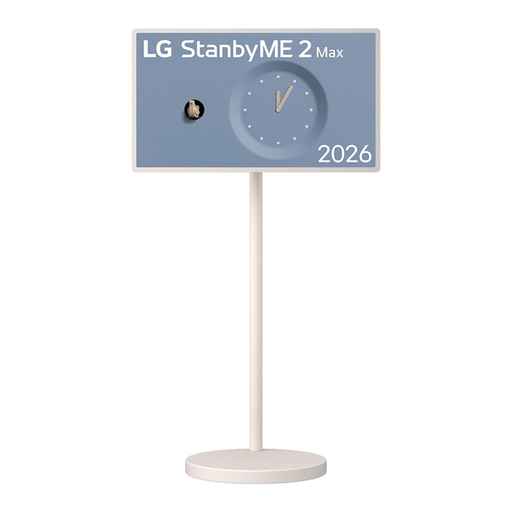
LG StanbyME 2 32LX6BPGA

LG StanbyME 2 32LX6BPGA

For anyone looking for a portable touchscreen as well as a large 4K screen.

32 inches; 3840 × 2160 pixels; built-in battery; webOS 26; Dolby Vision and Dolby Atmos, according to the product title.

View at Joybuy

Frequently asked questions

Do you need 240 Hz for story-driven puzzle games?

Not necessarily. To get the full benefit of a high refresh rate, you need a sufficiently powerful source. If you mainly play slower-paced puzzle games, first consider screen size, sharpness and dark scenes; a higher refresh rate may matter more for faster-paced games you play on the side.

Why might HDR not look as expected after connecting everything?

For HDR on a PC, VESA lists a suitable graphics processor, an HDR display and compatible connection cables. Also check the HDR settings and certification level of the specific monitor; simply receiving an HDR signal does not guarantee a noticeably better picture than SDR.

What should I check about care and warranty for an OLED monitor?

Read the care and warranty terms for the specific model. MSI describes OLED Care 2.0 as a way to reduce the risk of burn-in, and lists a three-year burn-in warranty for the MPG 321URX QD-OLED. A voluntary manufacturer’s warranty is separate from your statutory rights relating to faulty goods against the seller.

What energy labelling applies when buying a monitor in Germany?

According to the European Commission, computer monitors are generally covered by EU rules for electronic displays. The energy label shows, among other things, the efficiency class and information for SDR and HDR. Compare the label for the specific model; it doesn’t replace considering how you’ll use the monitor.

What should I do if a product is faulty or I change my mind after buying online?

The Verbraucherzentrale distinguishes statutory rights against the seller from a voluntary warranty. Online purchases generally come with a 14-day right to cancel; the specific purchase determines when the cancellation period begins and what conditions apply. Cancelling because you’ve changed your mind is different from making a claim about faulty goods.