For reaction training, assess input lag and motion handling separately for the specific monitor – a high refresh rate or advertised pixel response time alone doesn’t prove that input lag is low. Then choose a screen format and resolution that suit your games, seating position and source device: 4K at high frame rates has different requirements from a lower-resolution mode, and ultrawide isn’t equally suitable for every game. RTINGS distinguishes between input lag, pixel response time and refresh rate in its monitor tests.
Who is a large gaming monitor suitable for?
Players who value speed
If you’re practising quick aiming or reaction decisions, check both the delay before an image appears and how well the monitor handles fast motion. RTINGS treats input lag, pixel response time and refresh rate as separate test measurements.
Players who want a wider view
Depending on the game and your seating position, a larger screen could be a 16:9 display or a wider ultrawide model. The key is whether your game supports the format and which areas you can comfortably keep in view.
Players with varied needs
If you want to use the same screen for reaction training and detailed games, compare the resolution with the achievable frame rate. A dual mode may offer different combinations, so check exactly which refresh rate is available at each resolution.
What should you look for when buying?
Start by checking how well the specific model handles motion and input lag at your intended frame rate. Then decide which format suits your games and seating position. Finally, make sure the resolution and refresh rate work with your PC and the connection you’ll be using.
| What you’re looking for |
What to check before buying |
Who it matters most to |
| Input lag and motion |
Compare independent input lag measurements and motion tests at your intended refresh rate and overdrive setting. |
When I’m practising my reactions, I want to know how quickly a signal appears on screen and whether fast movement remains clear. Around 33% of consumers put these features first. |
| Screen size and format |
Check that 16:9, 21:9 or 32:9 suits your games, seating position and available space. |
If I want a large picture, the format needs to suit my games and field of view. Around 27% of consumers make this a priority. |
| Frame rate and hardware |
Check the frame rate you can achieve in games, as well as the resolution and refresh rate supported by your chosen connection. |
I want to make sure my PC and connection can actually use the monitor features I’m after. Around 20% of consumers prioritise checking hardware compatibility. |
| Usage and cover |
Check the EU energy label for the specific model, along with OLED care guidance and the written warranty terms. |
For longer sessions, energy use, care and clear warranty terms matter to me. Around 20% of consumers make this a priority. |
Common buying misconceptions
-
Confusing pixel response time with input lag
Pixel response time describes how quickly pixels change colour, while input lag is the delay before an image appears after the signal is received. Overshoot can also make fast movement harder to see clearly.
Look for separate measurements of input lag and motion handling for the specific model at the refresh rate you plan to use.
-
Comparing the highest refresh rate without checking the resolution
A dual mode may offer its highest refresh rate only at a lower resolution. The game, source device and connection also need to support the output you want.
Before buying, decide which resolution and refresh rate you want, then check that your PC can handle them and that the monitor’s inputs support them.
-
Assuming the largest screen automatically gives you the best training space
Large monitors vary in aspect ratio and refresh rate. A wider screen doesn’t automatically make it easier to follow the action.
Choose between a large 16:9 screen and an ultrawide model based on game support, your seating position and the format you want.
-
Leaving OLED care and warranty checks until after you buy
Care features don’t eliminate the risk of burn-in. A voluntary manufacturer’s warranty is also different from your statutory consumer rights.
Check the care guidance and written warranty terms for the exact model variant. Also compare the EU energy label for the specific monitor.
Key brands and product ranges
LC-Power
The LC-M32UCO and LC-M49QCO take different approaches to a large screen: 31.5 inches with 4K and 165 Hz, or 49 inches with a 32:9 aspect ratio and 144 Hz, according to the manufacturer.
- For the specific LC-M32UCO model it tested, COMPUTER BILD rated the picture quality and response times positively.
- COMPUTER BILD noted that the LC-M32UCO’s maximum brightness was a little low, and considered the LC-M49QCO’s 144 Hz on the low side for competitive players. These assessments apply to the models named.
MSI
According to MSI, the MPG 321URXDE combines a 4K QD-OLED display with a 240 Hz refresh rate.
- MSI lists OLED Care 2.0 as a feature designed to reduce the risk of burn-in.
- This care feature doesn’t eliminate the risk. For the specific model it tested, COMPUTER BILD noted that the USB-A ports were version 2.0.
LG
According to LG, the UltraGear 34GX90SA-W is a 34-inch ultrawide OLED monitor with a resolution of 3,440 × 1,440 pixels and a 240 Hz refresh rate.
- For the 32GS95UX-B, LG describes a dual mode offering 4K at 240 Hz or Full HD at 480 Hz.
- The higher refresh rate in dual mode is available at Full HD, not 4K. The right resolution and refresh rate also depend on your source device.
ASUS ROG
ASUS’s ROG range includes large OLED and dual-mode models, with different resolutions and refresh rates to suit different needs.
- ASUS lists 4K at 240 Hz or Full HD at 480 Hz for the XG32UCWMG.
- This manufacturer’s claim applies to the model named and, on its own, doesn’t prove an independently measured input lag advantage.
AOC
According to AOC, the AGON PRO AG326UD is a 31.5-inch 4K QD-OLED monitor with a 165 Hz refresh rate.
- AOC lists a three-year warranty for this model, including cover for burn-in.
- The exact warranty terms determine what’s covered. The refresh rate doesn’t prove a particular input lag.
Gaming monitors at Joybuy
The selection includes large gaming displays, including a 32-inch OLED model with dual mode, wide 49-inch screens, and 32-inch 4K and curved models.
 No image available
TCL 32x3A 32-inch OLED monitor
Dual mode offers a large gaming display with different resolution and refresh rate combinations.
Listed in the product title: 4K UHD at 240 Hz or FHD at 480 Hz. The quoted response time of 0.03 ms GtG is not an input lag measurement.
View at Joybuy
 No image available
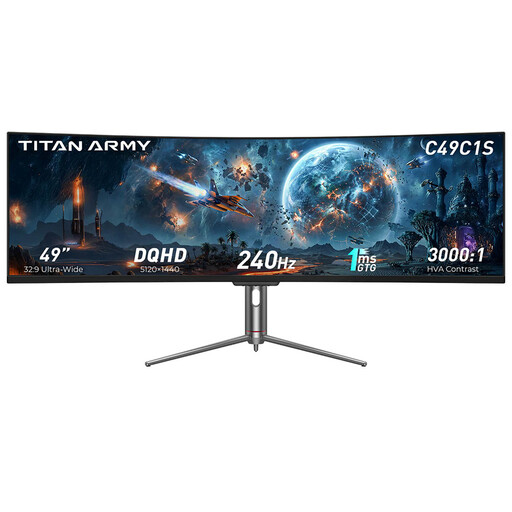
TITAN ARMY C49C1S 49-inch ultrawide monitor
The 32:9 format is worth considering if your game supports the wider picture and the extra screen space suits your field of view.
Listed in the product title: DQHD, 32:9, 240 Hz and 1800R curvature.
View at Joybuy
 No image available
CRUA CR320QB 32-inch curved 4K monitor
A 32-inch gaming option if a 4K resolution and curved display suit your seating position.
Listed in the product title: 3,840 × 2,160 pixels, VA display and 3000R curvature.
View at Joybuy
 No image available
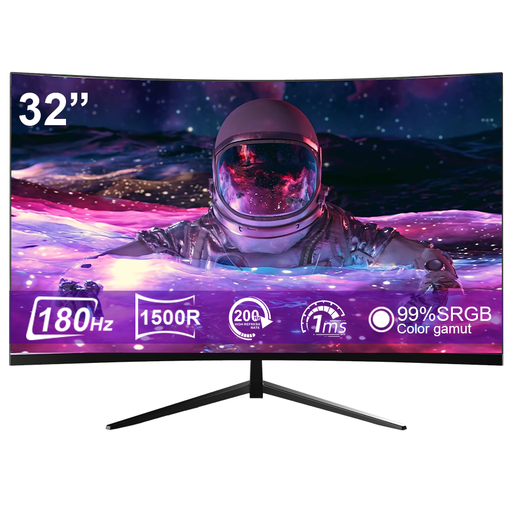
CRUA CR320ZC-H 32-inch curved gaming monitor
This model is worth considering if you’re looking for a large curved gaming screen with the stated refresh rate.
Listed in the product title: 1500R curvature, 180 Hz and 1 ms response time. Response time is not the same as input lag.
View at Joybuy
 No image available
CRUA 49-inch DQHD ultrawide monitor
The extra-wide 32:9 format is a good fit if your games support it and you want to make use of the extra screen space.
Listed in the product title: 5,120 × 1,440 pixels, 165 Hz and 1500R curvature.
View at Joybuy
Frequently asked questions
Is a 0.03 ms response time the same as low input lag?
No. Pixel response time describes how quickly pixels change colour; input lag is the delay before an image appears after the signal is received. For reaction training, you should assess the two separately.
How do I set my preferred refresh rate in Windows?
In Windows 10 or 11, you can select a supported refresh rate in the advanced display settings. Microsoft notes that some higher refresh rates require a different resolution, so check the combination shown for your monitor.
What ongoing costs and rights should I consider when buying online?
Compare the energy consumption shown on the EU energy label for the specific monitor. Your statutory rights against the seller are separate from a voluntary manufacturer’s warranty, which has its own terms. Many consumer contracts made online generally come with a 14-day right to cancel, although the conditions depend on the circumstances. The Verbraucherzentrale explains these differences.


