Which monitor is right for you?

Shooter players focused on motion

If you want to keep track of moving targets clearly, compare the exact model’s smearing, overshoot and input lag rather than relying on marketing claims. RTINGS.com treats pixel response time and input lag as separate measurements.

Players looking for a wider view

A large gaming area needs to suit the resolution, aspect ratio, your seating position and the space available on your desk. A wider display also changes the picture height and can affect how the HUD appears in a given game.

Players who often use static displays

If the same HUD or desktop window stays on screen for a long time, factor in the risk of OLED burn-in and the usage conditions for the specific model when choosing a panel. An LCD with Mini LED backlighting avoids this OLED-specific risk, but can show other image artefacts such as blooming.

What should you look for when buying?

Large 16:9 OLED

A good fit if: You want a large, detailed gaming area and your device can output your chosen resolution and frame rate.

Trade-off: The risk of OLED burn-in remains relevant if you often display static HUD or desktop elements. Manufacturer refresh-rate claims are no substitute for an independent motion test.

Large QHD LCD

A good fit if: A large 16:9 picture and a high advertised refresh rate matter more to you than 4K, and you often display static content.

Trade-off: QHD displays fewer pixels than 4K. Check the exact model for smearing and overshoot rather than assuming its refresh-rate or GtG figures tell you how clear motion will look.

Large 4K Mini LED LCD

A good fit if: You want to combine 4K with a large screen and often display static images.

Trade-off: Mini LED avoids the risk of OLED burn-in from static elements, but can show blooming. The number of dimming zones alone says nothing about motion clarity.

34-inch ultrawide

A good fit if: You specifically want a wider picture and your game supports the format and your preferred HUD layout.

Trade-off: A 34-inch diagonal doesn’t give you the same picture height as a 32-inch 16:9 screen. Also check how your game is displayed.

Buying consideration What to look for Who is it important to?
Motion and input lag Compare independent measurements for the exact model at the frame rates you use, including pixel transitions, overshoot and input lag. If I want to see moving targets clearly while panning, tests for my game matter more than a single marketing figure. This is a priority for around 33% of consumers whose main concern is motion clarity.
Screen size and resolution Consider the diagonal size, native resolution, aspect ratio, viewing distance and desk space together. If I want a wider view, the picture should still look sharp enough from where I sit and fit on my desk. Around 27% of consumers put a large, sufficiently sharp gaming area first.
Output from your device Match the resolution, frame rate and, where applicable, VRR to your device, connection and game. If I play on a console, I want to know which display modes my specific screen and game actually support. Around 20% of consumers focus first on this connection and console compatibility.
Static content and panel type For OLED, consider how long you use the screen, pixel care and the warranty terms for the exact model; also bear in mind that Mini LED can show blooming. If the same HUD or desktop window stays on screen for a long time, I want to weigh up the panel risks for the way I use it. Around 20% of consumers prioritise suitability for displaying static images frequently.

Gaming monitor buying pitfalls

  • Taking a millisecond figure as proof of clear motion

    Pixel transitions, overshoot and input lag are different measurements. Their values can vary depending on the frame rate and settings.

    Look for measurements and motion images for the exact model at the frame rates you expect to use.

  • Buying 240 Hz without checking the output

    Your device, connection, settings and game all affect which resolution and frame rate you can actually use.

    Check the supported video modes and, where applicable, VRR on both ends of the connection.

  • Comparing OLED and Mini LED on contrast claims alone

    Frequently displayed static HUD elements make the risk of OLED burn-in relevant; Mini LED, in turn, can show blooming.

    Take your usage time, room lighting, independent picture tests and the terms of the specific OLED warranty into account.

  • Treating a 34-inch ultrawide like a 32-inch 16:9 monitor

    The diagonal size alone tells you neither the picture height nor how the HUD will look in a given game.

    Before choosing a format, check game support, your preferred screen layout and the space available on your desk.

Key brands to consider

LC-Power

The LC-M32UCO is a 31.5-inch 4K QD-OLED model with a refresh rate of 165 Hz, according to LC-Power. It’s worth considering if a large, high-resolution OLED picture matters more to you than a higher advertised refresh rate.

  • LC-Power lists 4K and 165 Hz for this model.
  • COMPUTER BILD notes that this model has relatively low peak brightness; this assessment doesn’t apply to every monitor from the brand.

MSI

According to MSI, the MPG 321URXDE QD-OLED combines 4K QD-OLED with 240 Hz and HDMI 2.1 ports.

  • MSI lists OLED Care 2.0 as a feature designed to reduce the risk of burn-in.
  • The manufacturer’s claim doesn’t mean there’s no risk. COMPUTER BILD lists USB-A 2.0 ports as a drawback of this model.

Dell Alienware

The AW3226DM is a 31.5-inch QHD VA LCD monitor with a 240 Hz refresh rate. Dell’s specifications describe its features, not independently measured motion clarity.

  • Dell lists QHD and 240 Hz for this specific model.
  • At the frame rates you actually use, check for dark smearing or overshoot.

BenQ MOBIUZ

The EX321UX is an example of a large 4K Mini LED LCD with 1,152 dimming zones, according to BenQ. This feature doesn’t indicate how clear motion will look.

  • BenQ lists 1,152 Mini LED dimming zones for this model.
  • Mini LED can show visible blooming; check the picture quality of the specific model.

LG UltraGear

According to LG, the 34GX90SA-W is a 34-inch OLED with a resolution of 3,440 × 1,440 pixels and a refresh rate of 240 Hz. The wide format is only worth it if it suits your game and HUD.

  • LG lists a 21:9 format and 240 Hz for this model.
  • Factor in game support and the risk of OLED burn-in when displaying static content.

Joybuy products for a bigger gaming view

This selection includes large gaming monitors with OLED, QHD and ultrawide options. The stated refresh rates are the advertised figures for each product, not independently measured motion clarity.

TCL 32x3A, 32-inch OLED monitor

TCL 32x3A, 32-inch, 4K OLED

An option if you’re looking for a large 4K OLED picture for gaming. If you often display static HUD or desktop elements, bear in mind the risk of OLED burn-in.

32 inches; 3,840 × 2,160 pixels; 240 Hz at 4K; 480 Hz at FHD.

Joybuy

KTC H32S17, 32-inch QHD gaming monitor

KTC H32S17, 32-inch, QHD, 180 Hz

A large, curved QHD option if you’re looking for a high advertised refresh rate; check the motion clarity of the exact model independently.

2,560 × 1,440 pixels; 180 Hz; 1,500R; Adaptive Sync; HDR10.

Joybuy

CRUA CR320C-H, 32-inch curved gaming monitor

CRUA CR320C-H, 32-inch, QHD, 165 Hz

A curved 32-inch option for a large gaming picture; the refresh rate alone doesn’t tell you how clearly moving targets will appear.

QHD; 165 Hz; 1,500R; FreeSync.

Joybuy
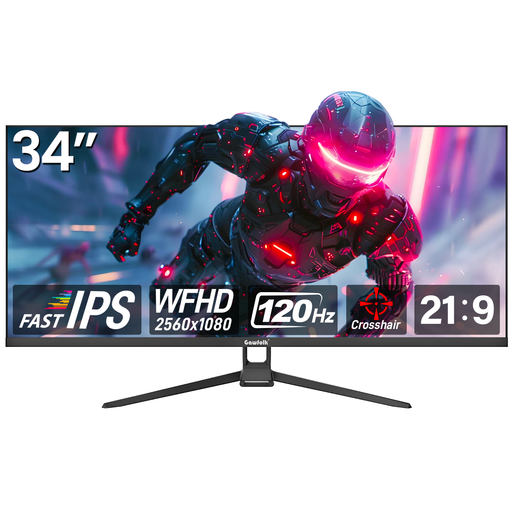
Gawfolk GF340H-H, 34-inch ultrawide gaming monitor

Gawfolk GF340H-H, 34-inch, 21:9

A wide gaming area if your game and preferred HUD layout support the ultrawide format.

WFHD, 2,560 × 1,080 pixels; 120 Hz; flat display.

Joybuy

Samsung Odyssey G5 G50F, 32-inch QHD gaming monitor

Samsung Odyssey G5 G50F, 32-inch, QHD, IPS

A 32-inch 16:9 option if you’re looking for a large QHD gaming area and a high advertised refresh rate.

2,560 × 1,440 pixels; 180 Hz; 16:9; FreeSync.

Joybuy

Frequently asked questions

Is 240 Hz alone enough to improve my aim?

No, a refresh-rate figure alone doesn’t tell you whether your aim will improve. Check the exact monitor’s motion clarity, overshoot and input lag, as well as your game’s frame rate. The refresh rate describes how often the screen can update.

How do I check whether 120 Hz and VRR work on a PS5?

Go to “Settings > Screen and Video > Video Output” to see information about the connected display. According to PlayStation Support, 120 Hz output and VRR depend on the display and game supporting them, as well as the relevant settings.

How should I clean a delicate monitor screen?

Start by checking the instructions for the specific model. LG’s general monitor guide recommends unplugging the power cable before cleaning and gently wiping the screen with a soft microfibre cloth, without applying too much pressure. The advice may vary by model.

What are my rights in Germany if a product is faulty or I want to cancel an online order?

Your statutory rights against the seller and a voluntary guarantee are different things. According to Verbraucherzentrale, online orders generally come with a 14-day cancellation period from the date you receive the goods. Check the specific terms and the returns address.

Does a gaming monitor need an energy label in Germany?

The European Commission classifies computer monitors as electronic displays generally covered by energy labelling rules; the label uses classes A to G. Compare the information for the specific model rather than trying to work out its efficiency class from the panel type or size.