What should you look for when buying?
Start by considering how easy cards and menus are to read, the right aspect ratio and the space available. Choose a refresh rate and panel to suit how else you plan to use the monitor.
| What matters |
What to check before buying |
Who it matters to |
| Reading cards and menus |
Compare the native resolution, scaling and on-screen image from your usual seating position. Dell Germany lists the G3223D as 2560 × 1440, while Samsung Germany lists the G70D as 4K. |
If I want small card text to be easy to read, I’ll compare how it looks in-game rather than looking at screen size alone. Around 31% of consumers put readability first. |
| Aspect ratio and desk space |
Measure the monitor’s width and depth, including the stand, and check how your game arranges cards and menus at the aspect ratio you’re considering. |
If I want to use other windows alongside my game, the extra width needs to fit on my desk and be genuinely useful in-game. Around 25% of consumers prioritise aspect ratio and desk space. |
| Panel for elements that stay on screen for a long time |
Check the panel type, care instructions and warranty terms for the exact model. MSI describes OLED Care 2.0 as reducing the risk of burn-in, not eliminating it. |
If cards and menus stay in the same place for a long time, I’ll weigh the picture quality against the care requirements of the specific panel. Around 19% of consumers prioritise panel choice and content that stays on screen for long periods. |
| Connectivity and refresh rate |
Check the inputs, outputs and achievable refresh rate at your chosen resolution against your source device. Samsung notes that performance can depend on the input source and settings. |
If I also want to use the monitor for fast-paced games, I’ll check that the device and connection can deliver the resolution and refresh rate I want at the same time. Around 13% of consumers prioritise connectivity and other games. |
| Energy use and after-sales service |
Compare the EU energy label and product information for specific models. Check the difference between your statutory rights against the seller and any voluntary warranty. The European Commission and Germany’s consumer advice centre provide further information. |
If energy use and support after purchase matter to me, I’ll check energy data and service cover separately. Around 12% of consumers put energy use and after-sales service first. |
Joybuy product selection
This selection includes large gaming monitors in 32-inch QHD, 32-inch 4K and OLED, as well as an extra-wide 32:9 format. Check how easy your game is to read and how much space you have on your desk.
 No image available
TCL 32x3A, 32-inch OLED monitor, 4K UHD
A large view of your cards, if you’re specifically looking for a 4K OLED monitor.
The product title lists 3840 × 2160, 240 Hz at 4K UHD and 480 Hz at FHD. The stated burn-in protection doesn’t eliminate the risk of burn-in, so follow the model’s care instructions.
View at Joybuy
 No image available
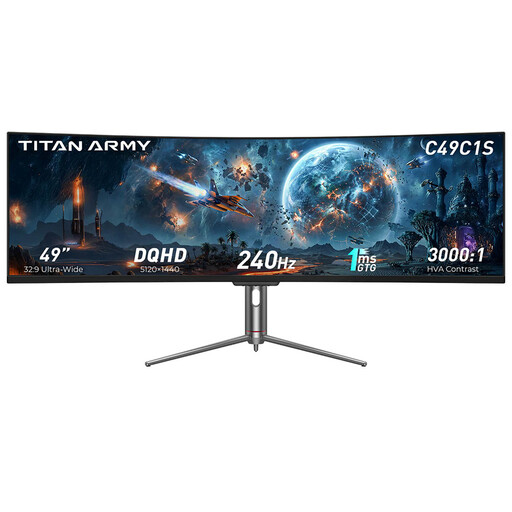
TITAN ARMY C49C1S, 49-inch, 32:9
For an extra-wide setup, if your game makes good use of the format or you want to use additional windows side by side.
The product title lists DQHD at 5120 × 1440, 240 Hz, HVA and an 1800R curvature. Check how it looks and how much space it needs for your particular setup.
View at Joybuy
 No image available
KTC H32S17, 32-inch, QHD
A large QHD view, if you want to check how cards and menus look from your usual seating position.
The product title lists 2560 × 1440, 180 Hz, 1 ms, HVA, 1500R, Adaptive Sync and HDR10.
View at Joybuy
 No image available
CRUA CR320C-H, 32-inch curved QHD monitor
A large QHD gaming view, if a curved screen suits your desk and seating position.
The product title lists 165 Hz, 1 ms GTG, 1500R, 99% sRGB and FreeSync. Check the stated resolution in the product details before comparing it with your source device.
View at Joybuy
 No image available
Samsung Odyssey G5 G50F, 32-inch, QHD, IPS
A large QHD view, if you’re looking for an IPS monitor for your deckbuilding setup.
The product title lists 2560 × 1440, 180 Hz, 1 ms, HDR10, FreeSync and G-Sync Compatible.
View at Joybuy
Frequently asked questions
Is QHD or 4K better for reading card text?
Compare card text and menus at native resolution, with suitable scaling and from your usual seating distance. Large monitors are available in both 2560 × 1440 and 3840 × 2160; pixel count alone doesn’t guarantee an easy-to-read game interface.
How should I set up a large monitor for deckbuilding games?
Before setting it up, measure the space it needs, including the stand, and choose a resolution supported by both your game and source device. Then check the cards and menus, and, with ultrawide formats, the entire game area in the specific version of the game.
What do energy labels, warranties and statutory rights mean?
Compare the EU energy label and product information for the specific models. If a product is faulty, your statutory rights apply against the seller. A warranty is a voluntary service with its own terms and conditions. Germany’s consumer advice centre explains the difference.
What are the rules in Germany for buying and disposing of a monitor?
Electronic displays are covered by EU energy labelling and ecodesign requirements. Germany’s Federal Environment Agency advises against putting old electrical equipment in household waste; it should be disposed of through separate collection instead. For a typical online purchase, you generally have a right to cancel; Germany’s consumer advice centre says the usual deadline is 14 days from receiving the goods. The terms of your specific purchase apply.


