
Lieferung heute & morgen

Qualitätsgarantie

Willkommens-Angebote freischalten: KOSTENLOSE Lieferung | Bis zu 80 % RABATT | Kostenlose 30-Tage-JoyPlus-Testphase
App herunterladen
Purchasing a laser engraver opens up new possibilities for creative projects, personalized gifts, or even starting a small business. However, the market is flooded with technical specifications and marketing promises that make an informed decision difficult. Many buyers invest in a device that fails to meet their needs or has hidden flaws. This guide will help you understand the crucial factors and avoid common pitfalls.
The three most common mistakes when buying a laser engraver are:
To avoid a bad purchase, it's essential to interpret the technical specifications correctly. Focus on the following three key parameters that determine the performance and suitability of an engraving machine for your projects.
The most important metric is the optical output power, measured in watts (W). It determines how quickly and deeply a material can be engraved or cut.
Make sure the manufacturer clearly declares the optical power and not just the device's input power.
The size of the work area defines the maximum dimensions of your projects. A standard size for hobbyist devices is often around 300 x 300 mm, while professional machines offer significantly larger areas.
The engraving precision, specified in millimeters (e.g., 0.01 mm), describes the fineness of the laser beam. A smaller value allows for more detailed engravings and sharper edges, which is particularly relevant for intricate designs or small text. High precision is a hallmark of a quality engraving machine for wood and metal.
A good laser cutter should be flexible in its control. Check for compatibility with common third-party software like LightBurn, which is considered the industry standard for controlling diode lasers. Proprietary apps can be useful for getting started but often limit creative possibilities. Modern devices also offer various connection options such as USB, Wi-Fi, or a direct hotspot connection, which simplifies data transfer.
Based on the criteria mentioned, we have identified models that are suitable for different user profiles.
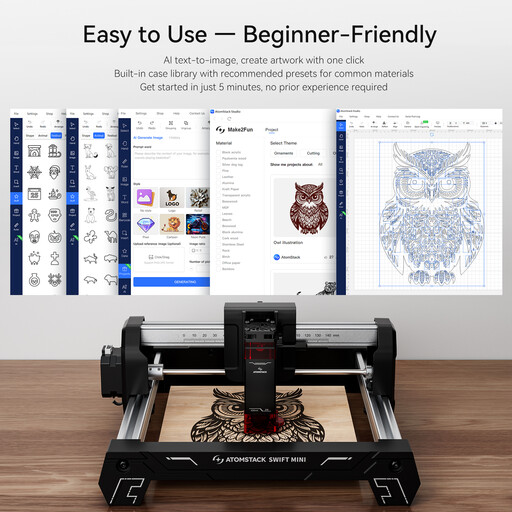
Why This Fits Their Persona: This model is an ideal laser engraver for beginners. It comes fully pre-assembled and is ready to use right out of the box. The compact work area is perfect for personalizing gifts, cards, or small wooden objects.
The 3W power rating is clearly declared as optical power. Its plug-and-play design eliminates complex software installations and hidden hurdles.
Fully pre-assembled and ready to use immediately; very compact and lightweight design (2.64 kg).
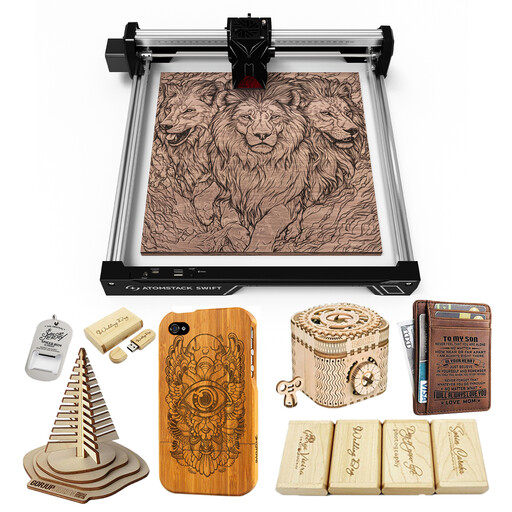
Why This Fits Their Persona: With 12W of optical power and a 300x300 mm work area, this ATOMSTACK laser engraver provides the capacity needed for larger and more demanding projects. It is suitable for users who want to go beyond simple personalizations and also cut thinner materials.
The product description clearly distinguishes between 12W output power and 40W peak power. A laser protective cover is included, and compatibility with LightBurn and ATOMSTACK Studio is explicitly mentioned.
Good balance of power (12W) and work area (300x300 mm); high precision of 0.01 mm for fine details.
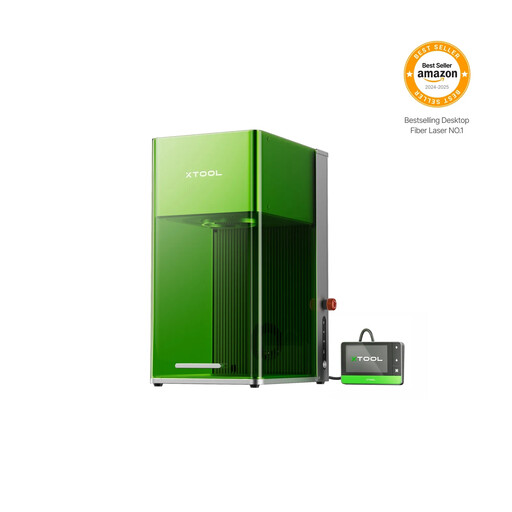
Why This Fits Their Persona: As a professional-grade engraving machine, the xTool F1 Ultra combines a diode and a fiber laser. This allows it to process almost any material, from wood to bare metal. Its extremely high speed is ideal for producing small batches and for demanding commercial applications.
This device solves the problem of material limitations by combining two laser types in one housing. Integrated safety features and an intelligent camera for positioning minimize user errors and risks.
Dual-laser system (20W Diode + 20W Fiber Laser) for maximum material versatility; extremely high engraving speed of up to 10,000 mm/s.
We have compiled a complete, up-to-date list of products that fully meet these strict selection criteria and German safety regulations.
Regardless of the model, three safety measures are non-negotiable: Always wear safety goggles certified for the laser's wavelength. Ensure adequate ventilation or an exhaust system to remove harmful fumes. Never leave the machine unattended during operation. Models with an enclosure, flame detector, and emergency stop button offer a higher level of safety.
Most devices come with proprietary software that is sufficient for getting started. However, for more control and advanced features, software like LightBurn is recommended. It is compatible with most diode lasers and offers extensive design and control options. Before buying, check if the desired device is supported by such third-party software.
The main difference lies in the wavelength and the associated material compatibility. Diode lasers (approx. 455 nm) are ideal for organic materials like wood, leather, and paper, as well as for dark acrylic and coated metals. Fiber lasers (approx. 1064 nm) are optimized for the direct engraving of metals such as stainless steel, aluminum, or titanium, as well as many plastics. For a universal engraving machine for wood and metal, a device with both laser sources, like the xTool F1 Ultra, is a practical solution.