
Lieferung heute & morgen

Qualitätsgarantie

Willkommens-Angebote freischalten: KOSTENLOSE Lieferung | Bis zu 80 % RABATT | Kostenlose 30-Tage-JoyPlus-Testphase
App herunterladen
Published on August 30, 2026 by the Joybuy Product Recommendation Officer
The search for the right gaming chair can quickly become overwhelming. The market is filled with models that advertise aggressive designs and a long list of features. However, not every feature is useful, and not every design is built for comfort and longevity. Many buyers discover after just a few months that their new chair is uncomfortable, the material is showing cracks, or the mechanics are failing.
This guide focuses on the crucial criteria that define a good PC chair. We'll show you how to avoid common purchasing pitfalls and what to look for to make an informed decision for your gaming setup or home office.
Before we dive into the important features, it's helpful to know the typical problems that can lead to a bad purchase.
To avoid buyer's remorse, you should focus your attention on three core technical areas. These are the primary determinants of comfort, durability, and safety.
An ergonomic gaming chair should adapt to your body, not the other way around. Long periods of sitting require dynamic support that relieves pressure on the spine. Look for the following adjustment options:
The upholstery material and the quality of the padding are directly responsible for seating comfort and longevity.
The stability of a gaming chair depends on its foundation.
Based on the criteria above, we have identified a few models that are well-suited for different needs and budgets.
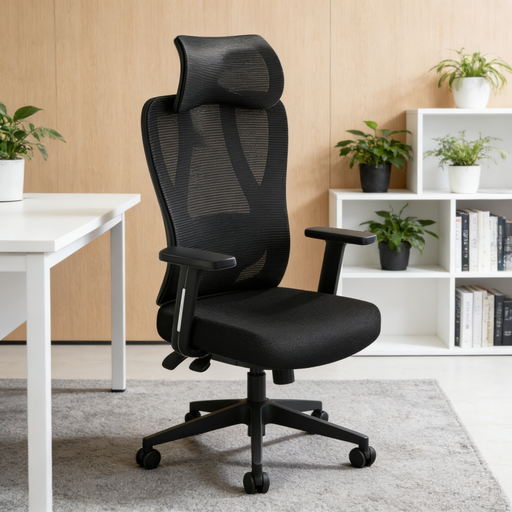
Why This Fits Their Persona: Ideal for users who spend many hours at their desk daily and value precise adjustability and breathable materials, whether for a home office or gaming.
Instead of an aggressive look, this model focuses on functional ergonomics. The breathable 2-layer mesh upholstery prevents heat buildup, and the integrated 4D lumbar support offers more targeted support than loose cushions.
The 4D pivoting lumbar support dynamically adapts to your posture. The recline angle of up to 140° and the pressure-relieving seat are designed for long periods of use.
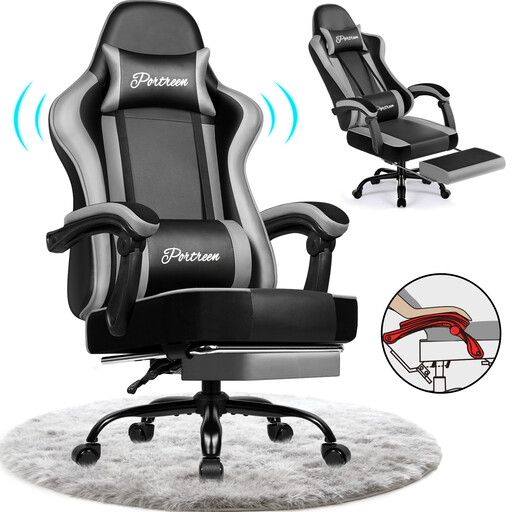
Why This Fits Their Persona: Suitable for gamers and home office users looking for a chair with extensive features like a footrest and high adjustability without needing a premium budget.
According to the manufacturer, this model is certified to BIFMA and SGS standards, indicating tested stability and mechanical safety. The high-density foam padding is aimed at long-term durability.
The wide recline angle (90° to 170°) and the retractable footrest offer flexible options for relaxation. The manufacturer states the PU leather is water-repellent and stain-resistant.
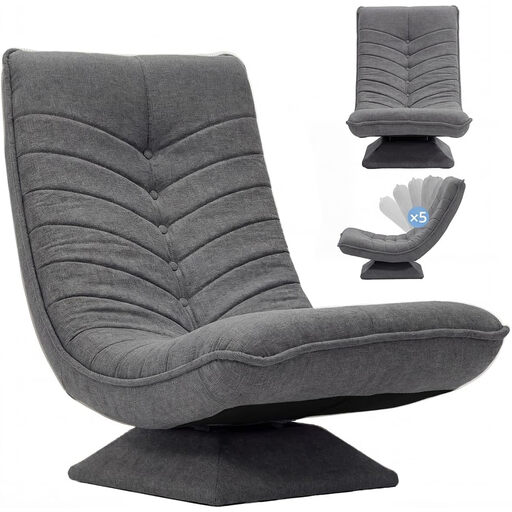
Why This Fits Their Persona: Perfect for console gamers in the living room or individuals seeking a flexible, low-profile, and space-saving seating option for reading or relaxing that doesn't require a permanent desk setup.
This model completely sidesteps the "racer-style" trap by focusing on living room comfort. It requires no assembly and is ready to use out of the box, which reduces issues with unstable mechanics from the start.
The 360° swivel function offers great flexibility within a room. The backrest is adjustable up to a 120° angle, and the chair can be folded for space-saving storage when not in use.
A good chair is only half the battle. A matching gaming desk, like the COMHOMA L-Shaped Desk with integrated USB ports or the GTPLAYER Gaming Desk with its robust carbon fibre surface, completes the ergonomic setup.
We've compiled a complete, up-to-date list of products that fully meet these strict selection criteria and safety regulations.
1. Is a gaming chair also suitable as an office chair for a home office? Yes, many models are very well-suited for this purpose. An ergonomic gaming chair often offers more precise adjustment options than a standard office chair in the same price range, especially regarding the backrest recline and armrests. Look for a subtle design if the chair needs to blend seamlessly into a professional environment.
2. How long does a gaming chair last on average? The lifespan heavily depends on the quality of the components and the intensity of use. A budget model may show significant wear on the padding and upholstery after just 1-2 years. High-quality chairs with cold cure foam padding, a robust steel frame, and certified components can last 5 years or more with proper care.
3. What should I pay attention to when assembling a gaming chair? Read the instructions carefully and tighten all screws securely. It is advisable to re-tighten the screws after a few weeks of use, as they can settle with movement. Ensure the gas lift is correctly seated in the base and the seat mechanism before sitting on the chair.