A lavalier capsule worn close to the body and suited to your recording device is a good starting point for character voices in an echoey room. RØDE explains that keeping the mic close can help capture more direct sound, while Shure points out that a microphone cannot improve a room’s acoustics. A wired model may suit a fixed position; if you need to move around, wireless or a body-worn recorder may be more practical. Just remember to check connections, power and file transfer.
Which setup is right for you?
Performers in a fixed position
If you record several roles mainly while sitting or standing, keeping the microphone close to you and in the same position can help capture more direct sound than a microphone placed further away. RØDE explains the benefit of keeping the mic close to your voice; Shure points out that this does not change the room itself.
Performers with dynamic roles
If your performance ranges from whispers to loud speech, test the entire recording chain using the quietest and loudest passages you plan to record. Shure recommends positioning the MVL 15–25 cm from your mouth; Zoom describes the F2 as recording in 32-bit float.
Performers on the move
If you move around while performing or are filming at the same time, a wireless set or a body-worn recorder may be worth considering. With a recorder, saving and transferring files later becomes part of the process; with wireless, the transmitter, receiver and recording device all need to work together.
What should you look for when buying?
First, check that the microphone position and connection suit your recording setup. Then test the quietest and loudest parts of your performance using the recording chain you’ve chosen.
| Priority |
What to check before buying |
Who is this important to? |
| Clear speech in a reverberant room |
Check the microphone position on your clothing and listen to a test recording in the room where you’ll be recording. |
If I’m recording in an untreated room, I want to capture my voice as directly as possible without mistaking a microphone feature for a way to remove room echo. Around 36% of consumers prioritise clear speech despite room echo. |
| Quiet and loud performance passages |
Test the quietest and loudest passages you plan to record using the complete recording chain. |
If my characters switch between whispers and loud passages, I want to listen to both extremes before recording. Around 29% of consumers prioritise headroom for significant changes in level. |
| Connection to your existing device |
Check the microphone input, TRS or TRRS connection, any adapters you need and whether your recording app recognises the microphone. |
If I want to keep using my existing device, a signal path that actually works matters more to me than a plug that simply looks similar. Around 21% of consumers prioritise getting the right connection. |
| Freedom of movement |
Consider how far you need to move, how the receiver connects and whether you’ll need to transfer files. |
If I move around while speaking, I don’t want a cable to the recording device to restrict me. Around 14% of consumers prioritise freedom of movement while performing. |
Common misconceptions when buying a lavalier
-
A clip-on microphone won’t automatically eliminate room echo
Keeping the microphone close to your voice can help capture more direct sound, but it won’t remove reflections from the room. Shure points out that a microphone cannot improve a room’s acoustics.
Listen to a test recording in the room where you’ll be recording and check the microphone position before choosing a setup or recording an important take.
-
TRS and TRRS aren’t interchangeable just because the plugs are the same size
RØDE describes the Lavalier GO as having a 3.5 mm TRS connection; the Shure MVL is a TRRS model. So a plug that looks right doesn’t guarantee that the microphone will work with your recording device.
Check the complete signal path, from the microphone to the recording app, with your specific device.
Depending on your device combination, you may need a suitable audio adapter or a different microphone model.
-
32-bit float won’t solve every recording problem
The recording format can affect how you handle changes in level, but it won’t stop room or clothing noise from being picked up by the capsule in the first place.
Make test recordings of whispers, loud passages and movement using your complete setup, then listen back to the files.
With a pocket recorder, you’ll also need to factor in storage media, power and managing your files later.
Key brands at a glance
RØDE
The Lavalier GO is a wired lavalier with a 3.5 mm TRS connection, designed for compatible microphone inputs and the Wireless GO systems listed by RØDE.
- RØDE says the Lavalier GO comes with a clip and pop filter.
- For a typical smartphone TRRS input, RØDE specifies a TRS-to-TRRS adapter. The manufacturer’s specifications aren’t an independent sound test in an untreated room.
Shure
The wired MVL is a TRRS model for compatible portable recording devices.
- Shure lists a clip, windscreen and recommended distance of 15–25 cm from your mouth for the MVL.
- TRRS is not the same as the TRS connection on the Lavalier GO; the instructions don’t confirm that it works with every current smartphone.
Sennheiser
The ME 2, item no. 508935, is a clip-on microphone for the bodypack transmitters listed by Sennheiser.
- Sennheiser specifies a maximum sound pressure level of 130 dB and a 1.6 m cable for this ME 2.
- A 3.5 mm plug alone doesn’t guarantee universal compatibility. Don’t assume the ME 2 is the same as an ME2-II bundle without checking.
Zoom
The F2 combines a body-worn recorder with the included LMF-2 lavalier.
- Zoom lists 32-bit float recording and a locking lavalier connection for the F2.
- Storage media, power and file transfer are all part of the process; the manufacturer’s specifications don’t claim to eliminate room echo.
DJI
The DJI Mic Mini 2 is a 2.4 GHz wireless system for recording with greater freedom of movement. The key is to check the transmitters and receiver included in the specific version you choose.
- DJI publishes technical details for transmitters and receivers in specific configurations.
- DJI’s stated battery life for the Mic Mini 2 is based on short-range use in interference-free conditions with noise cancellation switched off; it isn’t a guarantee for other conditions or versions.
Joybuy products for this recording setup
This selection includes wired lavalier microphones for fixed positions and wireless sets for recording on the move. Before buying, check that the connection and device compatibility suit your recording setup.
 No image available
DJI Mic Mini 2S (2 TX + 1 RX + Charging Case)
This wireless set may suit character recordings involving movement, provided the receiver can connect to your recording device.
The product name lists two transmitters, one receiver and a charging case. The description also mentions 32-bit float recording.
Joybuy
 No image available
SYNCO S8 Lavalier Microphone
This wired lavalier may suit recording from a fixed position, provided the connection works with your recording device.
The description lists a 3.5 mm connection and an adapter set. Check in advance that the specific connection works with your device.
Joybuy
 No image available
SYNCO P1XT USB-C Wireless Microphone
This wireless lavalier system may suit recordings on the move, provided your recording device supports the compatible USB-C receiver.
The description lists OTG as a requirement for Type-C Android devices. Check compatibility with other devices too.
Joybuy
 No image available
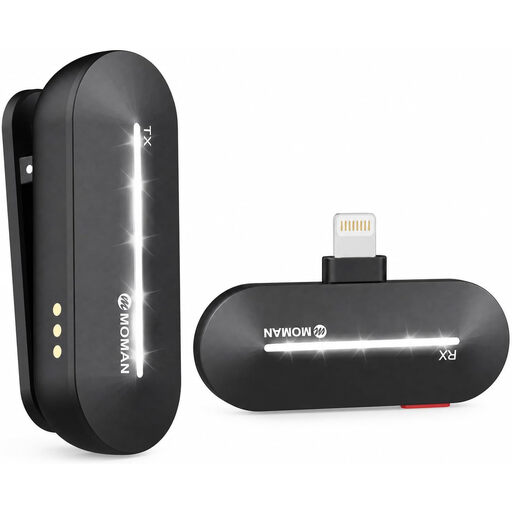
Moman M1CL Wireless Lavalier Microphone, 1TX + 1RX, iPhone 14/13/12/11/X
This wireless set may suit voice recordings on the move with a supported iPhone.
The product name lists one transmitter and one receiver, as well as iPhone models 14, 13, 12, 11 and X. Compatibility is limited to supported devices.
Joybuy
 No image available
Moman MC1(C) Wireless Lavalier Microphone, 2.4 GHz, USB-C (1TX + 1RX)
This wireless lavalier may suit mobile recordings with a compatible USB-C device.
The product name lists 2.4 GHz, one transmitter and one receiver. You’ll need a compatible USB-C device to use the connection described.
Joybuy
Frequently asked questions
Can a lavalier get rid of echo in an untreated room?
No. Placing the microphone close to you can help capture more direct sound, but Shure says it cannot improve the room’s acoustics. Listen to a test recording in the room where you’ll be recording.
Do I need an adapter to use the RØDE Lavalier GO with my smartphone?
For a typical TRRS microphone input, RØDE specifies a TRS-to-TRRS adapter. If your particular smartphone doesn’t have a 3.5 mm connection, RØDE also lists a compatible Lightning or USB-C audio solution. Check the complete signal path with your recording app.
Can I use any wireless lavalier in Germany without restrictions?
No. The German Federal Network Agency grants general frequency allocations for specific frequency bands, device categories and conditions of use. Check the technical specifications of your wireless set against the relevant allocation in force when you plan to use it. The words ‘2.4 GHz’ alone don’t mean it’s automatically approved for every use.
Can I record other people’s voices in Germany without asking?
No. Section 201 of the German Criminal Code (StGB) makes it an offence, among other things, to record someone else’s non-public speech without authorisation. If you’re recording other people, make sure you have permission beforehand.
What else should I consider when using a lavalier with a pocket recorder?
Allow for suitable storage media, power and time to transfer your files. Zoom says the F2 uses microSD cards and two AAA batteries.


