Solo learners recording in one place
If you record lots of short cards at your desk, clear speech and a straightforward set-up matter most. RØDE recommends positioning a lavalier close to your mouth.


If you mostly record on your own in one place, a wired lavalier microphone with a confirmed compatible input is usually the simplest place to start. A wireless set may suit you better if a cable gets in the way when you move around, or if you want to try noise processing. Neither option replaces good microphone positioning or a test recording in your own room.
If you record lots of short cards at your desk, clear speech and a straightforward set-up matter most. RØDE recommends positioning a lavalier close to your mouth.
If you want to record directly on your current phone, check the specific microphone input and whether you need an adapter. RØDE and Shure specify different connection requirements for their models.
If you move around while recording or want to avoid a cable, the receiver, set configuration and power supply are important factors. For example, DJI offers the Mic Mini as a one-transmitter, one-receiver set for solo recording.
For audio flashcards in a noisy flat, first check how close the microphone sits to your voice and whether it works with your recording device. Then consider your recording workflow and how much freedom to move you need.
| What you need | What to check before buying | Who is it important to? |
|---|---|---|
| Clear speech | Attach the microphone close to your mouth; listen to a short test recording made in your own room. | If I want to record short words and pronunciation examples clearly despite household noise, I put speech intelligibility first. Around 36% of consumers prioritise this. |
| The right connection | Check the device input and whether it needs a TRS or TRRS connection; find out if an adapter is required. | If I want to keep using my current smartphone or recorder, the microphone needs to work with it. Around 29% of consumers prioritise compatibility with their recording device. |
| A simple recording workflow | Record and listen back to a test card; with wireless models, check the level controls and battery charge. | If I’m recording lots of short cards one after another, I want to do so without a complicated set-up and be able to repeat a recording easily if needed. Around 21% of consumers prioritise a smooth workflow. |
| Freedom to move | Check the number of transmitters and the type of receiver; test the set where you plan to record. | If I move around while recording and don’t want a cable connecting me to the recording device, a suitable wireless option matters. Around 14% of consumers prioritise freedom to move. |
TRRS connections for smartphones and TRS microphone inputs are not interchangeable just because the plugs have the same diameter.
Before buying, check the specific device input, adapter standard and microphone power requirements against the model.
Noise processing cannot reliably eliminate poor room acoustics or other voices simply because of the name given to the feature.
First, improve the microphone position and choose a quieter time to record. Then compare a short voice recording with and without processing in the room where you’ll actually use it.
Wireless sets can differ in the number of transmitters and the type of receiver. Wired models can also have different connection or battery requirements.
Check the exact version and what’s included. For example, BOYA says the BY-M1 needs an LR44 battery, while the BY-M1S does not.
RØDE offers wired lavalier models for different inputs, as well as wireless sets for smartphones.
The Shure MVL is a wired option for voice recording with compatible mobile devices.
DJI offers Mic Mini wireless set configurations for solo recording or two speakers.
The LARK M2S is a compact wireless option; the receiver and accessories depend on the combination you choose.
The BY-M1 is a wired lavalier with switchable camera and smartphone modes.
This selection includes wireless lavalier sets and a lavalier for recording on smartphones and computers. Make sure the connection and set configuration suit your recording device and workflow.
 No image available
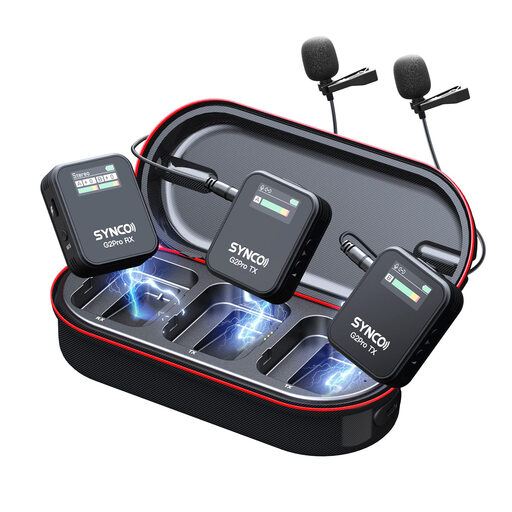
An option if two people need to record their own contributions for the same cards; for solo recording, you may not need the second transmitter.
The product name specifies two transmitters, one receiver and a charging case.
 No image available
This wireless option is worth considering if you want to record without a cable and have a compatible USB-C recording device.
The product name mentions Noise Reduction, but that doesn’t prove how well it will work in your room. Check the connection and listen to a test recording.
 No image available
The product name lists this lavalier for use with smartphones, PCs, laptops and cameras. Check that the actual connection matches your device.
If you need an adapter, check before recording that your device recognises the microphone.
 No image available
A wireless option if a cable gets in the way when you’re recording; check that the receiver works with your chosen recording device.
The product name mentions Noise Cancellation. Try it in your own room with a test recording rather than assuming a particular level of noise reduction.
 No image available
This set may suit you if two people need to record cards; two transmitters may be unnecessary if you’re recording on your own.
The product name specifies 2.4 GHz and USB-C and Lightning connections. Check which receiver connections are included and whether they suit your recording device.
There’s no evidence that it will eliminate them completely. DJI and Hollyland describe processing features on specific wireless models; compare a short recording with and without processing in your own room. Good microphone positioning and keeping background noise to a minimum are still important.
RØDE recommends placing lavalier microphones about a hand’s breadth, or 20–30 cm, from your mouth. Keep clothing away from the microphone capsule and listen to a test card for rustling and clear speech. This distance is general manufacturer guidance.
Check the specific microphone input and the microphone’s connection type; a 3.5 mm plug alone doesn’t confirm compatibility. The RØDE smartLav+ is specified as TRRS, while the RØDE Lavalier GO requires a TRS microphone input. Also check whether you need a suitable adapter.
BOYA specifies an LR44 battery for the BY-M1; according to the manufacturer, the BY-M1S does not need a battery. For goods that consumers buy from a business seller in the EU, the European Union’s Your Europe website states that there is a minimum two-year legal guarantee from the date the goods are received.
According to the Federal Ministry of Justice and the Federal Office of Justice, § 201 StGB concerns the unauthorised recording of another person’s non-public spoken words. Take care not to record such conversations without permission; when recording your cards, make sure the microphone is focused on your own voice.