Stationary audiobook narrators
If you usually record chapters from the same position, clear speech and a stable microphone position are key. ACX and Shure explain aspects of voice recording and the contact noise that clothing can cause.


If you usually record from a fixed position, start by looking at a wired lavalier microphone with a connection and power supply that suit your recording device. Wireless is worth considering if a cable genuinely gets in your way. For consistent recordings across chapters, you’ll also need a quiet space, a stable microphone position and a test recording in the clothes you normally wear. If you’re submitting your audio to ACX, you’ll also need to check the finished recording against its requirements.
If you usually record chapters from the same position, clear speech and a stable microphone position are key. ACX and Shure explain aspects of voice recording and the contact noise that clothing can cause.
If you want to connect the microphone directly to a compatible mobile device or computer, check the specific connection and make sure your recording device recognises it. Sennheiser lists USB-C as the connection for the XS Lav USB-C; a guide from the University Library of Marburg explains the different types of microphone and device connections.
If you often change position or stand up while recording, cable routing, transmitter batteries and the receiver connection will all affect your choice.
First, check that the connection and power supply work with your recording device. Then consider your recording clothes, microphone position and how much you actually need to move around to decide whether a wired or wireless system suits your setup.
| Consideration | What to check when buying | Who is it important to? |
|---|---|---|
| Clear speech with minimal interference | Test the microphone position and cable routing with the clothes you normally wear; if you’ll be recording from a fixed position, compare the pickup patterns too. For a single audiobook narrator, ACX recommends a cardioid microphone. | When I record longer passages in the clothes I normally wear, I want to spot rustling and other unwanted noise early. Clear speech with minimal interference is the top priority for around 36% of consumers. |
| Connection and power supply | Check that your recording device, microphone input and required power supply are compatible, and make sure you have any adapters you need. | If you want to keep using an existing smartphone, computer, recorder or transmitter, you need a compatible connection—not just a socket that looks the same. Device compatibility is the top priority for around 29% of consumers. |
| A reliable chapter-recording workflow | Before recording, check the microphone attachment, input level and recording signal path; if you’re using batteries or a wireless system, check the power supply too. | When I’m recording several long chapters, I want to avoid interruptions and unnoticed changes to the recording signal path. A workflow I can check and control is the main priority for around 21% of consumers. |
| Freedom to move | Think about whether you’ll move around while recording; if you’re using a wireless system, check the exact set variant and receiver connection. | If I stand up or change position while recording, a cable can get in the way. Freedom to move is the top priority for around 14% of consumers. |
A 3.5 mm plug alone doesn’t tell you whether the microphone input and power supply are compatible. According to RØDE, the Lavalier GO needs a suitable TRS microphone input with plug-in power; for the Shure MVL, Shure specifies a compatible 3.5 mm input or a CTIA-compliant adapter.
Before you decide, compare the details of the plug wiring, input and power requirements for both devices.
Clothing can rub against the microphone capsule or cable, and sounds from outside can still get into your recording. Shure describes contact noise caused by friction, while ACX highlights the possibility of external noise at the recording location.
Record a short passage in the clothes you’ll actually wear and listen for rustling and other unwanted noise before recording a whole chapter.
A range quoted for an open, interference-free environment doesn’t prove that wireless will offer an advantage in a small booth. A cable can restrict movement, while a wireless system adds a transmitter, receiver and batteries to the list of things to check.
Choose wireless if you need to move freely while recording, and check the exact set variant and connection to your recording device.
The XS Lav USB-C is a wired option for compatible USB-C mobile devices or computers.
The Lavalier GO is a wired analogue option for a compatible TRS microphone input.
The ATR3350x is a battery-powered wired lavalier for compatible camera or recorder inputs.
The MOTIV MVL is a wired option for compatible mobile devices with a suitable 3.5 mm connection or a CTIA-compliant adapter.
The Mic Mini set with one transmitter and one receiver is a wireless option for solo recordings when freedom of movement matters.
This selection includes wired and wireless lavalier microphones for voice recording. Before buying, check that the connection and device combination suit your recording setup.
 No image available
For voice recording with a compatible smartphone, PC, laptop or camera; check the specific connection in advance.
 No image available
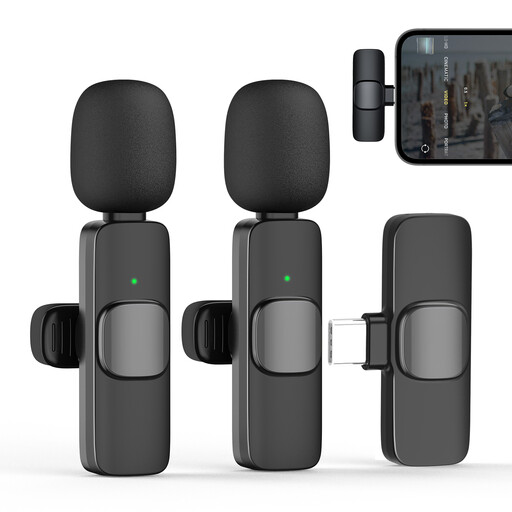
For a wireless setup with a supported USB-C recording device; according to the product information, Android devices need OTG functionality.
 No image available
For USB-C recording with one transmitter and one receiver; check that your specific recording device supports the receiver.
The product name specifies a 2.4GHz wireless connection and a 1TX/1RX set configuration.
 No image available
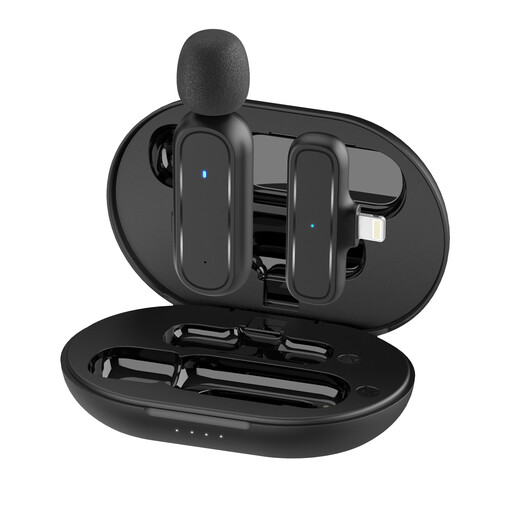
For a wireless setup with a compatible Lightning device; the product information applies to the listed Lightning devices.
The product name specifies Lightning and a 1TX/1RX set configuration.
 No image available
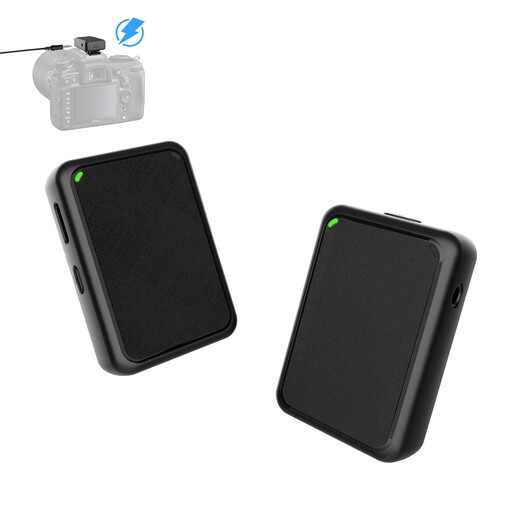
For camera recording with the wireless transmitter and receiver set described; check how the receiver connects to your camera.
The product name specifies a 1TX/1RX configuration.
Secure the microphone around the upper chest and route the cable so it doesn’t rub against your clothes or the capsule. Record a short passage in the clothes you normally wear and check it for contact noise; you’ll need to test the best position in practice.
Not necessarily: the input type and power supply matter too. RØDE specifies a suitable TRS microphone input with plug-in power for the Lavalier GO; the Audio-Technica ATR3350x has an LR44 battery and a dual-mono plug, as described by the manufacturer. Check the details for the specific microphone against those of your recording device.
Yes. Permitted use depends on the frequency band and the technical conditions that apply to it. In April 2026, the German Federal Network Agency published Vfg. 37/2026 for wireless microphones. Check the frequency details of your specific system against the relevant current allocation; the term ‘wireless microphone’ alone isn’t enough to determine whether registration is required or use is permitted.
No. ACX’s published requirements apply to submissions to ACX. If you want to publish there, check the requirements against your fully edited audio; other publishing routes have their own requirements.
The Federation of German Consumer Organisations explains that new faulty goods are covered by statutory warranty rights for two years after receipt. For online orders, a 14-day cancellation period from receipt generally applies, subject to legal conditions; cancelling an order and claiming your rights for faulty goods are separate claims. Check the details provided by the specific seller before ordering.