What should you look for when buying?
First decide whether one or both voices need to be clearly audible on their own. Then check the connection and how much freedom of movement you need.
| What you need |
What to check |
Who is it important to? |
| One clearly audible voice |
Check whether a clip and windscreen are included; test the microphone position and sound with a short recording. |
If I’m mainly recording the learner who’s sitting down, their voice needs to be clear; the second voice doesn’t have to be equally loud. This is a priority for around 29% of consumers. |
| Both voices in the dialogue |
Check how many microphones or transmitters are included, whether the receiver supports two transmitters and whether it can output the voices separately. |
If both speakers need to be clearly audible or edited separately, I need a solution for both people. This is a priority for around 24% of consumers. |
| The right connection |
Check the microphone input on your device, along with TRS, TRRS or USB-C. Make sure you have any audio adapters you need and check that the recording app is set to use the microphone. |
If I want to record using my existing mobile phone, laptop, recorder or camera, the whole setup needs to be compatible. Device compatibility is a priority for around 29% of consumers. |
| Wired or wireless |
Check that the cable is long enough for your seating arrangement. For wireless models, check the number of transmitters, the receiver connection and charging requirements. |
If I don’t need much freedom of movement while speaking seated, I want to keep extra equipment to a minimum. If the cable gets in the way, wireless could be an option. Ease of use is the main priority for around 18% of consumers. |
Joybuy products for lavalier recording
This selection includes lavalier microphones for different device connections, as well as wireless models for one or two speakers. Before buying, check that the connection and set variant are right for your recording setup.
 No image available
SYNCO S8 lavalier microphone for smartphone, PC, laptop and camera
For recording one person sitting down, as long as the microphone works with the recording device you’re using.
The product title lists smartphones, PCs, laptops and cameras as compatible devices. Check that you have the right connection and that your recording app uses the external microphone.
View at Joybuy
 No image available
Moman M1CXT wireless lavalier microphone, USB-C, 2TX+1RX
For a dialogue between two speakers, as long as the USB-C receiver is compatible with your recording device.
This variant is listed as 2TX+1RX with USB-C. Check that your device supports the receiver.
View at Joybuy
 No image available
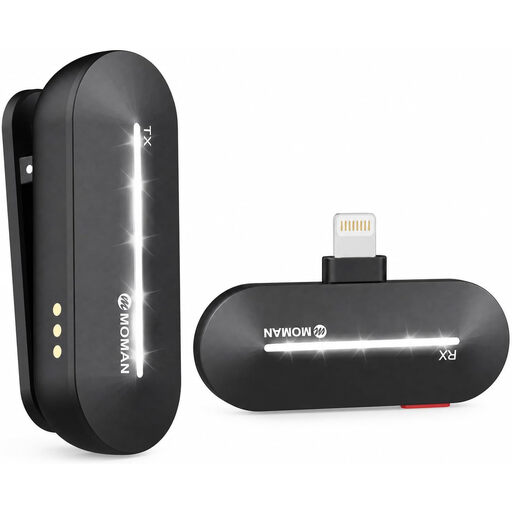
Moman M1CL wireless lavalier microphone for iPhone, Lightning, 1TX+1RX
For recording one speaker with a compatible Lightning device.
The product title lists iPhone 14/13/12/11/X and 1TX+1RX. Check that your device and recording app support the receiver.
View at Joybuy
 No image available
Moman MC1(C) wireless lavalier microphone for USB-C mobile phones, 1TX+1RX
For recording one speaker with a compatible USB-C mobile phone.
The product title lists 2.4 GHz and a 1TX and 1RX configuration. Check compatibility with your device and recording app.
View at Joybuy
 No image available
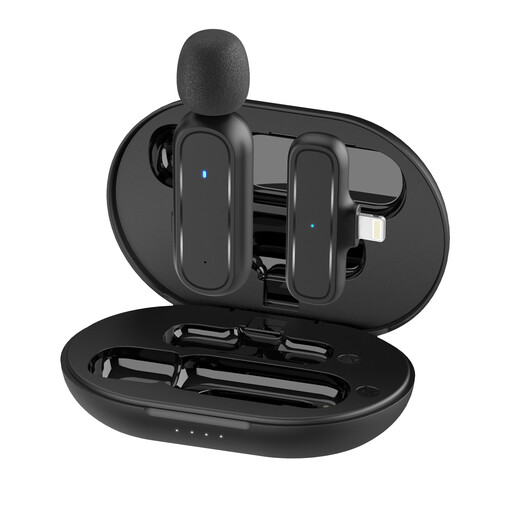
Moman MC1(A) wireless lavalier microphone, Lightning, 1TX+1RX
Consider this for mobile recording only if the connector on the specific version is compatible with your device.
The connection details aren’t clear. Before buying, check whether the receiver on the version being offered uses Lightning or USB-C.
View at Joybuy
Frequently asked questions
Is one lavalier microphone enough for both voices in a dialogue?
If both voices are equally important, don’t rely on a single microphone worn on one person’s collar. The Media Team at Nuremberg Institute of Technology describes a lavalier microphone as suitable for recording one person. For two speakers, consider two microphones or a suitably equipped set with two transmitters.
How do I check the recording before a practice session?
Attach the microphone so it won’t rub against clothing, then listen to a short test clip featuring both speakers. The BOYA instructions recommend making a short recording and playing it back before an important recording with the BY-M1. These specific details apply to this model.
Do I need an adapter to use a 3.5 mm lavalier microphone with a smartphone?
It depends on the microphone and device. For using the Lavalier GO with a TRS plug on a smartphone, RØDE recommends a TRS-to-TRRS adapter. If your device doesn’t have a 3.5 mm socket, you’ll also need a suitable Lightning or USB-C audio adapter. Check that your recording app is using the external microphone, too.
Who should I contact if my microphone is faulty?
For a consumer purchase in Germany, the seller’s statutory liability for defects is separate from any voluntary guarantee. If a product is faulty, the first step may be repair or replacement. The European Commission explains that sellers are liable for defects that existed when the goods were delivered and become apparent within two years.
Can I simply record a German-learning dialogue with other people?
Not in every case. Section 201 of the German Criminal Code covers recording another person’s privately spoken words without their permission, as well as certain uses of such recordings. Make sure you have the participants’ permission before recording. If personal data is being processed and the GDPR applies, you’ll also need a legal basis for doing so. The Federal Commissioner for Data Protection and Freedom of Information explains that consent is one possible legal basis, but not the only one.


