What should you look for when buying?
For quiet voice recordings, microphone placement and the actual noise level where you’re recording matter most. Shure points out that a microphone can’t reliably separate the wanted direct voice from unwanted room reverberation.
| What matters |
What to check before buying |
Who it matters most to |
| Quiet voice and background noise |
Clip the microphone close to your voice; listen back to a quiet test recording made in your actual recording spot. |
If I speak quietly, I want to know before recording the full take whether my voice will remain clear despite the noise at the desk. This is the top priority for around 36% of consumers. |
| Connection to the recording device |
Match the connector type to the input; check the complete adapter setup if needed. |
If I want to keep using my existing device, the microphone needs to work without incompatible connectors or untested adapters. This matters most to around 29% of consumers. |
| Freedom to move |
For wireless sets, check the receiver, number of transmitters and compatible device version. |
If I get up to guide the meditation or move to another spot, I don’t want a microphone cable in my way. Freedom to move is the top priority for around 21% of consumers. |
| Longer recordings without interruptions |
For wireless models, check battery life with the settings you intend to use; for wired models, test that the connector stays secure and the cable is routed safely. |
If my meditation lasts longer, I want to avoid interruptions caused by a flat battery or loose connection. Around 14% of consumers rank this as their top priority. |
Joybuy products for this setup
The Joybuy products below include a wired lavalier for a fixed recording spot and wireless lavalier systems for compatible devices. Before buying, check the connector and what’s included with the specific version.
 No image available
Hollyland LARK M2 Wireless Lavalier Microphone System
This wireless lavalier system could suit you if a microphone cable gets in the way where you’re speaking; check that the receiver version is compatible with your recording device.
The product description lists 48 kHz/24-bit audio, a 9 g transmitter and switchable noise reduction. This feature doesn’t confirm that conversations at the next table will be filtered out.
View at Joybuy
 No image available
SYNCO S8 Lavalier Microphone for Smartphone, PC, Laptop and Camera
This lavalier could suit a fixed recording spot if its connection setup is compatible with your device.
The product description lists a 3.5 mm connector and an adapter kit. Check whether these cover the specific input and connection you need.
View at Joybuy
 No image available
Moman M1CXT Wireless Lavalier Microphone, USB-C, 2TX+1RX
This wireless set could suit you if you’re planning a cable-free setup with a compatible USB-C device; check that the receiver works with your device.
The product description lists a range of up to 150 m in open areas and up to six hours of operation. Switchable noise reduction doesn’t confirm that nearby conversations will disappear.
View at Joybuy
 No image available
Moman M1CT Wireless Lavalier Microphone, USB-C, 1TX+1RX
This wireless set with one transmitter and one receiver could suit a solo recording without a microphone cable, provided your device supports the USB-C receiver.
The product description lists a range of up to 150 m in open areas and up to six hours of operation. Test the noise reduction with a recording rather than assuming it will remove conversations.
View at Joybuy
 No image available
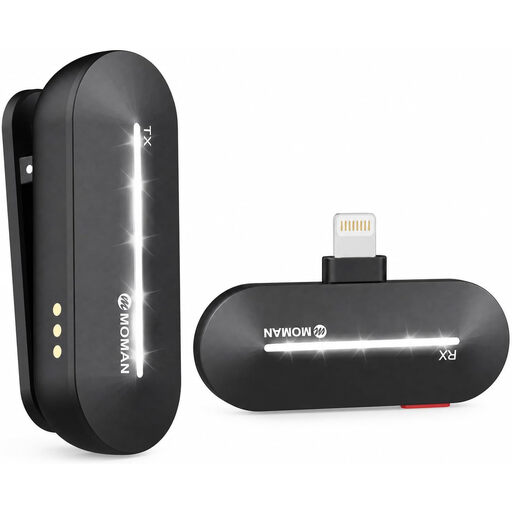
Moman M1CL Wireless Lavalier Microphone for iPhone 14/13/12/11/X, 1TX+1RX
This wireless set with one transmitter and one receiver could be suitable if you use one of the iPhone models listed in the product name; check the connection with your specific device.
The product description lists up to six hours of operation and three noise reduction modes. These modes don’t guarantee that other people’s voices will disappear from a recording.
View at Joybuy
Frequently asked questions
How should I position the microphone for a quietly guided meditation?
Clip the microphone capsule close to your voice, making sure it won’t rub against your clothing. For a short test, speak as quietly as you will during the actual take and listen back in the real recording environment; a microphone can’t fix the room acoustics after the fact.
Will any lavalier with a 3.5 mm connector work with my smartphone?
No. The RØDE smartLav+ uses TRRS, while the Lavalier GO uses TRS. You’ll also need to check that the input, any adapter and the power supply are compatible. Sennheiser describes the ME 2 as suitable for specific bodypack transmitters.
What should I check before buying a wireless set?
Check that the package includes a receiver compatible with your recording device and any adapters you need. Versions in the same product range can differ, so also check the details of the specific offer rather than assuming they match another set version.
Can I record other people’s conversations at a shared desk?
Don’t record other people’s non-public speech without authorisation: Section 201(1) of the German Criminal Code (StGB) makes this a criminal offence. Choose a time or place where other people aren’t having conversations, and get permission in advance if you intend to record them. If you’re recording personal data, you must also observe the relevant data protection requirements.
Can I use any wireless microphone in Germany without checking anything else?
You can’t tell from the term ‘wireless microphone’ alone. The Federal Network Agency publishes general frequency allocations and their conditions; check which frequency use applies in Germany for the specific model.


