Who is this guide for?

Quiet speakers in flats where sound carries

If you might pick up the sound of a fan, traffic or housemates, positioning the microphone close to your voice and testing it where you’ll actually record are key. RØDE says that placing the microphone close to your mouth can help capture your voice.

People recording with a smartphone or camera

Getting the signal path right is crucial: a 3.5-mm TRS microphone input, a smartphone connection and a suitable adapter aren’t automatically interchangeable. Check compatibility with your specific device.

Instructors who move around or record for longer

If you want to move while speaking or record independently of your phone, compare a wireless set with a body-worn recorder. Check the specific set variant, its power supply and how you’ll monitor and transfer the recording.

What should you look for when buying?

Wired lavalier microphone

A good fit if: you usually speak from one spot and your device supports the specific connection and any power it requires.

Bear in mind: cable movement and clothing can cause audible noise. An omnidirectional capsule won’t selectively block changing background noise.

Directional lavalier microphone

A good fit if: unwanted sound mainly comes from one direction and you can carefully point the microphone towards your voice.

Bear in mind: positioning and a suitable recording input still matter. A cardioid polar pattern doesn’t guarantee a noise-free recording.

Wireless clip-on microphone

A good fit if: you want to move around while instructing or avoid a cable running to your recording device.

Bear in mind: the transmitter, receiver and recording device need to work together. Battery-life figures only apply to the specific test conditions stated.

Lavalier microphone with recorder

A good fit if: you want to create a separate recording file without relying on an ongoing connection to your smartphone or camera while recording.

Bear in mind: recording, checking the file and transferring it are all part of the process. Level assistance won’t remove traffic noise or clothing rustle.

What matters to you What to look for Who it matters most to
Background noise when speaking quietly Make a test recording where you plan to record; check the microphone position and polar pattern; if relevant, compare noise reduction switched on and off. If I can hear a fan, traffic or voices in the next room, I want to know whether my quiet voice will still be clear where I’m recording. That’s why around 33% of consumers put background noise first.
The right connection Check the exact smartphone, camera or recorder model, as well as the connection, required power, adapter and included receiver. If I want to record directly with my smartphone or camera, the whole signal path needs to be compatible. That’s why around 27% of consumers prioritise device compatibility.
Freedom to move Check the attachment and how close it sits to fabric. With a wired microphone, consider cable routing; with a wireless one, check how many transmitters you need. If I want to stand up or move around while instructing, I want to minimise cable contact and rustling. That’s why around 20% of consumers put freedom of movement first.
Recording security Check where the file is stored, how you can monitor and transfer it, the battery life of your specific setup and any accessories you’ll need. If I want to save and check my recording as a separate file, having a clear recording process matters to me. Around 20% of consumers prioritise having a separate recording as a backup.

Common buying mistakes

  • Assuming “Noise Cancelling” guarantees a silent recording

    A noise reduction feature doesn’t prove that changing traffic or individual sounds will disappear. Audacity describes its noise reduction as suitable for relatively constant sounds, but not irregular traffic or individual impacts.

    Record a short passage where you plan to record, with noise reduction both on and off. Listen at your actual speaking volume.

    Background noise can mean re-recording or spending extra time editing.

  • Assuming a 3.5-mm plug is universally compatible

    A plug may appear to fit even when the connection type or required power isn’t right for your recording device. RØDE specifies a suitable TRS microphone input and Plug-in Power for the Lavalier GO; Shure describes the MVL as connecting to mobile devices or using a suitable CTIA adapter.

    Check the complete signal path against the specifications for your exact recording device.

  • Confusing a windscreen with a way to block distant room noise

    A windscreen can reduce noise at the microphone capsule. That doesn’t mean it will reliably block a fan or traffic in the room.

    Use the windscreen for its intended purpose, and assess the effects of microphone position and room noise separately.

  • Assuming recorder features and accessories are always included

    Different set variants may come with different transmitters and receivers. Tascam lists the AK-BT1 as optional for app control and wireless timecode synchronisation with the DR-10L Pro.

    Check the exact product variant and what’s included before you buy.

Brands to consider

RØDE

The Lavalier GO is a wired option for compatible TRS microphone inputs.

  • RØDE specifies an omnidirectional capsule for the Lavalier GO, with Plug-in Power through a suitable input.
  • Flexible positioning doesn’t prove that it can selectively block noise around the home. Check smartphone compatibility for your specific connection.

Shure

The wired, cardioid MX185 and the MVL, which is designed for compatible mobile devices, offer different uses and connection options.

  • Shure describes the MX185 as an option for noisy environments and the MVL as a microphone for compatible mobile devices.
  • Positioning matters with the MX185. The features of the MX185 and MVL aren’t interchangeable.

BOYA

The BY-M1 is a wired option with a selectable camera or smartphone mode.

  • BOYA specifies a 6-m cable and an LR44 button cell for the BY-M1.
  • These details apply to the BY-M1; other variants may differ in their power requirements. Also check the mode and connection for your recording device.

DJI

The Mic Mini is a compact wireless set for situations where you need to move around and have a compatible recording device.

  • DJI specifies two levels of noise reduction and automatic level limiting.
  • Manufacturer specifications aren’t an independent assessment of sound quality for quiet meditation voices. The stated transmitter battery life was measured with noise reduction switched off.

Tascam

The DR-10L Pro combines a body-worn audio recorder with a lavalier microphone.

  • Tascam describes 32-bit float recording as helping you avoid having to choose a recording level.
  • It won’t remove background noise. Tascam lists the optional AK-BT1 for app control and wireless timecode synchronisation.

Joybuy product options

The options below include wired and wireless lavalier microphones for smartphones, computers and cameras. Before buying, check that the connection and set variant are compatible with your recording device.

DJI Mic Mini 2S with two transmitters, one receiver and charging case

DJI Mic Mini 2S, 2 transmitters + 1 receiver with charging case

The two transmitters make this set suitable if you want to record two people or move freely without a cable running to your recording device.

The set includes two transmitters, one receiver and a charging case. The product description specifies two levels of AI noise reduction and internal 32-bit float recording. These features haven’t been independently assessed for quiet speech or noise around the home.

Joybuy

SYNCO S8 lavalier microphone for smartphones, PCs, laptops and cameras

SYNCO S8 lavalier microphone for smartphones, PCs, laptops and cameras

This wired option may suit you if you record mostly from one spot and its connection is compatible with your device.

The product description specifies an omnidirectional pickup pattern, a windscreen and an adapter kit for iOS, Android and desktop devices. A windscreen doesn’t prove that it can block changing noise around the home. Check compatibility with your specific device.

Joybuy
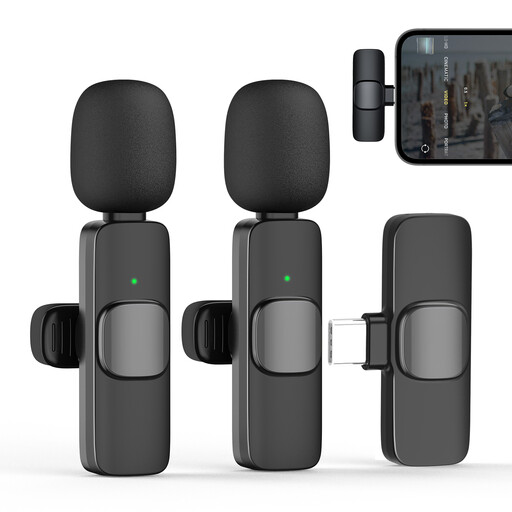
Moman CP1X(C) 2.4-GHz wireless lavalier microphone with Type-C, one transmitter and one receiver

Moman CP1X(C), 2.4-GHz wireless microphone with Type-C, 1 transmitter + 1 receiver

This wireless option may suit you if you want to move around and your recording device has a compatible Type-C connection.

The product name and description specify Type-C, one transmitter and one receiver, as well as automatic pairing. The description also mentions a noise reduction chip. Test how it works with your voice and the noise where you plan to record.

Joybuy
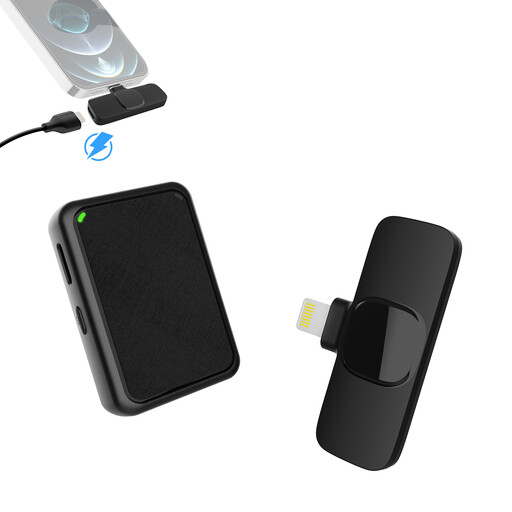
Moman MB1X(A) wireless lavalier microphone with Lightning, two transmitters and one receiver

Moman MB1X(A), 2.4-GHz wireless microphone with Lightning, 2 transmitters + 1 receiver

This set may suit you if you want to record wirelessly with a compatible iPhone. Check the connection with your specific device.

The product name and description specify two transmitters, one Lightning receiver and a charging case. The description mentions three noise reduction modes, but their effect on quiet meditation speech hasn’t been independently assessed.

Joybuy
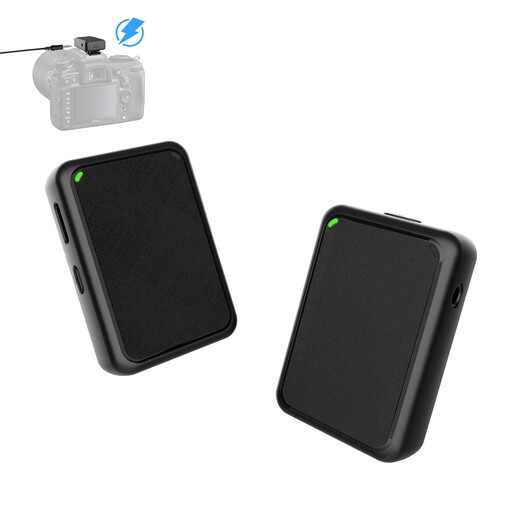
Moman MB1(M) wireless lavalier microphone for cameras, one transmitter and one receiver

Moman MB1(M), wireless lavalier microphone for cameras, 1 transmitter + 1 receiver

This variant is designed for wireless camera recording. Before you buy, check which connection and signal path are compatible with your camera.

The product title specifies USB plug-and-play, while the description also mentions a 3.5-mm camera cable. It lists three noise reduction modes and transmitter battery life of up to 10 hours. Check these details against your specific setup and test the sound where you plan to record.

Joybuy

Frequently asked questions

Can I simply remove traffic noise later?

Not reliably if the traffic noise keeps changing. Audacity describes its noise reduction as suitable for relatively constant hum or hiss, not irregular sounds. First, make a test recording where you’ll actually record, and make sure your voice is clearly louder than the background noise.

How can I attach the microphone without picking up clothing rustle?

Attach the capsule so it doesn’t rub against your clothing, then listen to a test recording while making the movements you’ll make when recording. For wired setups, RØDE recommends adding a cable loop to reduce movement noise caused by cable strain.

How can I tell if a lavalier microphone is compatible with my smartphone?

Check your specific device’s connection, the power it requires and, if needed, the right adapter. RØDE specifies a suitable 3.5-mm TRS microphone input for the Lavalier GO; Shure describes the MVL as suitable for compatible mobile devices, with a CTIA-compliant adapter if required.

Do older frequency guidelines for wireless microphones in Germany still apply?

Not necessarily. In April 2026, the German Federal Network Agency published a general frequency assignment for wireless microphones and expressly revoked certain older assignments. If your variant depends on its frequency, check the specific device version against the current applicable German regulations. The general assignment alone doesn’t mean every individual model is authorised.

Can I record other people’s conversations while recording my meditation?

Recording another person’s non-publicly spoken words without authorisation is a criminal offence under Section 201 of the German Criminal Code (StGB). Recording your own guidance is different. Don’t record other people’s conversations in the background, and get their agreement first if you intend to include them.