Recording a greeting on your smartphone
If you’re recording the greeting directly on your smartphone, check that its connection and recording app support an external microphone.


For a single phone greeting, a wired lavalier microphone is usually the simplest place to start, provided its connection is compatible with your recording app. Wireless is a good choice if you need to move around, but you’ll need to factor in the transmitter, receiver and power supply. Clip the microphone close to your voice and make a test recording: a lavalier won’t eliminate room echo. Before exporting, also check the format and length requirements for your particular phone system.
If you’re recording the greeting directly on your smartphone, check that its connection and recording app support an external microphone.
If you’re using recording equipment you already own, check the actual microphone input: TRS and TRRS are different types of connection.
In an untreated room, positioning the microphone carefully and listening to a test recording will help you assess echo and any rustling from clothing.
| What you’re looking for | What to check before buying | Who is it important to? |
|---|---|---|
| Connection and recording setup | Check that USB-C, TRRS or TRS matches the actual input; in the app, make sure the external microphone is being used for recording. | When I record on my smartphone, I want to be sure the app is using the external microphone. Around 40 % of consumers prioritise finding the right connection. |
| Speech clarity in the room | Make a test recording from the intended position, avoid contact with clothing and check the microphone placement. RØDE gives 20–30 cm from the mouth as a general starting point. | In an untreated room, I want to assess speech clarity without mistaking echo for noise; around 33 % of consumers prioritise room acoustics. |
| Simple setup | Consider the cable length and whether you’ll need a transmitter or receiver; only opt for wireless if you need the freedom to move around. | For a short greeting, I want to connect as few components as possible while still being comfortable speaking from where I’m recording. This is a priority for around 17 % of consumers. |
| Getting the greeting file right | Check the instructions for your particular phone system for the type of greeting, file format and permitted length. | If my system has specific file requirements, I want to use the finished greeting without unnecessary extra editing; around 10 % of consumers prioritise the output file. |
The same plug diameter doesn’t mean every microphone will work with every input. RØDE recommends a TRS-to-TRRS adapter for using the Lavalier GO with a smartphone; Shure describes the MVL as suitable for compatible TRRS headset connections.
Check the microphone input on your recording device and make a short test recording before recording the whole greeting.
Depending on your setup, you may need a suitable adapter or a different microphone.
SYNCO says the P1S system has switchable noise reduction. This doesn’t mean it will eliminate echo in an untreated room.
Listen to a short test recording from the intended position and assess the echo and speech clarity before recording the final greeting.
For custom answering-machine greetings on the FRITZ!Box 7330, FRITZ! specifies a maximum length of 60 seconds and certain formats, including WAV at 8000 Hz, 16 bit and mono. These requirements don’t automatically apply to other systems or types of greeting.
Check your phone system’s instructions and the type of greeting you need before exporting the finished file.
If your system won’t accept the file, you may need to edit it further or record it again.
The XS Lav USB-C is a wired option for recording speech on compatible mobile devices or computers.
The MVL is designed for recording through a compatible 3.5 mm TRRS headset connection.
The Lavalier GO is a wired TRS option for compatible recorder and transmitter inputs.
The V.Lav is worth considering if you switch between devices with 3.5 mm microphone inputs.
The P1ST from the P1S range is a wireless option with a USB-C receiver for a compatible mobile recording setup.
The range includes wired 3.5 mm lavalier microphones and wireless systems with USB-C or iPhone versions. Before recording, check that the connection and recording app are compatible with your device.
 No image available
A wired option if your recording device supports a 3.5 mm connection as a microphone input.
The product description lists a clip and windscreen.
 No image available
A wireless option if you need the freedom to move around and your recording device is compatible with the USB-C receiver.
The product title lists two transmitters and one receiver; also check that your recording app uses the external input.
 No image available
A wireless option for recording speech with one transmitter, provided the USB-C receiver is compatible with your recording device.
The product title lists one transmitter and one receiver; check that your recording app uses the external input.
 No image available
A wireless option for a compatible USB-C recording device.
Android devices must support OTG; also check that your app uses the external receiver.
 No image available
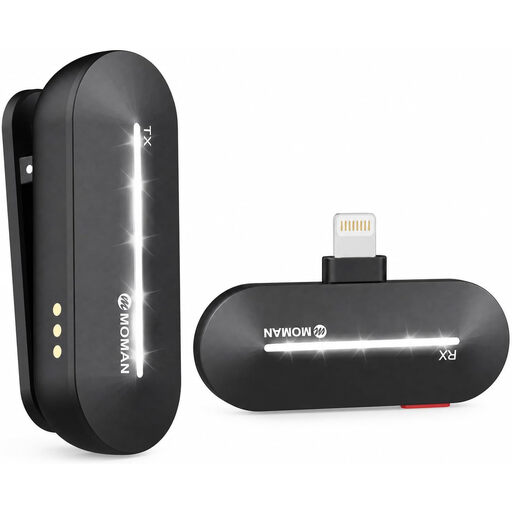
A wireless option for the iPhone models listed in the product title.
The product title lists one transmitter and one receiver; check the connection on your particular device and make sure the app selects the external microphone.
Start by clipping it to your chest, around 20–30 cm from your mouth, and make a test recording. RØDE gives this distance as a general starting point. Make sure clothing or the cable doesn’t rub against the capsule, and adjust the position if needed.
No. A lavalier microphone doesn’t change the room’s acoustics. Placing it close to you can help your voice stand out compared with a microphone further away, but it won’t simply eliminate echo. Compare test recordings from different quiet spots in the room.
A wired setup is usually simpler if the cable is long enough for your recording position and the connection is compatible. Wireless is worth considering if you need the freedom to move around; if so, remember to factor in the transmitter, receiver, power supply and a suitable connection to your recording device.
It depends on the system model and the type of greeting. For custom answering-machine greetings on the FRITZ!Box 7330, FRITZ! specifies a maximum length of 60 seconds and certain WAV and MP3 formats; these requirements don’t automatically apply to other devices or hold music.
There’s no reliable answer that applies to every model. The German Federal Network Agency publishes frequency bands and technical requirements for wireless microphones. For a particular wireless system, check its frequency specifications against the rules currently in force.