Which setup is right for you?

Recording a podcast on a smartphone

If you want to record on your phone, first check whether it has a compatible analogue connection and which adapter you’ll need. Shure says the MVL works with compatible mobile 3.5 mm connections or a suitable CTIA adapter. RØDE recommends a TRS-to-TRRS adapter for connecting the Lavalier GO to a smartphone headset socket.

Interview using a recorder you already own

If you already have a recorder, check its microphone input and power requirements against the microphone’s specifications. A 3.5 mm plug alone doesn’t guarantee a compatible connection.

A longer oral history interview

For a longer story, you’ll want a secure way to attach the microphone and a recording setup you can prepare reliably before you start. Zoom says the F2 set has a locking microphone connection and a Hold switch designed to prevent you from accidentally stopping a recording once it has started.

What should you look for when buying?

Wired connection to a device you already own

A good fit if: The person will remain seated and there’s a compatible microphone input.

Things to consider: The cable route, connector and power supply need to suit the seating position and recorder.

Recording on a smartphone

A good fit if: You want to record on your phone and have checked the connection and adapter requirements.

Things to consider: Test the adapter and recording app together before the interview.

Lavalier with a portable recorder

A good fit if: You want to record without connecting directly to a phone or using a tabletop recorder.

Things to consider: The extra device needs power and storage, and you’ll need to transfer the files afterwards.

Wireless lavalier setup

A good fit if: A cable would get in the way of your particular seating or recording setup.

Things to consider: You’ll need to account for the transmitter, receiver and power supply, as well as choosing the right frequency variant for wireless use.

What to consider What to look for when buying Who will find this most important?
Connection and power supply Check the microphone input, TRS or CTIA pinout and power requirements against your recording device’s specifications. If you’re using a smartphone, remember to factor in any audio adapters you may need. If I want to record using my existing phone or recorder, the connection needs to work without any guesswork. Around 33% of consumers consider connection the most important factor when buying.
Clothing noise Position the clip and cable so clothing or jewellery won’t touch the microphone capsule. Test the sound with the clothes you’ll actually be wearing. If I’m recording someone telling a story while seated, their clothes shouldn’t rub against or knock the capsule. Around 27% of consumers who consider noise the most important buying factor say this is their top concern.
Reliability during long recordings Check the connection, power and storage before you start. If you’re buying a recorder set, check the features of the specific variant. If a long oral history interview mustn’t be interrupted by a loose connection or an accidentally stopped recorder, it’s essential to prepare a reliable workflow. Around 20% of consumers who prioritise recording reliability say this is their main concern.
Recording workflow at the location Decide in advance where your recorder or smartphone will go and how long the cable needs to be for your setup. If you’re using a portable recorder, plan how you’ll transfer the files afterwards. If I don’t want to place the recorder right next to the seated person during the interview, the cable route or local recording setup needs to work in the room. Around 20% of consumers say their main concern is how the recording will work in practice.

Common misconceptions

  • Every 3.5 mm plug works with every 3.5 mm input

    TRS connections, smartphone headset sockets, power requirements and dedicated bodypack transmitter connections don’t all serve the same purpose.

    Check the microphone and recording device specifications together, then test that exact connection before you record.

    Depending on the signal path, you may need a suitable audio adapter or a different microphone variant.

  • Wireless is automatically the better choice for someone who’s seated

    Wireless removes the cable, but adds a transmission link, another power requirement and conditions relating to the frequency used.

    First check whether a cable would actually get in the way of your setup. Choose a wireless variant and frequency that suit the intended use.

    A wireless setup requires a transmitter and receiver, and you’ll need to plan how to power them.

  • A standalone microphone comes with the same accessories as a recorder set

    The Zoom F2 set and the separately sold LMF-2 don’t include the same items: Zoom specifically says that the standalone microphone doesn’t come with a windscreen or microphone clip.

    Check what’s included with the specific variant, rather than relying on the microphone’s name alone.

    If you need a clip or windscreen, check whether you’ll have to buy these separately.

Brands to consider

RØDE

The Lavalier GO is designed for compatible 3.5 mm TRS inputs and RØDE wireless transmitters.

  • RØDE describes the clip, cable management and pop shield as part of the Lavalier GO setup.
  • You may need extra adapters to connect it directly to a smartphone; this doesn’t necessarily apply to every lavalier model from the brand.

Shure

The MVL is an option for recording speech on a mobile device with a compatible phone connection.

  • Shure lists a clip and windscreen as MVL accessories.
  • The stated mobile compatibility requires a suitable 3.5 mm connection or a compatible CTIA adapter.

Sennheiser

The ME 2 is designed for wearing on the body when recording speech, and for use with certain compatible Sennheiser bodypack transmitters.

  • The product specifications state that it has an omnidirectional pickup pattern and a 1.6 m cable.
  • The mini-jack plug is specified for certain bodypack transmitters. Its diameter alone doesn’t mean it’s suitable for a smartphone or any recorder.

Deity

The V.Lav is a wired option if the recording device isn’t placed next to the person speaking.

  • Deity lists a 5 m cable and an automatic adjustment feature for connecting the 3.5 mm plug to many microphone sockets.
  • “Many” doesn’t mean every device is compatible; the specifications list button-cell batteries as the power source.

Zoom

The F2 set combines a portable recorder with an LMF-2 lavalier microphone included in the box.

  • Zoom describes the set as having a locking connection, a Hold switch and local recording.
  • These set features aren’t automatically included with the separately sold LMF-2; Zoom specifically says that the standalone microphone doesn’t come with a windscreen or microphone clip.

Related products at Joybuy

This selection includes wireless lavalier setups and lavalier microphones for smartphones and other compatible recording devices. Before buying, check that the connection, device variant and recording setup you want are suitable for your interview.

DJI Mic Mini 2S with 2 transmitters, 1 receiver and charging case

DJI Mic Mini 2S (2 TX + 1 RX + Charging Case)

For a wireless lavalier setup with local recording; the product description lists two transmitters and one receiver.

Internal 32-bit float recording; the description states that it offers up to 28 hours of storage.

View at Joybuy

SYNCO S8 lavalier microphone for smartphones, PCs, laptops and cameras

SYNCO S8 Lavalier Microphone for Smartphone & PC Laptop Camera

For a microphone attached to the speaker, provided your device is compatible with the connection and adapter kit supplied.

The product description lists a 3.5 mm connection, an adapter kit, a clip and windscreen accessories.

View at Joybuy

SYNCO P1XT wireless USB-C microphone

SYNCO P1XT USB-C Wireless Microphone

For a lavalier setup with a compatible USB-C device; the product description states that Android devices need OTG support.

The description lists real-time audio monitoring on the receiver. It also names certain iPhone models as compatible.

View at Joybuy
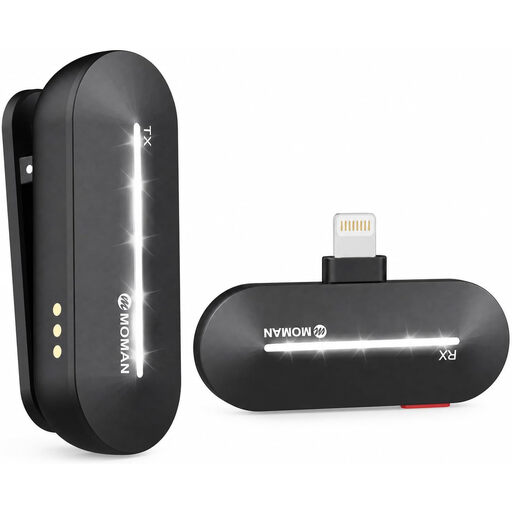
Moman M1CL wireless lavalier microphone with 1 transmitter and 1 receiver

Moman M1CL Wireless Lavalier Microphone, iPhone 14/13/12/11/X, 1TX+1RX

For wireless recording with one of the iPhone models listed in the product title.

This variant is listed as 1TX+1RX. If you’re using a different device, check compatibility with the specific model.

View at Joybuy
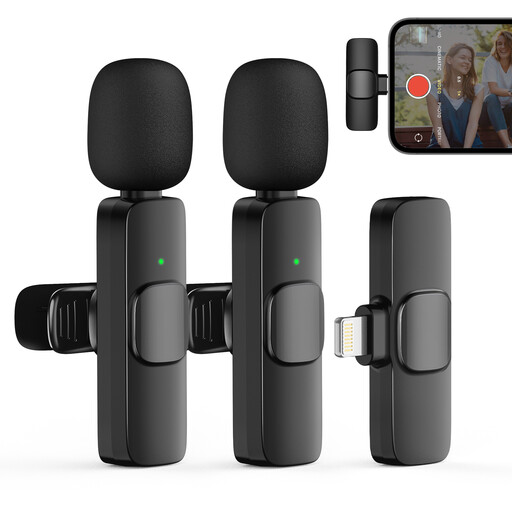
Moman CP1XA wireless lavalier microphone with 2 transmitters and 1 receiver

Moman CP1XA Wireless Lavalier Microphone for iPhone (2TX&1RX)

For wireless recording with an iPhone or iPad; the description lists a receiver designed for these devices.

This variant is listed as 2TX&1RX. The product description states that it can be used for up to eight hours, making it suitable for longer interviews.

View at Joybuy

Frequently asked questions

Can I connect a RØDE Lavalier GO directly to my smartphone?

Not always. RØDE recommends a TRS-to-TRRS adapter for smartphone headset sockets. Devices without a 3.5 mm socket may also need a suitable USB-C or Lightning audio adapter. Test the complete connection before recording.

How should I attach a lavalier for a seated interview?

Attach the microphone so that clothing or jewellery won’t touch or rub against the capsule. Shure recommends avoiding contact when positioning the microphone; listen back to a test recording made with the clothes and sitting position you’ll use for the interview.

What’s the difference between the standalone Zoom LMF-2 and the F2 set?

According to Zoom, the standalone LMF-2 doesn’t include a windscreen or microphone clip; in the F2 set, the lavalier is described as part of the setup. So check what’s included with the specific variant.

Can I simply record a private oral history interview?

Not without the necessary authorisation: Section 201(1) of the German Criminal Code covers the unauthorised recording of another person’s privately spoken words. Agree the recording arrangements before the interview; consent to being recorded shouldn’t automatically be taken as consent to publishing the podcast.

Can I use any wireless lavalier microphone in Germany?

No. In its general frequency allocation, Order 37/2026, issued in April 2026, the Federal Network Agency lists the permitted frequency bands and the related technical and operational conditions. Check the specific device variant and frequency against these conditions; among other things, the order repeals the previous Order 109/2025.