If you usually record study notes on your own from a fixed position, a wired lavalier microphone is an obvious choice – as long as you’ve confirmed that the connection and power supply are compatible with your device. Wireless is more useful if you want to move around while speaking, but you’ll also need to check the receiver connection, batteries and reception at your recording location. Whichever option you choose, a test recording using your recording software and usual clothes is the best way to check that the signal path works and the levels are right.
Which microphone is right for you?
Recording on your own from a fixed position
You regularly record summaries at your desk and want a repeatable recording setup without unnecessary wireless components. Check the input, cable routing and recording with a short test take; Audacity offers practical guidance on this.
Using the smartphone you already own
You want to keep using your phone, so first check whether USB-C, a suitable 3.5 mm input or an appropriate adapter will route the microphone audio to your recording app. RØDE, Shure and Sennheiser describe different connection options for their respective models.
Explaining things while moving around
You stand up or move to a different spot while recording your summaries. The freedom to move may justify the extra setup involved with a transmitter, receiver and batteries; DJI lists separate details for the Mic Mini components and test conditions.
What should you look for when buying?
Wired via USB-C
A good fit if: you record from a fixed position using a compatible USB-C smartphone or computer.
Consider: the cable length, device recognition and recording software must all suit your setup.
Wired via 3.5 mm
A good fit if: your device has a suitable microphone input and the connector wiring and power supply are compatible with the microphone.
Consider: TRS and TRRS aren’t interchangeable just because they have the same plug diameter; depending on the combination, you may need a suitable adapter.
Wireless kit
A good fit if: you stand up while explaining things or can’t conveniently connect the recording device by cable.
Consider: you’ll also need to check the receiver connection, battery charge and reception at your recording location.
| Priority |
What to check before buying |
Who is it important to? |
| Compatible signal path |
Check the connector wiring, microphone input and, where necessary, the power supply or adapter against your recording device. |
If I want to keep using my smartphone or computer, the audio needs to reach the recording app from the microphone. Around 34% of consumers put a compatible connection first. |
| Consistent voice recordings |
Check the microphone attachment and levels with a test take at your actual recording location. Audacity suggests around −6 dB as a guide for its level meter. |
When recording lots of short study summaries, I want my voice to be clear and avoid distortion. Around 33% of consumers prioritise consistent voice recordings. |
| Ease of use |
Consider the cable routing and components required; for battery-powered options, check the power supply too. |
For regular recordings at the same desk, I want as few components as possible to connect and maintain. Around 20% of consumers particularly value ease of use. |
| Freedom to move |
For wireless options, check which receiver is included, how it connects and what reception is like at your recording location. |
If I stand up or move around while explaining things, I don’t want to be tied to a cable. Around 13% of consumers prioritise freedom to move. |
Common buying mistakes
-
Checking only the diameter of the jack plug
TRS, TRRS and the power supply required vary between lavalier models. A plug may fit physically without the device recording audio from the microphone as intended.
Before buying, check the complete signal path from the microphone to the recording app against your devices’ requirements.
Depending on the connection, you may need a suitable adapter or a different microphone.
-
Confusing a Lavalier GO with a complete wireless kit
RØDE describes the Lavalier GO as a wired microphone that can be connected to compatible Wireless GO transmitters, among other devices. The microphone on its own isn’t a complete wireless kit.
Check separately whether the microphone, transmitter, receiver and connection to your recording device are all included.
Wireless use also requires a compatible transmitter system.
-
Judging range instead of making a test recording
DJI gives the Mic Mini’s maximum range for an open, unobstructed environment. That doesn’t tell you what reception will be like in your room; recording at too high a level can also cause clipping.
Test the wireless connection and levels at your actual recording location, then listen back before a longer session.
Brands and models to consider
RØDE
RØDE describes different wired connection options: smartLav+ for compatible TRRS smartphone connections, and Lavalier GO for suitable TRS microphone inputs.
- The manufacturer’s information helps you compare the connection requirements of the two models.
- The models aren’t interchangeable just because they have a 3.5 mm plug; according to RØDE, the Lavalier GO requires plug-in power.
Shure
Shure describes the MVL as a clip-on microphone for recording speech with compatible mobile devices.
- According to Shure, the package includes a clip and foam windscreen.
- Shure says some mobile devices require a CTIA-compliant adapter.
Sennheiser
The XS Lav USB-C provides a wired USB-C recording option for compatible mobile devices and computers.
- Sennheiser lists a 2 m cable for the XS Lav USB-C; the Mobile Kit adds a mount and tripod to the microphone.
- The cable length limits where you can position it. The mount and tripod are listed for the Mobile Kit, not necessarily for the microphone on its own.
BOYA
According to BOYA, the BY-M1 combines a longer cable with switchable camera and smartphone modes.
- BOYA lists a 6 m cable for the BY-M1.
- According to BOYA, the BY-M1 requires an LR44 battery; the BY-M1S has a different power supply. Check the exact model and device mode.
DJI
The Mic Mini offers a wireless connection for recordings where you need more freedom to move, provided the kit version and receiver are compatible with your recording device.
- DJI publishes separate technical details for the transmitter, receiver and charging case.
- According to DJI, battery life and maximum range apply to specifically stated test conditions; they aren’t measurements for your home studio.
Joybuy products for recording at home
The products below include wired lavalier microphones with a 3.5 mm connection, as well as wireless kits for compatible USB-C or 3.5 mm devices. Before buying, check that the connection or receiver is compatible with your recording device.
 No image available
SYNCO S8 lavalier microphone for smartphones, PCs, laptops and cameras
For recording speech from a fixed position, if your device has a compatible 3.5 mm input or you’re using a suitable adapter. Check the signal path all the way to your recording app.
View at Joybuy
 No image available
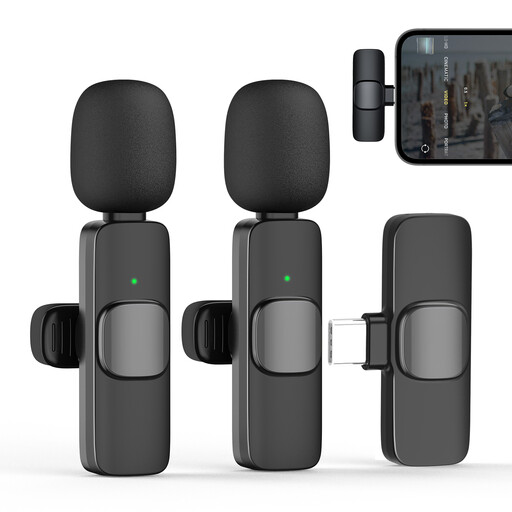
Moman M1CXT wireless lavalier microphone, USB-C, 2TX+1RX
For a compatible USB-C device when you want to move around while explaining things. The model name indicates two transmitters and one receiver.
View at Joybuy
 No image available
Moman M1CT wireless lavalier microphone, USB-C, 1TX+1RX
For a compatible USB-C device when you want freedom to move while recording. The signal passes through a transmitter and receiver.
View at Joybuy
 No image available
Moman MA6 lavalier microphone
For keeping further away from your recording device, if it supports a compatible 3.5 mm connection. Check that the transmitter-and-receiver setup described suits your equipment.
View at Joybuy
 No image available
Moman CP1X(C) wireless lavalier microphone, USB-C, 2.4GHz, 1TX+1RX
For a compatible USB-C device when you want to speak wirelessly. The model name indicates one transmitter and one receiver.
View at Joybuy
Frequently asked questions
How can I check that my lavalier microphone is recording before I make my first study summary?
Select the microphone as the input device in your recording software, record a short test wearing your usual clothes, then listen back. Watch the level meter while speaking at your loudest; Audacity suggests around −6 dB as a guide for its recording meter and recommends lowering the recording level if clipping occurs.
Can I freely switch a 3.5 mm lavalier microphone between my phone and recorder?
No. The connector wiring and power supply need to be compatible with both the microphone and recording device. RØDE specifies TRRS for smartLav+ and TRS with plug-in power for Lavalier GO; for the MVL, Shure notes that some mobile devices require a CTIA-compliant adapter. Check the requirements of both devices before buying an adapter.
What batteries or additional components might I need?
It depends on the model and version: BOYA specifies an LR44 battery for the BY-M1, while the BY-M1S doesn’t require a battery according to BOYA; Deity specifies two LR41 batteries for the V.Lav. For wireless kits, you’ll also need to consider which components are included and whether they need charging.
Can I use any imported wireless microphone in Germany?
There’s no blanket answer. In its General Allocation Vfg. 37/2026, the Bundesnetzagentur lists frequency bands with technical and operational conditions and also refers to Vfg. 91/2025 for certain short-range devices. Check the exact device version against the conditions currently in force. A CE mark doesn’t replace this check.
What should I do if a product is faulty or I want to cancel an online purchase in Germany?
Online consumer purchases generally come with a 14-day right to cancel; you must notify the other party to the contract that you’re cancelling. Verbraucherzentrale distinguishes this right from statutory rights against the seller for faulty goods, and from a voluntary guarantee. The details depend on the sales contract and the circumstances.


