Voice actors at a fixed position
You record individual roles or narration at a fixed speaking position and want to set up the microphone position and connection reliably.


For audio drama recordings at a fixed speaking position, a wired lavalier is a good choice if its connection and power requirements are compatible with your recording device. When several roles speak at once, separate microphones and recordable channels are essential. For movement, consider a wireless system or a recorder worn on the body. A wireless system needs to be set up, while recorder files have to be transferred into your editing software afterwards.
You record individual roles or narration at a fixed speaking position and want to set up the microphone position and connection reliably.
You speak at the same time and need a suitable recording channel for each voice, rather than sharing a single lavalier microphone.
You walk or act during a scene and weigh the freedom to move against setting up a wireless system or transferring individual recordings later.
First, decide how many voices need to be recorded at the same time and whether the speakers will stay in one place. Then you can weigh up whether a cable, wireless system or portable recorder best suits the scene.
| What matters | What to look for when buying | Who is it important to? |
|---|---|---|
| Clear speech without clothing noise | Attach the clip close to the voice without letting the microphone rub against the fabric; listen back to a test recording with the planned movements. RØDE recommends placing it close to the sound source and avoiding friction with clothing. | If I want to record dialogue clearly, I pay particular attention to positioning and rustling; around 33% of consumers put speech clarity and minimal clothing noise first. |
| Recording separate tracks for multiple roles | Check the number of microphones and transmitters, as well as the separate recording channels available. RØDE lists two transmitters and two Lavalier II microphones with the Wireless PRO. | If we’re speaking at the same time and want to edit the voices separately, we need a suitable recording channel for each person; around 27% of consumers prioritise being able to record multiple roles separately. |
| Connection and power supply | Check the connector wiring, socket and required power against the specifications for both devices. RØDE lists a TRS socket with 2.7 V plug-in power for the Lavalier GO. | If I want to keep using my existing recording device, the connection has to be genuinely compatible; around 20% of consumers put compatibility with their existing equipment first. |
| Freedom to move during a scene | Compare the cable length with the area you need to move around in, or test the actual transmission range if you’re using a wireless system. If you’re wearing a recorder, remember to factor in importing the files into your editing software later. | If I want to cross the room while acting out a scene, I don’t want a cable connecting me to the recording device to get in the way; around 20% of consumers prioritise freedom of movement while recording. |
According to the manufacturer, the RØDE Lavalier GO is a microphone with a TRS connector. The Wireless PRO, by contrast, is a kit with transmitters and a receiver. Buying the microphone on its own doesn’t give you a wireless connection.
Compare what’s included with your planned recording setup and check whether you already have a transmitter and receiver.
A compatible transmitter and receiver may also be needed for wireless operation.
The Lavalier GO, Sennheiser ME 2 and Shure MVL are designed for different connections or types of equipment. A mini-jack plug that fits physically doesn’t, on its own, prove that the microphone, power supply and recording device will work together.
Check the exact socket, connector wiring, required power and documented compatibility of the specific combination of devices.
The Bundesnetzagentur does not rule out interference when frequencies are shared. A lavalier clipped close to the body can also pick up noise from rubbing against clothing.
Before recording, test the wireless connection, microphone position and a complete scene with the planned movements.
Worth considering if you’re comparing a single wired lavalier with a complete wireless kit for two people.
The ME 2 is an option for a compatible bodypack transmitter setup.
The V.Lav is a wired option if you need a longer cable or want to switch between compatible recording devices.
The MVL is designed for recording directly to a compatible mobile device.
The DR-10L Pro offers a recording setup with a lavalier and portable recorder, instead of a continuous wireless connection to a studio recorder.
The products below are wireless lavalier kits for USB-C or Lightning devices; two transmitters are listed for several models.
 No image available
For recording two people on a USB-C device; the product name lists two transmitters and one receiver.
The product name specifies a range of 150 m. Before recording, check that the planned area of movement is within the wireless range.
 No image available
For wireless voice recording with a Type-C device.
For the described use with Android devices, the OTG function must be available.
 No image available
For the Lightning recording setup named in the product title, which also lists two transmitters and one receiver.
Check that the connection is compatible with your intended device.
 No image available
For the USB-C recording setup named in the product title, with two transmitters and one receiver.
The title lists Android phones with USB-C as compatible devices.
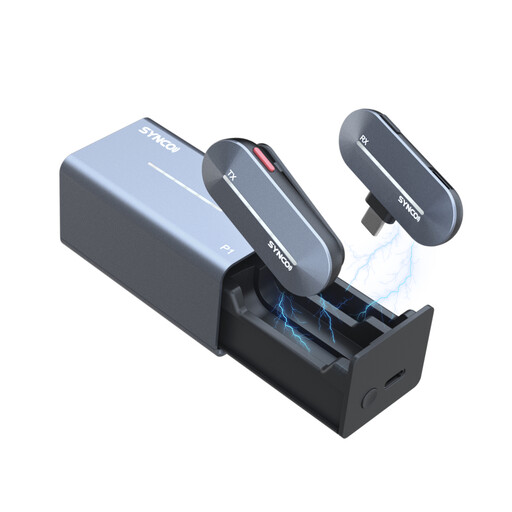 No image available
For wireless lavalier recording with a Type-C device.
The product title lists 2.4 GHz and a charging case; check the connection is compatible with your intended device before buying.
If you want to record each voice clearly and separately, plan for a suitable microphone and recording channel for each person. Check the number of transmitters and microphones, as well as the channel separation available; according to RØDE, the Wireless PRO includes two transmitters and two Lavalier II microphones.
Attach the lavalier close to the voice, making sure clothing doesn’t rub against the capsule, then listen back to a test recording with the planned movements. Shure warns that excessive liquid can penetrate lavalier microphones; follow the instructions for cleaning the specific model.
Check whether the microphone on offer includes a compatible transmitter, receiver or adapter, or whether you already own one. Also check that the connection and power requirements match your recording device.
Certain wireless microphone frequencies can be used without registration and free of charge, subject to the relevant general frequency allocation. Whether this applies to a particular kit depends on its frequency range and the technical and operational conditions. The Bundesnetzagentur cites general allocation Vfg. 37/2026 as the basis for the wireless microphones covered by it.
In Germany, consumers can generally claim their statutory warranty rights from the seller for faulty new goods within two years of delivery. Verbraucherzentrale advises that this is separate from a voluntary manufacturer’s guarantee.