What should you look for when buying?
If you’re mostly recording flashcards on your own in an untreated room, these four priorities can help you choose a microphone that suits your recording routine.
| Buying criteria |
What to check before buying |
Who it matters to |
| Clear voice recordings |
Check the clip and windscreen; make a short test recording in your intended speaking position and listen back to the same words. |
When I record short terms at my desk, I want my voice to sound close and consistent without picking up too much of the room. Around 36% of consumers put clear speech first. |
| The right device connection |
Check the microphone input on your specific device and whether you need an adapter; don’t assume TRS and TRRS are interchangeable. |
If I switch between my phone and a recorder, the connection needs to work with my recording device. Around 29% of consumers put device compatibility first. |
| Reliable repeated recordings |
Check the clip and cable routing; wear your usual clothes and move your head as you normally would to check for rustling or the microphone slipping out of place. |
When recording lots of short takes, I want to attach the clip and speak without distracting rustling or constant adjustments. Around 21% of consumers prioritise hassle-free repeated recordings. |
| Freedom to move around |
Check that the transmitter, receiver and connection are compatible with your recording device, and see what’s included in the kit. |
If I walk around while recording, I don’t want a cable connecting me to my recording device. Around 14% of consumers consider freedom of movement their top priority. |
Joybuy products for audio flashcards
This selection includes wired lavalier microphones for compatible 3.5 mm connections and wireless kits for compatible mobile devices. Check your device’s connection and, for short voice recordings, attach the microphone in a consistent position as close to your mouth as possible.
 No image available
DJI Mic Mini 2S (2 TX + 1 RX + Charging Case)
For wireless recording when your recording device is compatible with the receiver included.
Kit contents: 2 TX + 1 RX + Charging Case. The description mentions clip or magnetic attachment.
View at Joybuy
 No image available
SYNCO S8 Lavalier Microphone for Smartphone, PC, Laptop and Camera
For short recordings from a fixed spot, if your device supports the connection provided.
The description lists a 3.5 mm connection, windscreen, adapter kit and clip. Check the socket and adapter for your specific device.
View at Joybuy
 No image available
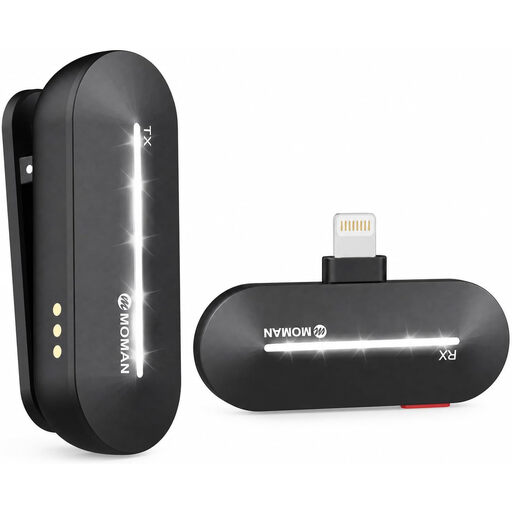
Moman M1CL Wireless Lavalier Microphone for iPhone, 1TX + 1RX
For wireless single-speaker recordings with a compatible iPhone and Lightning connection.
Kit contents: one transmitter and one Lightning receiver. The product name lists iPhone X and the iPhone 11 to 14 ranges as compatible models.
View at Joybuy
 No image available
Moman MC1(C) Wireless Lavalier Microphone for USB-C Phones, 1TX + 1RX
For wireless recording with a mobile device that supports the USB-C receiver described.
Kit contents: 1TX + 1RX; the product name specifies 2.4 GHz. The description lists a preset mode for quiet environments.
View at Joybuy
 No image available
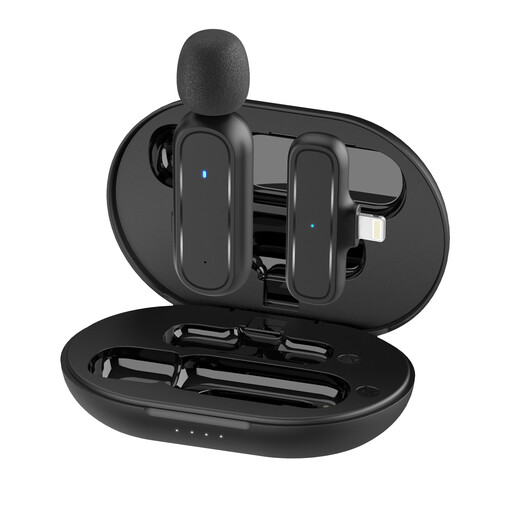
Moman MC1(A) Wireless Lavalier Microphone for iPhone, Lightning, 1TX + 1RX
For wireless recording with a device that supports the Lightning receiver specified.
Kit contents in the product name: 1TX + 1RX. Before buying, check your device’s connection and what’s included in this version.
View at Joybuy
Frequently asked questions about lavalier microphones for flashcards
How should I attach a lavalier microphone for recording lots of short flashcards?
Attach it at a consistent distance from your mouth, keeping fabric and cable away from the microphone capsule. Before a longer session, listen to a test recording for echo, breathing sounds and rustling; simply increasing the gain won’t fix poor positioning.
Will a 3.5 mm lavalier microphone work with every smartphone?
No, the connection needs to match your specific smartphone. For example, RØDE distinguishes between smartLav+ with TRRS and Lavalier GO with TRS; for the MVL, Shure specifies a suitable 3.5 mm socket or a compatible CTIA-compliant adapter.
What extra items might I need to buy?
Depending on your device, you may need a suitable adapter, batteries or, for a wireless system, the right receiver. So check the connection and what’s included with the specific version. In its article dated 5 August 2026, the Verbraucherzentrale explains that for online orders in Germany, you generally have 14 days from delivery to cancel. The seller is generally responsible for faulty goods, as the Verbraucherzentrale explains in its article dated 13 August 2026.
Can I record other people for audio flashcards in Germany?
You must not record another person’s private spoken words without authorisation. Section 201 of the German Criminal Code (StGB) covers such recordings and certain uses of them; make sure you have permission before recording anyone else’s voice. This is different if you’re recording only your own voice.
What should I check when buying a wireless microphone for use in Germany?
Check the information for the specific wireless device and how it is intended to be used. The German Federal Network Agency publishes frequency allocations with technical and operational conditions; its market surveillance guidance also lists product identification and conformity information as points to check.


