Readers recording from a fixed spot
You record chapters sitting down and want a consistent voice recording with minimal background noise. Mic placement, clothing and a quiet room matter more here than wireless range.


If you record mainly in one fixed spot, a wired lavalier with a compatible input is a sensible place to start; a USB-C model is another option if you have a compatible USB-C device. Wireless is most useful if you need to move around while reading. Whichever type you choose, a quiet setting, a secure clip that avoids clothing rubbing against the mic, and a test recording you can listen back to all matter. Manufacturer specifications alone don’t guarantee finished audiobook quality.
You record chapters sitting down and want a consistent voice recording with minimal background noise. Mic placement, clothing and a quiet room matter more here than wireless range.
You want to use a device you already own, so you’ll need to check its actual microphone input against the lavalier’s connection, whether that’s a jack, an adapter or USB-C.
You change position while recording and need to weigh the freedom to move against the extra checks required for the transmitter, receiver and power supply.
First decide whether you’ll record from a fixed reading spot using a wired mic, or need the freedom to move. Then check the connection and how the setup will work during your recording sessions.
Suitable if: you record from a fixed spot and the plug wiring, input and any required power supply are compatible with your device.
The trade-off: You don’t need a wireless connection to your recording device, but you’ll be limited by the cable and the possibility of cable or clothing noise.
Suitable if: you use a compatible USB-C device and your recording app actually uses the external input.
The trade-off: The connection differs from an analogue jack, but it’s still wired. Check that your specific device and software work together.
Suitable if: you regularly get up while reading, or want to use an existing transmitter system that’s explicitly compatible.
The trade-off: You’ll also need a transmitter, receiver and power supply. With wireless, you’ll need to check the requirements for the specific system, too.
| What matters | What to check before buying | Who is it important to? |
|---|---|---|
| Recording chapters with minimal noise | Test the clip position and cable routing with the clothes you usually wear; record a passage with natural movements and listen back. | When I want to record long chapters without recurring clothing rustle, a consistent voice recording with minimal noise comes first. Around 36% of consumers prioritise this. |
| Connecting to the recording device | Check your device model, socket, plug wiring and any adapter you may need. Use a test recording to confirm which input is actually being used. | I want to keep using my smartphone, computer or recorder and know in advance whether the external input works. Around 29% of consumers prioritise device compatibility. |
| Longer recording sessions | Measure the cable length needed to reach your usual sitting position; check the power supply and make a test recording before a longer session. | When I have several takes and corrections to make, I want a setup I can rely on and repeat. Around 21% of consumers focus above all on keeping longer sessions practical. |
| Freedom to move | Consider whether you need to move while recording. For wireless systems, check the receiver connection, lavalier compatibility and applicable frequency requirements. | When I need to get up or change position while reading, I don’t want a cable to the recording device to hold me back. Around 14% of consumers prioritise freedom to move. |
Jack microphones can be designed for different recording setups. A plug that fits the socket physically doesn’t guarantee that the device will record audio from the external microphone.
Before buying, check the device input, plug wiring and any adapter you need. Make a test recording to confirm which input is actually being used.
RØDE points out that friction against the microphone can be audible in a recording. Over long chapters, this kind of noise can crop up again and again.
Test the clip position and cable routing with the clothes you usually wear for reading, then listen to a test recording with natural head and arm movements.
The current Sennheiser ME 2 is described for use with specific bodypack transmitters, not as a universal input for recording devices. With a wireless system, you’ll also need to check the requirements for the specific device.
Check that the lavalier, transmitter, receiver and recording device all work together. For wireless systems, check the requirements that apply to the specific system in Germany.
Sennheiser lists the ME 2-II as no longer available and describes the current ME 2 separately. Don’t assume that model details and features apply to both.
Check the full model name and product number of the specific product.
The Lavalier II is an analogue TRS option for a compatible recording setup or transmitter. Its low-profile design and mounting accessories may help with positioning.
Shure says the MVL is designed for voice recordings with compatible mobile devices.
The ATR3350xiS offers an analogue connection for compatible recorder or camera inputs.
The XS Lav USB-C uses a USB-C connection, while the current ME 2 is described for use with specific Sennheiser bodypack transmitters.
The following Joybuy products cover wired jack and wireless lavalier setups for voice recording. Before buying, check that the connection, receiver and recording device are compatible.
 No image available
For voice recording when you don’t want to be tethered to your recording device by a cable. The product name lists 48 kHz/24-bit, a transmitter weight of 9 g and a transmission range of 300 m; check the wireless requirements for the specific system.
 No image available
For wired voice recording if your device supports the right jack connection. The product details list a 3.5 mm connection, a clip and an adapter set; check that the connection is compatible with your recording device.
 No image available
For wireless voice recording when you need the freedom to move around while recording. The product name lists iPhone 7–17, Android and camera; check the receiver connection and the wireless requirements for the specific set.
 No image available
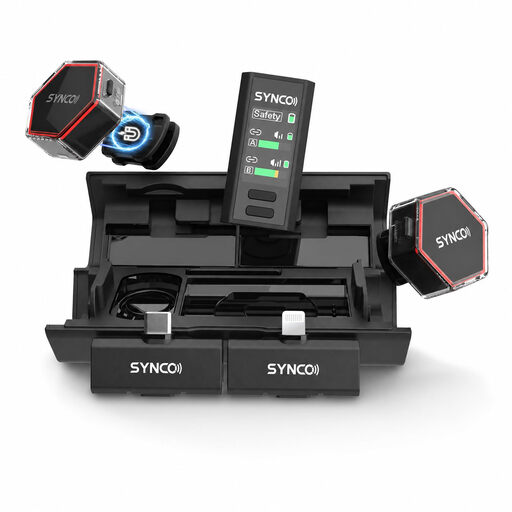
For wireless voice recordings with two transmitters. The product name lists 2.4 GHz, USB-C and Lightning; check which receiver works with your recording device and what wireless requirements apply.
 No image available
For wireless voice recording via a compatible USB-C connection. The product name lists 2TX+1RX and a range of 150 m; check the receiver connection and the wireless requirements for the specific system.
As a general rule of thumb, RØDE recommends clipping it to your chest, around 20–30 cm from your mouth. Check that your clothes don’t touch the capsule, then listen to a test recording with natural reading and arm movements. This manufacturer recommendation isn’t a guaranteed position for every voice.
No. The plug diameter alone isn’t enough to establish compatibility. Shure describes the MVL as suitable for compatible mobile-device sockets or a CTIA-compliant adapter, while RØDE lists a TRS connection for the Lavalier II. Check your device’s signal path and test which input is actually being recorded.
Check the power supply and accessories for the specific model: the ATR3350xiS comes with an LR44 battery. Also allow time for a test recording, listening back and making any corrections. ACX notes that its production process has requirements for finished audio files.
Only if you’re submitting the recording through ACX. That platform’s audio submission requirements apply to this publishing route; other routes have their own requirements.
You can’t tell from the product name alone. In its General Allocation Vfg. 37/2026, dated 15 April 2026, the Federal Network Agency lists the permitted frequency bands and technical and operational requirements for wireless microphones. Check the frequency and technical specifications of the specific set against the applicable requirements.