Two-person learning dialogue
If both people speak at the same time, check the number of transmitters and the recording mode to make sure the microphones suit your dialogue.


For a learning dialogue with two people speaking at the same time, a practical starting point is to attach a microphone close to each speaker. A set with two transmitters or two compatible wired microphones will do the job. For a single voice, a wired lavalier may be enough, provided its plug is compatible with your recording device. Shure points out that a microphone cannot improve the acoustics of its surroundings, so turn down the fan if possible and check how clear the audio is in a test recording.
If both people speak at the same time, check the number of transmitters and the recording mode to make sure the microphones suit your dialogue.
If you can’t always avoid the source of the noise, make sure the microphone is positioned close to the speaker and don’t rely on noise-cancelling claims alone.
If you want to record on your phone, check that its actual microphone input is compatible with the plug or receiver included with your chosen set, and see whether you’ll need an adapter.
First, check how many people will be speaking at the same time and which recording device you’ll use. If there’s fan noise, make a test recording with the fan running as it will be during your session.
| What matters | What to check | Who should pay particular attention? |
|---|---|---|
| Clear speech | Attach the microphone close to the speaker, turn down the fan if possible and listen to a test recording made with the fan running as it will be during your session. | If the fan has to stay on, you’ll want to hear pronunciation and the ends of words clearly. Around 33% of consumers put speech clarity first. |
| Capturing both voices | Check whether the set includes two transmitters and whether the voices can be recorded together or separately. | If two learners will be speaking at the same time, you’ll want to be able to place a microphone close to each person. Around 27% of consumers prioritise capturing both voices. |
| The right connection | Check that the plug or receiver matches the microphone input on your smartphone, computer or camera. | If you want to keep using your current device, the connection needs to be compatible, without any unexpected issues. Around 20% of consumers make this their main consideration. |
| Easy to use | Check what’s included, which adapters you’ll need and whether your chosen option needs charging. | If you make practice recordings regularly, you’ll want to keep setup and extra accessories straightforward. Around 20% of consumers put this first. |
The product name alone won’t reliably tell you how many transmitters are included in a particular version. DJI lists one- and two-transmitter combinations separately.
Before you buy, check the number of transmitters, the receiver and the recording mode included with the version on offer.
For two close-miked speakers, you may need an additional compatible transmitter.
According to the manufacturer, the Shure MVL is designed for compatible mobile recording devices with a 3.5 mm TRRS connection. A 3.5 mm plug alone doesn’t confirm that it will work with every recording device’s microphone input.
Check the plug type against your device’s microphone input and see whether you’ll need a suitable adapter.
Depending on your device, you may need a suitable adapter or a different microphone.
A stated noise-cancelling feature doesn’t prove that fan noise will disappear or that speech details will remain unchanged. Shure points out that a microphone cannot improve the acoustics of its surroundings.
Turn down the fan if possible, attach the microphone close to the speaker and listen to a full test dialogue.
The Wireless ME Dual is designed as a set with two transmitters; RØDE also offers wired lavalier options.
The Mic Mini and Mic Mini 2S are available in different combinations with one or two transmitters.
The LARK M2S is available with different receiver options for recording dialogue on the go.
The MVL is designed for compatible mobile devices; the WL183, WL184 and WL185 are intended for compatible bodypack transmitters.
The Profile Wireless 2-Channel Set is designed for recording two voices.
This selection includes wired lavalier microphones for individual speakers and wireless sets with two transmitters. The key things to consider are the number of voices, your recording device’s connection and how much freedom of movement you need.
 No image available
Two transmitters and one receiver let you place a microphone close to each person in the conversation.
The product description lists internal recording, two-level noise cancellation and connections for cameras, smartphones and PCs. Noise cancellation doesn’t prove that fan noise will disappear, so test the recording with the noise levels you’ll actually be working with.
 No image available
This wired lavalier microphone is an option for a single speaker, provided its connection is compatible with your recording device.
The description lists a 3.5 mm plug, an adapter kit and a windscreen. Check the plug type against your device’s microphone input.
 No image available
This wired clip-on microphone may suit a single voice, provided your recording device supports the stated connection.
The product name specifies a 6 m cable and a 3.5 mm connection; the description says it records omnidirectionally. The 3.5 mm specification alone doesn’t confirm compatibility with every device.
 No image available
Two transmitters are designed for a dialogue with two people speaking at the same time.
The set is described as using 2.4 GHz and includes a USB-C receiver for Android phones. Before you buy, check that the receiver is compatible with your specific recording device.
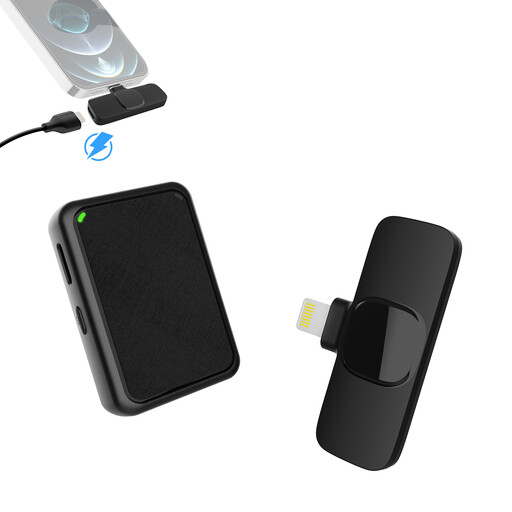 No image available
Two transmitters let you mic up both people in the conversation, provided the Lightning receiver is compatible with your recording device.
The product description lists 2.4 GHz, a Lightning receiver and three selectable noise-reduction modes. These details don’t prove that fan noise will disappear, so check how clear the audio is in a test recording.
Attach the microphone so that clothing won’t cover the capsule or rub against it, then listen to a short recording with the fan set to the level you’ll actually use. Shure recommends positioning the MVL 15–25 cm from your mouth; this guidance applies to this model and not to every lavalier microphone.
No, you can’t assume that from a product feature alone. Record a few sentences with the feature switched on and off, paying particular attention to quiet syllables and the ends of words. If possible, first reduce the noise at its source or move the microphone closer to your mouth.
Under section 201 of the German Criminal Code (StGB), recording another person’s private spoken words without authorisation is prohibited. Before recording, make sure you have permission from everyone involved. If personal data is being processed and the GDPR applies, the processing must also have a legal basis. Consent is one possible legal basis, but it isn’t the only one.
No. The German Federal Network Agency specifies permitted frequency bands and conditions of use for wireless microphones. Check the frequency information for the specific device against the relevant requirements. In Order 37/2026, dated 15 April 2026, the Federal Network Agency sets out different conditions and time limits for different frequency bands.
When you buy from a trader in the EU at a distance, you generally have a 14-day right to cancel from the date of delivery, subject to legal exceptions. Faulty goods are also generally covered by a statutory guarantee of at least two years. Your Europe, the European Union’s information portal, distinguishes these statutory rights from a voluntary manufacturer’s guarantee.