Family members recording someone who speaks quietly
You mainly want to capture a softly spoken family story clearly, and can attach the microphone to the storyteller’s clothing.


For someone telling a story quietly, a correctly connected lavalier microphone positioned close to their voice is a good starting point. Check the placement with a test recording. If you also want your questions to be clearly audible and easy to edit separately, plan to use a microphone for each person and check whether your recording device saves separate channels. Wired, wireless and dedicated recorder setups mainly differ in how much freedom of movement they offer and what extra steps are involved. For private conversations, you should also establish whether you are authorised to record under § 201 of the German Criminal Code.
You mainly want to capture a softly spoken family story clearly, and can attach the microphone to the storyteller’s clothing.
You want your questions to be clearly audible alongside the story. Before you buy, consider whether both people need their own microphone and whether their voices need to be recorded on separate channels.
You want to use your existing device, so check its microphone input, any adapters you might need and the recording app together.
Oral-History.Digital recommends putting the interviewee’s story at the centre of the recording. It’s also important to consider whether you need to capture questions, connect to a particular device or record independently of a smartphone.
A good fit if: you’re prioritising one person speaking quietly while seated, and the plug and cable length suit your recording device.
Worth considering: The cable restricts movement, and USB-C, 3.5 mm TRS and 3.5 mm TRRS connections aren’t interchangeable.
A good fit if: both the story and your questions matter in the finished recording.
Worth considering: As well as checking the number of microphones or transmitters, make sure your recording device actually saves separate channels.
A good fit if: you want to record one voice without relying on a smartphone app running.
Worth considering: You’ll need to factor in a memory card and transferring the files. A recorder with one lavalier microphone won’t automatically record a second voice separately.
| What matters | What to check before buying | Who is this important to? |
|---|---|---|
| Quiet storytelling voice | Check the clip, windscreen, connection and whether you can make and listen back to a short test recording. | If the storyteller speaks quietly, I want to record their voice up close and clearly. Around 36% of consumers put the clarity of the main voice first. |
| Both voices in the conversation | Check the number of microphones or transmitters, as well as the recording mode and whether separate channels are available. | If my questions are part of the family story, I want both voices to be heard. Around 29% of consumers prioritise recording both voices in the conversation equally. |
| Connecting to a device you already own | Check whether the specific microphone and device use USB-C, 3.5 mm TRS or 3.5 mm TRRS, then listen to a saved test file. | If I want to use my existing smartphone or recording device, its connection needs to suit the recording setup I have in mind. Around 21% of consumers put device compatibility first. |
| Recording without a smartphone | Check what’s included, the storage medium and the power supply for the specific recorder set, then check the saved file. | If I want to record independently of a smartphone, I also need to plan for storage and transferring the file later. Around 14% of consumers prioritise a standalone recording setup. |
With oral history interviews, it’s not just the microphone that matters. The key is whether the voice comes through clearly with the recording setup you’ll actually use.
These connection types aren’t the same. A plug that doesn’t match your recording device’s input could prevent you from using your planned setup.
Check your device’s input against the microphone’s full model name, then make a test recording. Depending on the connection, you may need a suitable adapter or a different microphone.
A single lavalier microphone clipped close to the body prioritises the person wearing it. It won’t automatically capture the interviewer’s voice just as clearly.
Before you buy, decide whether the questions matter in the finished recording. If both voices are important, look for microphones for both people and check the actual recording mode.
Zoom describes 32-bit float as a feature of the F2 recording setup, while DJI quotes battery life under specific test conditions. Neither confirms that a particular voice will be clearly recorded in your room.
Attach the microphone as instructed, test the room and recording setup, then listen to the saved file.
The XS Lav USB-C is designed for recording with a compatible USB-C audio input.
The Lavalier GO is designed for compatible 3.5 mm TRS microphone inputs and Wireless GO transmitters.
The MVL is designed for compatible mobile devices with a 3.5 mm TRRS connection or a suitable CTIA adapter.
The F2 is a recorder supplied with a lavalier microphone for recording one voice.
The equipment included with the Mic Mini depends on whether you choose a version with one or two transmitters.
The wireless microphone systems below are available in versions with one or two transmitters. Check that the connection listed is compatible with your smartphone or recording device.
 No image available
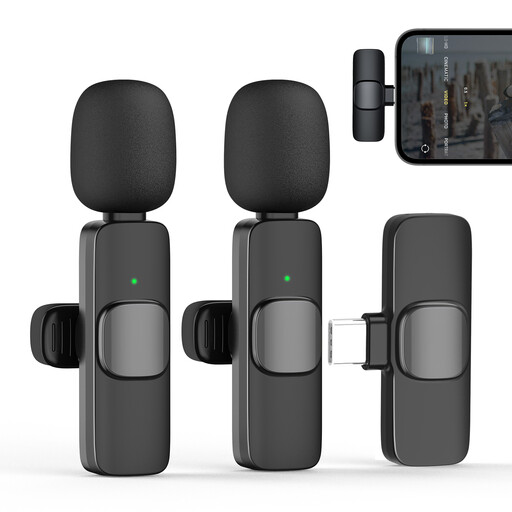
For conversations where both people should wear a microphone; the product name specifies two transmitters.
2.4 GHz; USB-C and Lightning are listed as connection options. Check which one is compatible with your device.
 No image available
For one storyteller using a compatible USB-C device; the product name specifies a transmitter and receiver set.
2.4 GHz; 1 transmitter and 1 receiver; USB-C version.
 No image available
For two people talking, using a compatible Android device. Also check whether the recording saves separate channels.
2.4 GHz; 2 transmitters and 1 receiver; USB-C Android version.
 No image available
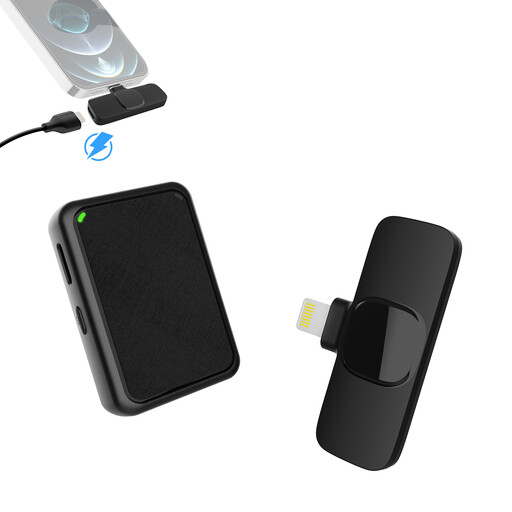
For two people talking, using the specified iPhone version. Check your device’s connection and recording mode.
2.4 GHz; 2 transmitters and 1 receiver; Lightning connection for the specified iPhone version.
 No image available
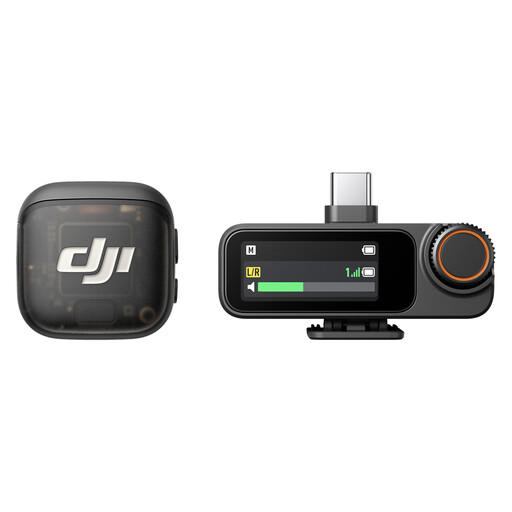
For close-miked recording of one person; the listed equipment includes one transmitter and one receiver.
The product name lists iPhone, camera and Android devices as compatible equipment. Check which connection suits your specific device.
Attach the microphone to the storyteller, choose a quiet setting if possible, and listen back to a short test recording that has actually been saved. Check for clothing rustle and make sure the recording app is using the external microphone.
If you want both voices to be recorded reliably and, if necessary, edited separately, plan to use a microphone for each person. Also check whether your device saves separate channels: having two transmitters alone doesn’t confirm how the audio file will be recorded.
Depending on your setup, you may need a suitable adapter, a second microphone or, with a dedicated recorder, a storage medium. Check what’s included and the connections on the specific set before deciding how you’ll record.
§ 201 of the German Criminal Code covers, among other things, unauthorised recording of another person’s privately spoken words and unauthorised sharing of such a recording. So establish that you are authorised before recording. If you plan to publish the recording or otherwise process personal data, you should assess the purpose and legal basis separately. The Data Protection Conference explains the requirements for consent when it is the legal basis you are relying on.
Discuss with the storyteller what the recording is for and who should be able to access it later. The Oral History Association recommends agreeing on consent, storage and access when preparing for the interview.