If you record alone in one fixed spot, a wired lavalier microphone is an obvious choice – provided the connector and power supply are compatible with your input. If you need to move around or record two voices, a suitable wireless kit could be a better fit; you’ll also need to check the receiver connection, power supply and kit configuration. Whichever option you choose, a secure, low-friction clip and a test recording of your loudest passage can help you spot problems before the proper recording.
Which setup is right for you?
Recording from a fixed spot
If you record most of your narration alone in one place, make sure the clip, connection and recording level are right for your device. As a general rule of thumb, RØDE recommends clipping the microphone to your chest, around 20–30 cm from your mouth.
Recording with a mobile device
If you want to use a smartphone or tablet, check the actual microphone input and whether you need an adapter that’s compatible with your device. For the MVL, Shure specifies a 3.5 mm socket or a suitable CTIA-compliant adapter.
Moving around or recording two voices
If you move around while speaking or want to record a second voice, check how many transmitters are included and whether the receiver is compatible. RØDE and DJI offer different wireless kit configurations for one or two speakers.
What should you look for when buying?
First, decide whether you’ll be recording from a fixed spot or moving around. Then make sure the connection and power supply are right for your recording device. A test recording of your loudest passage lets you check the microphone’s position and recording level before making a longer recording.
| What to consider |
What to check |
Who needs to think about this? |
| Clear voice recordings with minimal noise |
Position the microphone and cable so they don’t rub against your clothes, and test the recording level using your loudest passage. Audacity points out that clipping can’t simply be fixed after recording. |
When I record longer pieces of narration, I want to catch clothing noise and levels that are too high before the proper take. Around 36% of consumers put clear, noise-free voice recordings first. |
| Connection to your existing device |
Check the input, connector wiring and power supply for the exact model. RØDE says the Lavalier GO requires a compatible TRS input with plug-in power. |
If I want to keep using my existing recorder, computer or mobile device, every part of the connection needs to be compatible. Around 29% of consumers prioritise a connection that works with their device. |
| Long recordings without interruptions |
Check the power supply and recording method for the version you choose. The ATR3350xiS requires an LR44 battery, while onboard transmitter recording is a feature of the RØDE Wireless PRO. |
For longer pieces, I want to check the power supply and recording method before I start, rather than having to repeat a take because it was interrupted. Around 21% of consumers prioritise recording with minimal interruptions. |
| Freedom to move or record a second voice |
Check whether the kit includes one or two transmitters and whether the receiver is compatible with your recording device. For wireless use, check the conditions that apply to the specific frequency. |
If I move around while speaking or want to record someone else, I need the right number of transmitters and a compatible receiver. Around 14% of consumers prioritise freedom of movement or the ability to record a second voice. |
Common buying and recording mistakes
-
“A 3.5 mm plug always fits”
Plugs that look similar may require different inputs and power supplies. According to RØDE, the Lavalier GO needs a powered TRS input; Audio-Technica’s ATR3350xiS has a dual-mono output and requires an LR44 battery.
Check the connector wiring, microphone input and power supply for your exact recording device. Also check whether you need a suitable adapter.
-
Assuming a single microphone is a complete wireless kit
The Lavalier GO is a single wired microphone. RØDE includes two Lavalier II microphones and onboard transmitter recording with the Wireless PRO kit, not the Lavalier GO.
Before buying, check the exact kit name and what’s included.
-
Thinking wireless means you can skip a test recording
Even with a wireless kit, poor microphone placement or a recording level that’s too high can affect your recording.
Before recording the full script, check the microphone’s position, power supply and recording level with the clothes you’ll be wearing and at your actual speaking volume.
Brands and suitable product ranges
RØDE
The Lavalier GO is a single wired microphone; Wireless PRO is a separate wireless kit.
- RØDE says the Lavalier GO comes with a clip and pop shield, while Wireless PRO includes two Lavalier II microphones and onboard transmitter recording.
- The Lavalier GO requires a compatible TRS input with plug-in power. Features of the Wireless PRO kit aren’t available with the single Lavalier GO.
Audio-Technica
The ATR3350xiS is a wired lavalier microphone for voice recordings with a compatible 3.5 mm input.
- Audio-Technica says the box includes a clip, foam windscreen and adapter.
- The model has a dual-mono output and requires an LR44 battery. Dual mono here doesn’t mean that it records two voices separately.
Shure
According to Shure, the MVL is designed for voice recordings with compatible mobile devices.
- Shure lists a clip and windscreen, and connection via a 3.5 mm socket or a suitable CTIA-compliant adapter.
- This doesn’t confirm compatibility with every smartphone or any adapter.
Sennheiser
The AVX-MKE2 kit pairs a lavalier microphone with a wireless receiver for compatible XLR inputs.
- Sennheiser describes the kit as suitable for hands-free interviews and documentaries.
- The XLR receiver is suitable only if your home studio has a compatible XLR input.
DJI
Mic Mini is a wireless microphone system available in different configurations for one or two speakers.
- DJI offers versions with one or two transmitters.
- Check the specific combo and the receiver it includes. Battery-life claims are based on the manufacturer’s stated test conditions.
Joybuy products for wireless recording
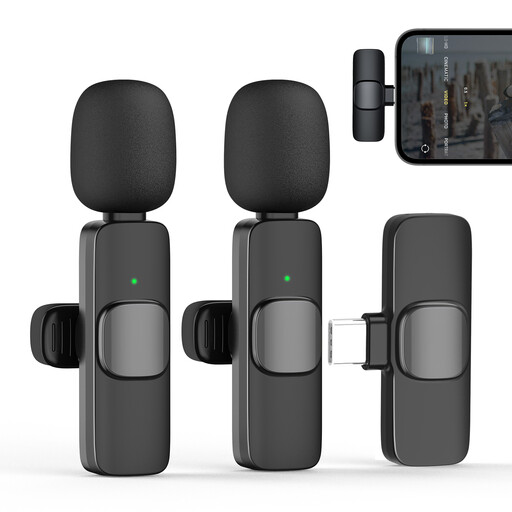
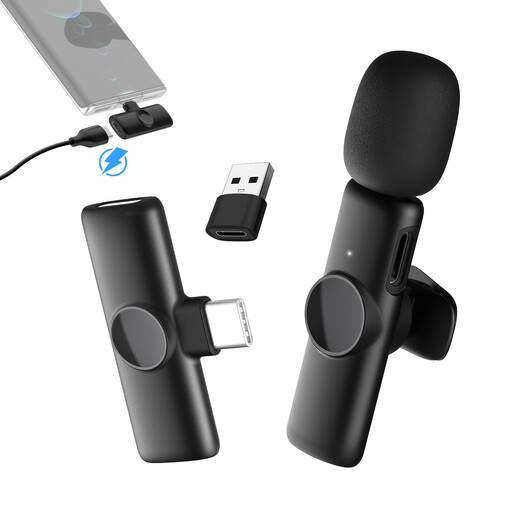
The products below are wireless lavalier kits with USB-C receivers, available with one or two transmitters depending on the version. Before buying, check that the connection is compatible with your recording device.
 No image available
Moman M1CXT, USB-C, 2TX+1RX
With two transmitters and one receiver, this kit is suitable for recording with two microphones. The product title also specifies USB-C.
Check that the USB-C receiver is compatible with your recording device.
View at Joybuy
 No image available
Moman CP1X(C), Type-C, 1TX&1RX
This version has one transmitter and one receiver and is designed for recording one voice. The product title specifies Type-C.
The connection needs to be compatible with your recording device.
View at Joybuy
 No image available
Moman MC1(C), USB-C, 1TX&1RX
This version has one transmitter and one receiver and is designed for recording one voice. The product information lists USB-C devices as compatible devices.
Check that your recording device has a compatible USB-C connection.
View at Joybuy
 No image available
Moman MS1(C), USB-C, 1TX&1RX
The product information lists a kit with one transmitter and one receiver for USB-C phones.
Before recording, make sure the connection is compatible with the phone you’re using.
View at Joybuy
 No image available
Moman MS1X(C), USB-C, 2TX&1RX
With two transmitters and one receiver, this kit is designed for recording with two microphones. The product information lists USB-C Android phones as compatible devices.
Check that the receiver is compatible with your specific device.
View at Joybuy
Frequently asked questions
Is a compatible 3.5 mm plug enough for my computer or recorder?
No. A plug that fits doesn’t necessarily mean the microphone is compatible. RØDE specifies a TRS input with plug-in power for the Lavalier GO; Audio-Technica lists a dual-mono plug and an LR44 battery for the ATR3350xiS. Also check that you’ve selected the right microphone as the input in your recording software.
How should I prepare for a longer voice recording?
Position the microphone and cable so they don’t rub against your clothes, then listen back to a test recording. Make sure to speak your loudest passage too: Audacity recommends lowering the input level if the meter shows clipping, as a clipped recording can’t easily be repaired afterwards.
Can I use a wireless clip-on microphone in Germany without registering it?
That depends on the frequency used and the conditions that apply to it. According to the Federal Network Agency, frequencies covered by a relevant general allocation can be used without registration and free of charge, provided you meet the conditions. Check the frequency of the specific device version. The Federal Network Agency’s Directive 37/2026 replaced earlier general allocations identified in the document.
What are my rights if a product is faulty?
In Germany, you generally have statutory rights against the seller if a product is faulty. The Verbraucherzentrale says these rights apply for two years from the date of purchase or delivery; a voluntary manufacturer’s guarantee is separate.


