What should you look for when buying?
First, test the recording at your usual speaking position, then check the connection and the workflow you want. For a wireless kit, you’ll also need to consider the kit version and frequency requirements.
| What to consider |
What to look for |
Who should pay particular attention? |
| Clear speech despite room echo |
Try the microphone at your usual speaking position and listen to a test recording for echo and plosives. |
If you’re reading news in an echoey room, you’ll want to capture your voice as close as possible rather than relying on echo correction later. Around 36% of consumers say clear speech despite room echo is their main purchasing concern. |
| The right device connection |
Check whether you need TRS or TRRS, and match the microphone input and any required adapters to the exact device and microphone model. |
If you want to keep using your smartphone, camera or recorder, its microphone connection needs to be compatible. Around 29% of consumers put device compatibility first. |
| Freedom to move and recording workflow |
Check the number of speakers, file storage, power supply and monitoring. For wireless systems, also check the conditions for using the frequency band. |
If you move while speaking or change recording locations, it’s important to know how the audio is recorded and then matched to the video. Around 21% of consumers prioritise freedom of movement and a suitable recording workflow. |
| A discreet fit |
Try the clip and cable routing with your clothes, then listen to a test recording while making typical head and body movements. |
If you want the microphone to be as discreet as possible on camera, make sure your clothes don’t rub audibly against it while you speak. Around 14% of consumers say how the microphone sits on clothing is their main purchasing concern. |
Joybuy product selection
The products below include wired lavaliers for existing recording devices and wireless kits for mobile voice recording. Check the connection for your specific device and, for wireless systems, the applicable frequency requirements.
 No image available
SYNCO S8 Lavalier Microphone
For a recording from a fixed position, check whether you can connect the microphone to your existing recording device.
The product name lists smartphones, PCs, laptops and cameras as compatible device types. Check the specific microphone input against the microphone’s connector.
Joybuy
 No image available
Wireless lavalier microphone set with 2 transmitters, 2.4 GHz, USB-C and Lightning
This set is worth considering if you want to move around while speaking or record two people. First, check that its connectors are compatible with your recording device.
The product name lists two transmitters, 2.4 GHz, and USB-C and Lightning connectors. For wireless use in Germany, the specific frequency band and technical operating conditions must comply with the applicable requirements.
Joybuy
 No image available
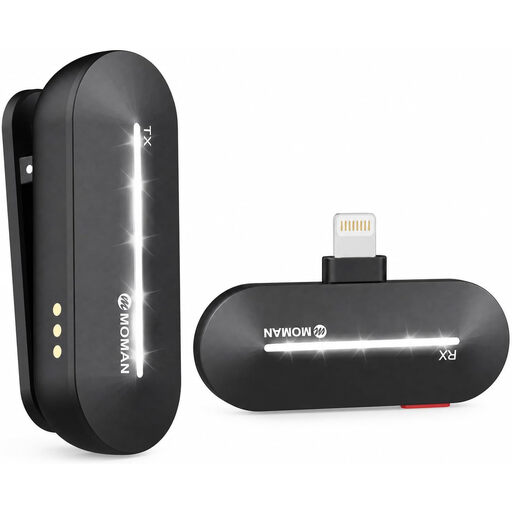
Moman M1CL Wireless Lavalier Microphone, 1TX+1RX
This wireless lavalier is an option if you need freedom to move while speaking and use the intended phone.
The product name lists iPhone 14/13/12/11/X and 1TX+1RX. Check compatibility with your specific device. For wireless use in Germany, the frequency band and technical operating conditions are also important.
Joybuy
 No image available
Moman MC1(C) Wireless Lavalier Microphone, USB-C, 1TX&1RX
This wireless lavalier is suitable for mobile voice and video recording only if your device is compatible with the receiver.
The product name lists USB-C phones and 1TX&1RX. Check the connection on your specific device and, for wireless use in Germany, follow the requirements for the frequency band used.
Joybuy
 No image available
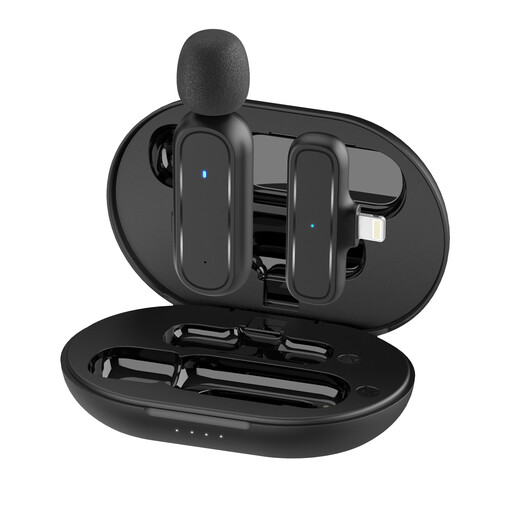
Moman MC1(A) Lightning Wireless Lavalier Microphone, 1TX and 1RX
This wireless lavalier is worth considering if you want a mobile recording setup. Check that the connector on this specific version matches your device.
The product name lists Lightning and 1TX and 1RX. Check the receiver connection before buying and, for wireless use in Germany, follow the requirements for the frequency band used.
Joybuy
Frequently asked questions
What microphone position should I try first when recording a news bulletin?
As a general starting point, RØDE recommends clipping the microphone to your chest, around 20–30 cm from your mouth. Listen to a test recording in your usual clothes and speaking position, and adjust the microphone if you notice echo or unwanted noise. This recommendation isn’t a guarantee for your room.
Can I plug a TRS lavalier straight into any smartphone socket?
No. A TRS lavalier won’t automatically work with every smartphone input. RØDE describes the smartLav+ as a TRRS microphone for smartphones and the Lavalier II as a TRS model. Check your phone’s microphone input and whether you need an adapter.
How does a lavalier recorder change the recording workflow?
A portable recorder saves your voice recording separately from the audio on your camera or smartphone. Zoom says the F2 comes with a lavalier. For video, you’ll then need to transfer the audio file and synchronise it with the picture.
Do I need an individual frequency allocation in Germany for every wireless lavalier?
Not necessarily: the Bundesnetzagentur’s Vfg. 37/2026 lists a general allocation for wireless microphones, with permitted frequency bands and the corresponding technical and operating conditions. Whether a particular device is covered depends especially on its frequency band and technical specifications. It isn’t possible to confirm the legality of an unspecified model in general terms.
What else should I check when buying a wireless kit?
Check the exact kit version, which microphones are included and how the system is intended to record. In its market surveillance guidance, the Bundesnetzagentur lists CE marking, product identification, manufacturer details, instructions in German and a declaration of conformity among the points to check. These checks don’t automatically confirm that a particular listing is compliant.


