Readers using a smartphone
You want to record a seated solo voice directly on your mobile device. The main thing to check is which microphone input your smartphone has and whether you need an adapter.


For a seated solo reader, a wired lavalier is a natural starting point if your recording device is within reach and the connection is compatible. First check whether your device needs USB-C, a compatible smartphone TRRS input or a TRS microphone input. Wireless gives you more freedom to move, while a lavalier with its own recorder lets you record separately. For quiet and emphatic lines, microphone placement and a test recording are still important, especially to check for clothing noise.
You want to record a seated solo voice directly on your mobile device. The main thing to check is which microphone input your smartphone has and whether you need an adapter.
You already use a recording device or transmitter and need a lavalier that works with it. The specific microphone input matters, not just the plug size.
You move between quiet lines and more emphatic delivery, and want to decide whether a separate recorder suits the way you record.
For a seated poetry reading, first check that the microphone connects to your recording device. Then try recording lines with different levels of emphasis, and check the attachment, cable route and how much freedom to move you need.
| What to consider | What to check before buying | Who should consider this? |
|---|---|---|
| Connection and compatibility | Check that the recording device, microphone input and USB-C, TRS or TRRS connection all work together; allow for any adapter you may need. | If I want to record directly on my smartphone or recorder, the connection needs to match the device. Around 33% of consumers put device compatibility first. |
| Quiet and emphatic lines | Record some quiet lines and some at a stronger volume, then check the file for distortion, background noise and clarity. | If my reading shifts between quiet lines and strong emphasis, I want to assess both in a test recording. Around 27% of consumers prioritise voice recording at varying volumes. |
| Attachment and cable routing | Check the clip, contact with clothing and cable route; make a short recording while turning the pages, too. | If my clothes or manuscript might make noise while I read, I need an attachment I can test in my seated position. Around 20% of consumers prioritise a setup that minimises unwanted noise. |
| Freedom to move | Consider whether a cable will get in the way where you sit. With a wireless system, also check the transmitter and receiver configuration, power supply and device connection. | If I want to move around more freely while recording, the connection between the microphone and device matters to me. Around 20% of consumers prioritise freedom of movement. |
A smartLav+ with TRRS and a Lavalier GO with TRS aren’t interchangeable without checking. For certain smartphone connections, RØDE specifies an additional TRS-to-TRRS adapter.
Before buying, check the microphone input and plug configuration on your specific recording device.
Depending on the combination, you may need a compatible adapter.
A wired lavalier may be all you need if your device is within cable range of where you’re sitting. A wireless system involves extra components and a different connection setup.
First decide where you’ll sit and how the cable will run. Then consider whether you really need more freedom to move.
A wireless system adds a transmitter, receiver and charging requirements. You’ll also need to check the applicable frequency regulations.
The recording function affects signal levels, not how the microphone is attached. It won’t prevent noise from rubbing clothes or turning pages.
Test the position with quiet and emphatic lines, and include page-turning in your test recording.
The XS Lav USB-C is designed for a single voice recording over a wired connection to a compatible USB-C device.
The smartLav+ and Lavalier GO use different connection types: TRRS and TRS respectively.
The MVL is designed for mobile devices with a compatible 3.5 mm input or a suitable CTIA-compliant adapter.
DJI describes the Mic Mini configuration with one transmitter and one receiver as an option for solo recordings.
The F2 is a standalone recorder with a connected lavalier, for recording separate voice files.
The V.Lav is a wired option for connecting to a device further away, provided it has a suitable 3.5 mm microphone input.
This selection of Joybuy products includes wired lavalier microphones and wireless sets for mobile recording. Before buying, check that the connection and configuration are right for your recording device.
 No image available
It may suit a seated solo voice recording if the 3.5 mm input, or a compatible adapter, works with your recording device.
The product description lists an adapter set, a clip and a windscreen.
 No image available
It may suit mobile voice recording if your device supports the USB-C receiver.
The description lists real-time audio monitoring. According to the product information, OTG must be enabled on Android devices.
 No image available
The version with two transmitters is an option if you need this configuration for your recording.
The product title lists USB-C and Lightning. Check which connection and receiver work with your specific device.
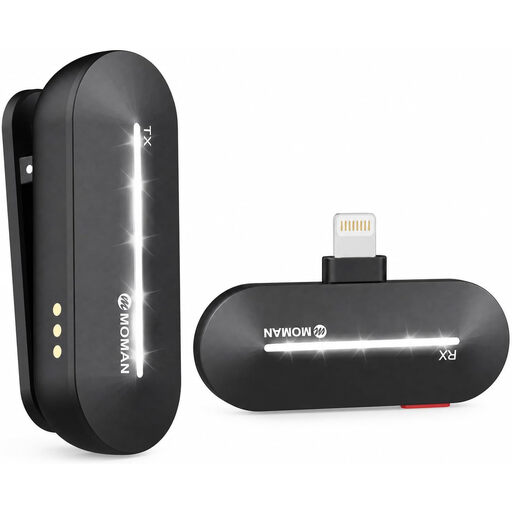 No image available
It’s an option for recording a single voice on the go if your iPhone is in the listed model range and the receiver connection is compatible.
The product title lists the 1TX+1RX configuration; the description includes three noise-reduction modes.
 No image available
It may suit wired voice recording if the 3.5 mm connection is compatible with your device.
The product description lists a range of up to 6 m. Check that this suits your recording setup.
Not just because it has a 3.5 mm plug: RØDE describes the Lavalier GO as a TRS microphone and specifies a TRS-to-TRRS adapter for smartphones with a TRRS input. Check the connection on your specific phone and whether you need an adapter.
As a general guide, RØDE recommends placing it on the chest, roughly a handspan or 20–30 cm from your mouth. Test the position with your own quiet and emphatic lines, and make sure the capsule doesn’t rub against your clothes.
With the Zoom F2, the voice recording is saved as a file on the recorder. Zoom describes transferring it to a computer via USB. If you’re recording video, you’ll then need to match the separate recordings in your workflow.
No, you can’t assume a product is approved just from its name. In April 2026, the Federal Network Agency published a general assignment setting out permitted frequency bands and technical and operational conditions; the end date varies by band. Check the specific system against the applicable conditions.
Your statutory rights against the seller are separate from any voluntary guarantee. The Verbraucherzentrale states that new goods generally come with two years of statutory rights. The remedy available in a particular case depends on the fault and the applicable legal requirements.