Which option is right for you?

Practising alone in an echoey room

If you want to listen back to your pronunciation regularly, focus on keeping the microphone securely in place and a consistently short distance from your voice. Shure explains that a microphone cannot correct room acoustics.

Learners recording on a smartphone

If you record directly on your smartphone, check that the connection type, adapter and recording app all support the external microphone. RØDE and Shure distinguish between different types of connection.

Practising on the move or recording a conversation

If you walk around while speaking or record someone else, freedom of movement and the number of transmitters matter. DJI offers sets with one or two transmitters for different recording needs.

What should you look for when buying?

TRRS wired microphone for smartphones

A good fit if: You mainly record alone and your device has a suitable TRRS input or a verified compatible adapter.

Things to consider: The cable and your clothing can restrict movement, and the app and adapter must be compatible.

TRS wired microphone

A good fit if: You already use a recorder or wireless transmitter with a compatible TRS microphone input.

Things to consider: A TRS connector is not generally interchangeable with a smartphone’s TRRS connection.

Wireless set with one or two transmitters

A good fit if: You move around while practising or record two people speaking.

Things to consider: Freedom of movement means charging and connectivity to manage; the receiver and set version must suit your device and how you plan to use it.

What you need What to check before buying Who it matters most to
Clear speech despite room echo Clip the microphone close to your body and make a test recording in the space where you plan to practise. Shure points out that a microphone cannot reliably distinguish reflected sound from direct speech. If I want to listen back to my pronunciation regularly in an echoey room, keeping the microphone in the same position is important. Around 33% of consumers cite room echo as their main concern.
Connecting to your recording device Check the device socket, TRS or TRRS connection, any adapter required, the receiver version and the recording app you want to use. If you want to record directly to your existing smartphone, computer or recorder, check the entire connection chain. Around 27% of consumers prioritise the connection to their device.
Moving around or recording two people For wireless sets, check the number of transmitters and that the receiver is suitable. For conversations, the set needs to support the number of people speaking. If I move around while practising or record someone else, I need a suitable range of movement or one transmitter for each voice. Around 20% of consumers cite movement or conversation recording as their main concern.
A simple solo set-up Choose only the kit you need, and allow for any adapters required when using a wired microphone. For frequent solo practice, a straightforward set-up with just the parts you actually need can make all the difference. Around 20% of consumers prioritise ease of use.

Common mistakes

  • Assuming noise cancellation will eliminate room echo

    A microphone cannot improve room acoustics. A processing feature on its own is no guarantee that the sounds important for speech practice will remain clear in your room.

    Clip the microphone close to your body and judge a test recording by listening for the sounds that matter to you.

  • Treating TRS, TRRS and USB receivers as interchangeable

    Connectors that look similar may be designed for different inputs. The wrong connection or an unrecognised recording source can prevent you from recording.

    Before buying, check the full connection path from the microphone to the recording app, including any adapter or receiver.

    Depending on the connection, you may need a compatible adapter or a different microphone or receiver set.

  • Choosing a set with just one transmitter for a conversation

    DJI offers sets with one or two transmitters, so the model family name alone does not tell you which version is included.

    Check that the number of transmitters, receiver and any required adapters match your recording needs.

    To record two voices separately, you may need an extra transmitter or a different complete set.

Brands to consider

RØDE

The models mentioned cover wired lavalier microphones and wireless options for smartphones.

  • RØDE specifies a TRRS connection on the smartLav+ for compatible smartphones and a TRS connection on the Lavalier GO for compatible microphone inputs.
  • The smartLav+ cannot be used as a TRS transmitter microphone without a suitable adapter; the connection type must match your recording device.
  • Manufacturer claims about sound quality are not independent evidence of speech clarity in an untreated room.

Shure

Shure describes the MVL as a wired, omnidirectional smartphone lavalier microphone for recording speech close to the body.

  • Shure lists a 3.5 mm TRRS connection, clip and windscreen.
  • Devices without a suitable socket require a verified CTIA-compatible adapter.
  • The manufacturer’s description does not prove that it performs better in an echoey room.

DJI

DJI offers Mic Mini sets with one or two transmitters, for solo recording or conversations.

  • The different set configurations may suit the number of people you want to record.
  • Check the number of transmitters and the included receiver for the specific version.
  • A stated battery life applies only under the test conditions described by DJI; it is not independent evidence that processed speech sounds are clear.

BOYA

According to BOYA, the BY-V range includes wireless versions with one or two transmitters and different receiver connections.

  • The manufacturer’s overview lists USB-C and Lightning receivers, as well as switchable noise cancellation.
  • Check that the specific version and everything included in the box suit your recording device.
  • Advertised speech quality is not an independent measure of performance for speech practice in an echoey room.

Joybuy products for speech recording

The following Joybuy options include wired and wireless lavalier microphones with different smartphone connections. Check that the specific connection and kit contents are compatible with your recording device.

DJI Mic Mini 2S, 2 TX + 1 RX + charging case

DJI Mic Mini 2S (2 TX + 1 RX + Charging Case)

This two-transmitter version may suit conversations or practising on the move, provided the receiver is compatible with your recording device.

The set includes two transmitters, one receiver and a charging case. The description lists compatibility with smartphones, cameras and PCs.

The transmitters are described as attaching with a clip or magnet.

View at Joybuy

SYNCO S8 lavalier microphone for smartphone, PC, laptop and camera

SYNCO S8 Lavalier Microphone

The wired design and clip may suit solo practice in a fixed position, as long as the connection is compatible with your recording device.

The description lists a 3.5 mm connection, an adapter set, clip and windscreen.

Smartphones, PCs, laptops and cameras are listed as compatible devices; check which adapter your device needs.

View at Joybuy
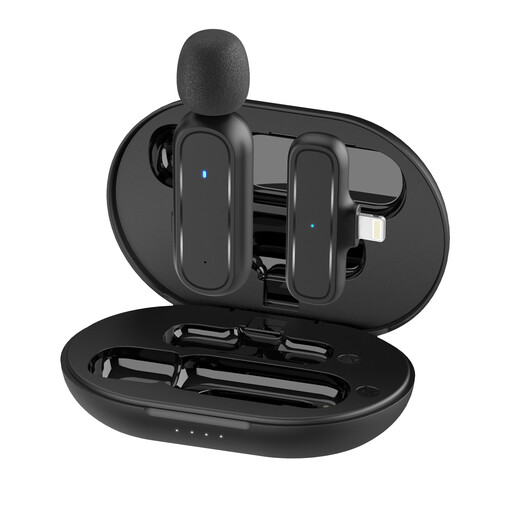
Moman MC1(A) Lightning wireless lavalier microphone with 1TX and 1RX

Moman MC1(A) Lightning (1TX + 1RX)

This solo version may suit speech recording with a compatible Lightning device.

The product name lists one transmitter, one receiver and a Lightning connection. Check that your recording device and app support the receiver.

View at Joybuy
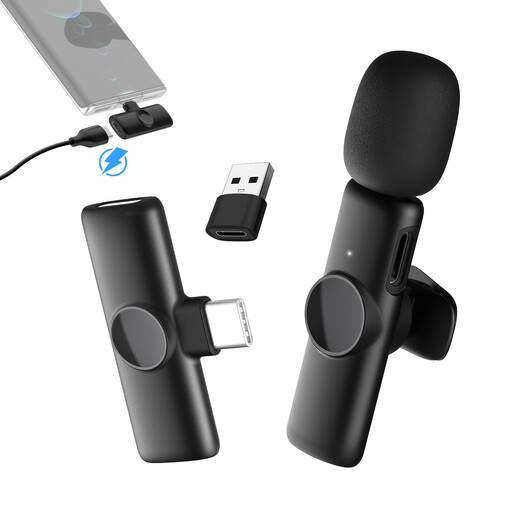
Moman MS1(C) USB-C wireless lavalier microphone with 1TX and 1RX

Moman MS1(C) USB-C (1TX + 1RX)

This single-transmitter set may suit solo recording with a compatible USB-C phone.

The description lists 2.4 GHz wireless, one transmitter, one receiver and an omnidirectional microphone.

The transmitter is described as clipping onto a collar; check that your recording device and app recognise it.

View at Joybuy

Frequently asked questions

Will a lavalier microphone get rid of echo in my room?

No. Shure explains that a microphone cannot reliably distinguish reflected sound from direct speech or improve room acoustics. Try the microphone position and your practice space with a short recording.

Why doesn’t my lavalier microphone work even though the 3.5 mm plug fits?

The plug and input may use different standards. RØDE describes the smartLav+ as a TRRS model for compatible smartphone connections, and the Lavalier GO as a TRS model for compatible microphone inputs. Check the adapter and recording app too.

How can I check my recording before a speech practice session?

Clip the microphone where your clothing won’t rub against it, then record a few sentences with both quiet and emphasised sounds and listen back. If you hear breath noise or too much room echo, adjust the microphone position and try again.

What should I check when recording a conversation between two people?

Check that the set includes two transmitters and a compatible receiver. DJI offers Mic Mini versions with one or two transmitters; the product family name alone doesn’t tell you what’s included.

Can I secretly record someone else during a conversation?

Don’t record someone else without clarifying the situation first: § 201 of the German Criminal Code (StGB) covers the unauthorised recording of another person’s non-public spoken words. Discuss the recording beforehand; this law does not apply simply because you record yourself practising alone.

Are older details about radio microphone frequencies in Germany still valid?

Not necessarily. In its General Allocation 37/2026, the Federal Network Agency repealed, among other things, Order 109/2025. Check the frequency band and the applicable conditions for the specific wireless model; the product name alone does not confirm that it is authorised for use.