Performers in costume
If you’re performing in costume, the microphone should be as unobtrusive as possible and not rub against the fabric. RØDE recommends routing the cable with strain relief when mounting a lavalier, to reduce handling noise.


If you usually record in one fixed spot, a wired lavalier is an obvious choice, provided its connection and power requirements are compatible with your recording equipment. If you move around more, a wireless system can avoid a cable running to stationary equipment, but it comes with extra transmitters, receivers and batteries. Whichever option you choose, test how it attaches to your costume and record your loudest and quietest passages before the performance.
If you’re performing in costume, the microphone should be as unobtrusive as possible and not rub against the fabric. RØDE recommends routing the cable with strain relief when mounting a lavalier, to reduce handling noise.
If you move a long way from your recording equipment during the monologue, a cable can get in the way. A wireless system avoids this, but takes more time to set up and requires batteries. RØDE describes onboard recording on the Wireless PRO, while Sennheiser also positions the MKE 2 for theatre productions.
If you usually record in one place, first check which signal path is compatible with your computer or recorder. RØDE, Sennheiser and Audio-Technica offer different connection and power options across their lavalier models.
First, work out which signal path you need and how much you’ll be moving around. Then test the attachment and recording level with your actual costume and voice.
| What matters | What to check before buying | Who will find this especially important? |
|---|---|---|
| Avoiding costume noise | Test the clip and attachment point, the distance between the fabric and capsule, and the cable routing while wearing the costume. | If I’m performing in costume, I don’t want the fabric rubbing against the capsule or the cable pulling. That’s why around 29% of consumers put a low-noise attachment first. |
| Recording quiet and loud passages | Record your quietest and loudest passages as a test, and check the levels throughout the entire recording chain. For wireless sets, check whether the specific model has an onboard recording function. | If my monologue ranges from a whisper to a powerful voice, I want to assess both in a test recording. Around 29% of consumers prioritise recording a range of vocal levels. |
| Compatible connection | Check your device’s input, whether it needs TRS, TRRS or USB-C, and whether power is required. RØDE specifies a compatible TRS input with 2.7 V plug-in power for the Lavalier GO. | If I want to record directly to my existing computer, recorder or mobile device, the signal path needs to be compatible. Around 21% of consumers say the connection is their main buying consideration. |
| Freedom to move | Consider the actual performance area and the set-up involved for the transmitter, receiver and batteries. In Germany, check the specific system’s radio parameters against the conditions of the applicable general authorisation. | If I move around a large performance area, I don’t want to be restricted by a cable running to stationary recording equipment. Around 21% of consumers put freedom of movement first. |
TRS and TRRS microphones are designed for different inputs. The RØDE Lavalier GO also requires a compatible input with plug-in power; having the same size plug alone doesn’t guarantee a compatible connection.
Check the exact input specifications of your recording equipment, and whether the microphone needs a particular power supply or a suitable adaptor.
Depending on your equipment, you may need a suitable adaptor or a different recording setup.
Contact with the fabric or a pulling cable can introduce handling noise into your recording. Simply placing the microphone out of sight doesn’t guarantee that the capsule will stay clear.
Test the clip, cable routing and any strain relief with your actual costume, and try out the passage with the most movement.
If rustling noise affects a scene, you may need to record it again.
Onboard recording is a feature of certain models, such as RØDE’s Wireless PRO, and isn’t available on every wireless set. Attachment, batteries and the conditions for radio operation also remain important.
Check whether the specific model has a backup recording function and whether it’s enabled. Check the batteries, and make sure the frequency band and operating parameters meet the applicable requirements.
Transmitter recordings also need to be managed and the files backed up.
With the Lavalier GO and Wireless PRO, RØDE offers different wired and wireless options for recording in costume.
The XS Lav USB-C is designed for compatible computers or mobile devices with a USB-C connection; the EW version of the MKE 2 is designed for use with a compatible bodypack transmitter.
The ATR3350x is a wired option for a compatible 3.5 mm recording input.
The MVL is designed for compatible mobile devices with a suitable TRRS signal path.
The G2 Pro is a wireless option with an external lavalier for discreet microphone placement.
This selection includes wired lavalier microphones and wireless sets for specific smartphone, USB-C and camera recording setups. Before buying, check that the receiver is compatible with your recording equipment. For wireless operation, the frequency band and operating parameters must meet the applicable requirements.
 No image available
A wired option if you’re recording on one of the device types listed in the product name and the connection is compatible.
 No image available
Could be a good fit if you want to move away from your recording equipment and are using a compatible USB-C mobile device.
The product name specifies USB-C, 1TX+1RX and a range of 150m. Before buying, check this wireless system’s frequency band and operating parameters against the applicable requirements in Germany.
 No image available
A wireless option for mobile recording if you can use the USB-C connection specified in the product name.
Before buying, check compatibility with your recording equipment, along with the system’s frequency band and operating parameters for use in Germany.
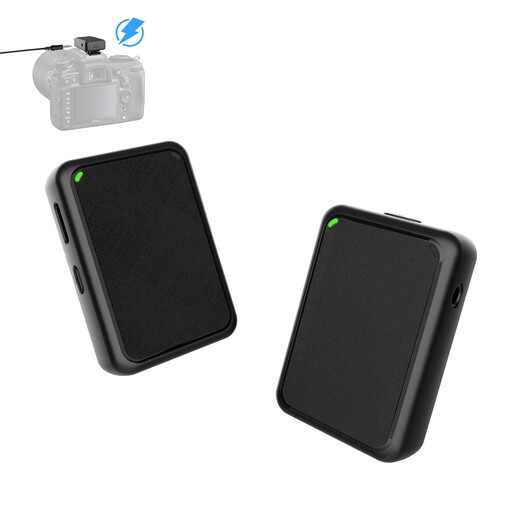 No image available
A wireless option for camera recording, provided the recording setup is compatible with your equipment.
The product name specifies USB plug-and-play and 1TX&1RX. Before buying, check this wireless system’s frequency band and operating parameters against the applicable requirements in Germany.
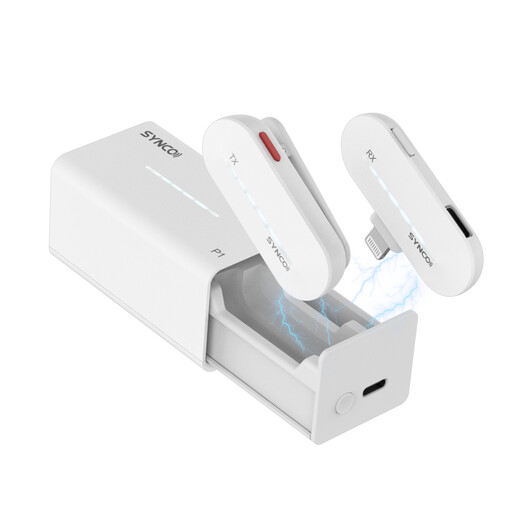 No image available
A wireless option if you want to use it with a compatible iPhone recording setup.
The product name specifies 2.4GHz and a charging case. Before buying, check compatibility with your device, as well as the frequency band and operating parameters for use in Germany.
No. The connection type and power requirements need to be compatible with your equipment. RØDE specifies a TRS microphone input with plug-in power for the Lavalier GO; the Shure MVL uses TRRS and may need a suitable CTIA adaptor. Check the exact input specifications and make a test recording.
Position the clip so the capsule doesn’t rub against the fabric, and route any excess cable so it can’t pull. RØDE recommends using a loop for strain relief. Test the attachment with your actual costume and try out the passage with the most movement.
The Audio-Technica ATR3350x uses an LR44 battery as part of its signal path; with a wireless system, you’ll also need to charge the batteries. For faulty goods, statutory consumer rights against the seller are separate from a voluntary guarantee, as explained by the Verbraucherzentrale.
There’s no single answer that applies to every wireless set. According to the Bundesnetzagentur, unregistered use is only possible if the frequency and operation are covered by an applicable general authorisation and its technical conditions are met. On 15 April 2026, the Bundesnetzagentur published decision 37/2026, which replaces, among others, the earlier decision 109/2025.
The Bundesnetzagentur lists checks including a valid CE mark, identifiable product and manufacturer details, and any required instructions for use and warnings in German. Also check the specific device’s frequency band and operating conditions.