Preserve the storyteller’s voice
For a mostly seated witness interview, you’ll want to mic up the person telling their story directly. The Oral History Association recommends choosing a quiet recording location wherever possible.


For a mostly seated witness interview in a small booth, a wired lavalier microphone is a good fit if the cable length, microphone input and power supply are compatible with your recording device. If you also want to capture the interviewer’s questions clearly, or a cable would get in the way, consider a two-microphone or two-transmitter setup. Check what’s included, how the signals are output and make a test recording. Before recording another person’s non-public speech, make sure you have the necessary permission: Section 201 of the German Criminal Code makes unauthorised recordings a criminal offence (Federal Ministry of Justice and Federal Office of Justice).
For a mostly seated witness interview, you’ll want to mic up the person telling their story directly. The Oral History Association recommends choosing a quiet recording location wherever possible.
If you want to capture questions and answers equally clearly, check whether the set actually includes two microphones or transmitters, and whether their signals can be output separately.
If you’re recording with a smartphone or computer, make sure the microphone input, connector or USB-C port, and recording app are compatible with your chosen signal path.
A good fit if: the speaker is mostly seated and the recording device is within the cable’s actual reach.
The trade-off: you’ll still have a cable to manage. A TRS or USB-C connection alone doesn’t guarantee that the device and recording app will work together.
A good fit if: the smartphone has a suitable TRRS input or you’re using a confirmed compatible adapter.
The trade-off: test the connector pinout and app recognition before the interview.
A good fit if: you want to mic up both sides of the conversation or a cable would get in the way. DJI says the Mic Mini receiver can connect to two transmitters.
The trade-off: check the number of transmitters, charging arrangements, receiver connection and frequency requirements for the specific set.
A good fit if: you want to record the wearer’s voice as a separate file, independently of a wireless connection. Zoom describes the F2 as a recorder supplied with a lavalier microphone.
The trade-off: you’ll need another recording solution for a second voice. Plan for storage, power and file backups.
For an important witness recording, it’s worth checking how clearly the voices come through in the actual booth first, then checking the connection, number of speakers and session length.
| Priority | What to check | Who is it important for? |
|---|---|---|
| Clear storytelling voice | Test the clip position and clothing in the booth; listen to the recording level at a normal and louder speaking volume. | If I want to capture the storyteller’s voice as clearly as possible, I check the microphone position and levels before the interview. Around 36% of consumers put this priority first. |
| Compatible device connection | Check the device model, microphone input and any power required; make sure the app recognises the lavalier microphone. | If I want to use my existing smartphone or computer, the signal path needs to work in practice. Around 29% of consumers prioritise a suitable connection to their recording device. |
| Capture both voices | Count the microphones or transmitters included; check whether two signals can be output separately or combined. | If I want to record both answers and questions clearly, I need a solution that works for both sides of the conversation. Around 21% of consumers make this their main priority. |
| Record longer sessions reliably | Check the power supply and available storage for the planned duration; listen to a test file and make a backup. | If I’m recording a longer interview, I plan for power, storage and backups in advance. Around 14% of consumers prioritise reliable recording and backups. |
TRS and TRRS can use different signal paths. The RØDE Lavalier GO requires a suitable TRS microphone input with plug-in power. The RØDE smartLav+ and Shure MVL are designed for compatible TRRS connections.
Check the connector, microphone input and any power requirements against the exact device model. Make a test recording in the app you plan to use and check that it’s actually using the lavalier microphone.
The option to connect two transmitters doesn’t tell you how many are included in the specific package, or whether both signals can be recorded separately.
Check what’s included in the exact version and test the output you need with both voices before the interview.
Manufacturer claims about processing or recording formats don’t tell you how a particular booth, outfit and speaking situation will sound.
Make a test recording with the clothes and room setup you’ll use, listen to the file and back up the original.
The Lavalier GO and smartLav+ are designed for different connection types.
The XS Lav USB-C and XS Lav Mobile differ in their connectors.
The Mic Mini is a wireless option that, according to the manufacturer, can work with two transmitters and one receiver.
According to Zoom, the F2 pairs a body-worn recorder with a lavalier microphone.
The MVL is designed for compatible mobile devices with a TRRS socket or a suitable CTIA adapter.
The Joybuy options below are wireless lavalier microphone systems for interviews. For each version, check the receiver connection and make sure the number of transmitters included is suitable for one or two voices.
 No image available
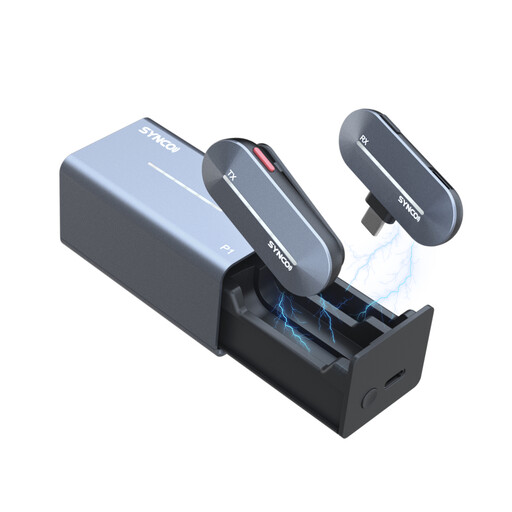
For interviews where you want to mic up both speakers, provided your recording device supports the USB-C receiver.
The product is listed with two transmitters and one USB-C receiver. Check how the two signals are output by your recording device.
Up to 6 hours of operation, according to the product description; plan how you’ll power the system during your session.
 No image available
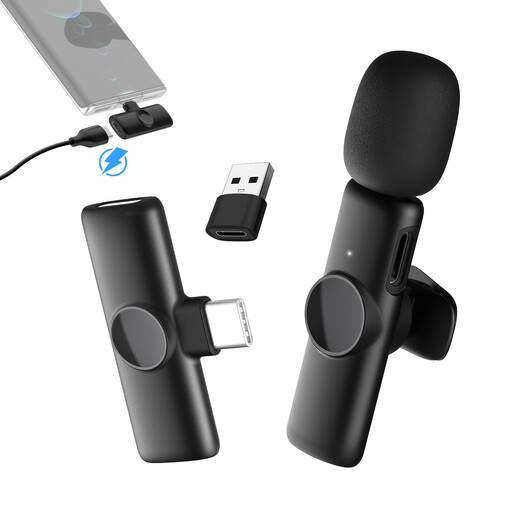
For recording an interview with a compatible Android device that has USB-C; check beforehand that the recording app recognises it.
The product description lists 2.4 GHz, a charging case and up to 5 hours of operation.
 No image available
For recording a single storyteller with a compatible USB-C mobile device; this version isn’t listed with a separate transmitter for the interviewer.
The product description lists 2.4 GHz and up to 8 hours of operation.
 No image available
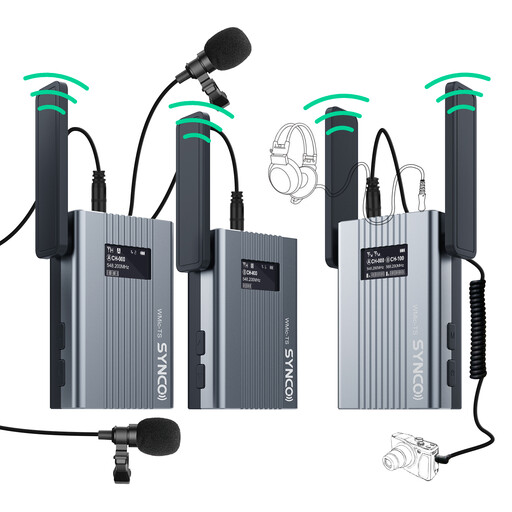
For interviews where one person is to be recorded using a lavalier microphone; the description lists one transmitter, not one for each speaker.
The product description lists a 62 g transmitter, an OLED display and headphone socket on the receiver, and up to 9 hours of operation. Before using it in Germany, check the frequency band and the conditions that apply to it.
Make a short test recording using the app you plan to use and the final booth setup, then listen to it. Check both voices, clothing noise and the recording level. The Audacity manual recommends making a test recording and checking the levels.
If you want to mic up both voices clearly, consider a setup with two microphones or transmitters. For wireless sets, check that two transmitters are actually included. Also test whether the recording device receives the signals separately or combined.
Where possible, the Oral History Association recommends choosing a quiet location and agreeing in advance on the recording process, consent, storage and access. These are professional recommendations, not a guarantee of how a particular microphone will sound in a specific booth.
For your chosen setup, check whether adapters, an extra transmitter, batteries and storage media are included. When you buy consumer goods in the EU, you’re generally entitled to a legal guarantee from the seller for at least two years from the date you receive the goods. This is separate from any voluntary manufacturer’s guarantee (Your Europe).
You can’t confirm this based on the term ‘wireless microphone’ alone. In its general allocation published in April 2026, the Federal Network Agency lists permitted frequency bands and the associated technical conditions. Check the frequency range and technical specifications of the specific set.