Students without a regular charging spot
If you regularly study somewhere without a free plug socket, battery capacity and charging options should matter more to you than a headline performance figure.


If you often study without access to a free plug socket, start by checking the battery capacity and charging options for the specific configuration. TUXEDO lists an 80 Wh battery and USB-C charging for the InfinityBook Pro 14 Gen10, while Framework lists 61 Wh for the Laptop 13 with AMD Ryzen AI 300. These capacity figures don’t guarantee a particular battery life for your study tasks. Choose a laptop with Linux pre-installed if you’d rather skip the installation; if you’re setting it up yourself, check support for your exact distribution and hardware. Or try Ubuntu on your existing laptop first.
If you regularly study somewhere without a free plug socket, battery capacity and charging options should matter more to you than a headline performance figure.
If you’re weighing up Linux pre-installed against installing it yourself, check support for the specific device and distribution you want to use—not just the brand name.
If you want to find out whether Linux suits the way you study before committing, you can start Ubuntu from installation media without installing it straight away. Canonical explains how to use this trial mode.
If access to plug sockets is limited, check battery life and charging options separately from Linux support.
| What matters to you | What to check before buying | Who should pay particular attention? |
|---|---|---|
| Keep studying without a plug socket | Check the battery capacity for the exact configuration, comparable battery-life test results and, for a second-hand device, the battery’s condition. | If I often study without access to a plug socket, the usable time between charges matters more to me than a single capacity figure. Around 36% of consumers put battery life first. |
| Run Linux on the specific hardware | Check the full model and configuration details against the relevant information for your distribution and version. | I want to use my chosen distribution on this exact hardware, rather than relying on the name of a product family alone. Around 29% of consumers prioritise documented Linux support. |
| Charge flexibly | Check whether the specific configuration supports USB-C charging, the required power and voltage profiles, and which cables and accessories are included. | If I have to share plug sockets, I want to know whether I can power the device using a suitable charger. Around 21% of consumers prioritise flexible charging. |
| Get started easily or customise it yourself | Check the pre-installed operating system, installation guidance and whether the RAM, SSD and ports can be changed. | I either want to get started without installing anything myself or take charge of setup and future changes. Around 14% of consumers prioritise an easy start or the ability to customise. |
The battery capacities listed by TUXEDO and Framework aren’t the same as battery-life results measured while carrying out the same study tasks on Linux.
Use capacity as just one point of reference, and look for battery-life tests based on usage and configurations as similar as possible to your own.
Support and certification can depend on the generation, processor and other hardware. Canonical lists certain ThinkPad T14 configurations; Lenovo specifies a Ryzen 5 PRO 8540U for model 21MC0009GE, while Canonical’s entry for the T14 Gen 5 AMD describes a Ryzen 7 PRO 8840U.
Check the full model name and, where possible, the components against the listing for the distribution you want to use.
If you install Linux on a computer you already use, the changes could affect your existing system and files. Canonical recommends backing up your data before installation.
Try Linux from installation media first, and back up your files before changing your existing installation.
A USB-C port alone doesn’t tell you what charging power or voltage profile the specific configuration requires. Framework’s power-supply guidance applies to a particular generation of the Laptop 13.
Check the charging requirements for the exact configuration, as well as whether your charger and cable are suitable.
Depending on the configuration, you may need to buy a suitable charger or cable separately. Check what’s included.
TUXEDO describes the InfinityBook Pro 14 Gen10 as a Linux laptop, listing an 80 Wh battery and USB-C charging for this specific configuration.
The Laptop 13 with AMD Ryzen AI 300 is also aimed at buyers who want to choose their own operating system and change components later.
Some ThinkPad T14 configurations may appeal to buyers who want to check a specific model against Canonical’s Ubuntu certification list.
Latitude and Pro configurations may suit buyers who want to compare a specific model with Canonical’s Ubuntu certification listings.
HP describes selected business laptops in connection with Ubuntu certification and a support model with Canonical.
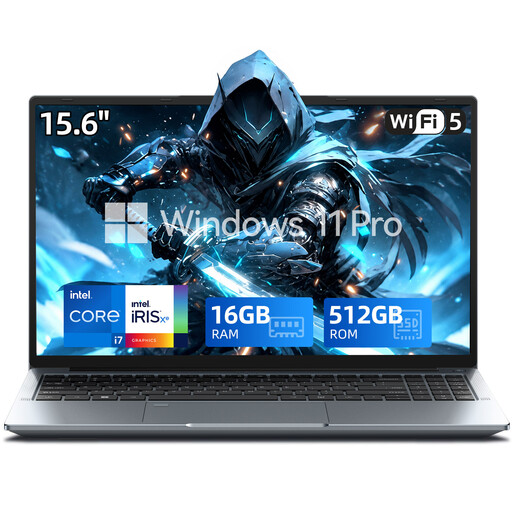
This selection includes a laptop listed as supporting USB-C charging and described as a Windows 11 Pro model. Check Linux support for the specific configuration separately before buying.
 No image available
USB Type-C is listed for charging; check that the charger and cable meet your requirements.
The title specifies an FHD display, 16 GB RAM, a 512 GB SSD and Windows 11 Pro. This doesn’t confirm Linux compatibility; check the exact hardware configuration against the guidance for your distribution.
Yes. Canonical explains how to start Ubuntu from installation media without installing it straight away. Trying it this way doesn’t guarantee that every hardware feature will work in exactly the same way after installation.
Back up your existing data. Canonical recommends making a backup before installing Linux on a computer you already use. Also check the installation steps for your Windows and encryption setup.
Don’t assume so based on the product name alone. Framework’s power-supply guidance for a particular Laptop 13 generation recommends a USB-PD charger rated at least 60 W and specifies 20 V for best charging. For other generations, check their requirements, as well as the cable and what’s included.
Your statutory rights for faulty goods are against the seller and are separate from any voluntary manufacturer’s warranty. Newly purchased goods are generally covered by a two-year period; the remedy available depends on the circumstances of the fault. This doesn’t mean that every Linux installation you carry out yourself will automatically be covered by a voluntary manufacturer’s warranty.