
Lieferung heute & morgen

Qualitätsgarantie

Willkommens-Angebote freischalten: KOSTENLOSE Lieferung | Bis zu 80 % RABATT | Kostenlose 30-Tage-JoyPlus-Testphase
App herunterladen
A modern workstation or gaming setup is more than just a tabletop and four legs. Expectations have risen: ample space for multiple monitors, a clean aesthetic without cable clutter, and an immersive atmosphere are crucial for many users. A gaming desk with LED lighting and integrated ports can meet these needs. This article presents a selection of functional models and provides practical tips to help with your purchasing decision.
The choice of the right desk depends on individual requirements for space, function, and design. The following three points offer guidance.
Before you decide on a model, measure your available space carefully. An L-shaped desk for a home office and gaming setup makes efficient use of corner space and logically separates work and play areas. Ensure the desktop has sufficient depth (at least 60 cm) to maintain a healthy distance from your monitor. Models with a raised monitor shelf can also improve neck posture by positioning the screen at eye level.
An integrated power supply is a key feature of modern desks. A corner desk with power outlets and USB ports reduces the need for extension cords and keeps the surface free of clutter. A gaming table with USB ports allows for convenient charging of controllers, headsets, or smartphones right at your station. Note that integrated outlets are typically designed for low-power devices like monitors and chargers. High-performance equipment should be plugged directly into a wall outlet.
Stability is critical, especially when expensive hardware is placed on the desk. A powder-coated steel frame provides a solid foundation. Desktops with a carbon fibre-look finish are not only visually appealing but also often resistant to scratches and easy to clean. For an organised environment, a computer desk with drawers and shelves is a smart solution. It provides a dedicated place for controllers, games, documents, and accessories.
Based on functionality and features, we have selected three models for different needs.
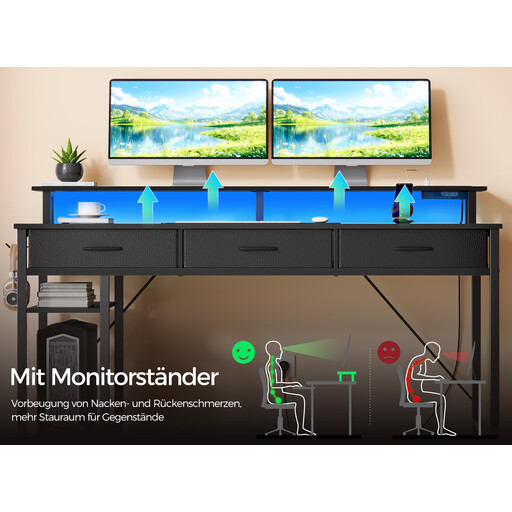
Why It Stands Out This model is a comprehensive workstation that combines connectivity, storage, and customisable lighting. The reversible L-shape allows for flexible adaptation to any room, while the integrated charging station with power outlets and USB ports ensures a tidy setup.
Pros
Who Is It For? For users seeking an all-in-one solution for gaming and home office use. Anyone who needs maximum storage, integrated charging, and a flexible desk layout will find this model to be a great fit.
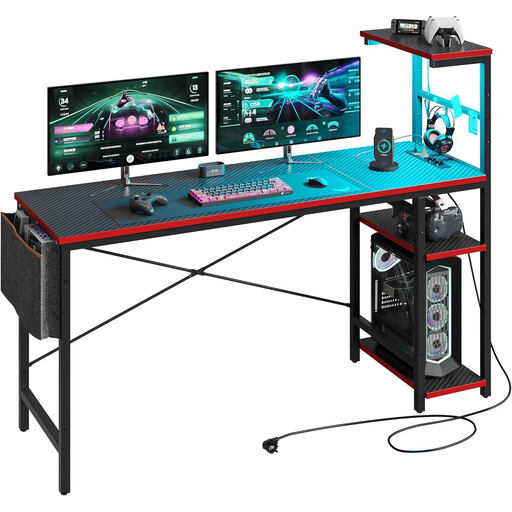
Why It Stands Out The Bestier Corner Desk is a compact solution for smaller rooms without compromising on functionality. It combines a PC desk with lighting and integrated power outlets in a space-saving L-shaped design.
Pros
Who Is It For? Ideal for students, gamers, or home office users with limited space. This model offers the core features of a modern gaming desk in a compact format.
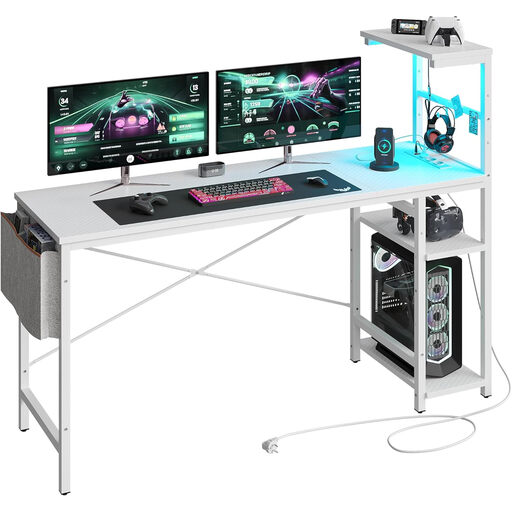
Why It Stands Out This larger version of the Bestier desk offers an expanded 155 cm work surface, making it perfect for multi-monitor setups or extensive accessories. It retains practical features like integrated power outlets and LED lighting.
Pros
Who Is It For? For demanding gamers, streamers, or professionals who need a large, stable work surface for multi-monitor setups and value integrated power and ambient lighting.
Choosing a desk is a very personal decision that depends on many factors. If the models presented here don't exactly match your vision, there are numerous other options to explore.
Discover more models and configurations in our Desk Corner.
1. What should you look for in a gaming desk with LEDs? Look for a sturdy construction (e.g., a steel frame), a sufficiently large and deep desktop, integrated features like power outlets and USB ports, and smart cable management. The LED lighting should be customisable to create the desired atmosphere without being distracting.
2. How important are integrated power outlets and USB ports? Very important for a modern, tidy setup. They minimise the need for external power strips, reduce visible cables, and allow for convenient charging of peripherals directly at your workstation. This contributes to both aesthetics and functionality.