Artists filming detailed videos
If you’re filming a pencil portrait taking shape, check that tonal gradations remain visible and that your hand or the paper doesn’t cast distracting shadows.


Choose a dimmable light that you can position at the side of the paper and secure firmly for a test shot. A small desktop panel saves space; a larger or additional panel gives you more positioning options, but needs more room and a suitable power supply. Before choosing a model, check for shadows, reflections and flicker in your actual camera set-up.
If you’re filming a pencil portrait taking shape, check that tonal gradations remain visible and that your hand or the paper doesn’t cast distracting shadows.
You need a light that fits alongside your camera and drawing materials and can be positioned securely for your chosen shot.
For longer drawing sessions, check whether the light is powered by a built-in battery, mains electricity or separately purchased batteries.
First, check where you can place or attach the light at your drawing desk. Then compare how it looks in a test clip and choose a power supply that suits your planned recording time.
| What matters | What to check before buying | Who should consider this? |
|---|---|---|
| Graphite tonal gradations | Dimming, side positioning and a diffuser; record a test clip using your usual paper and hand position. | If I want to show subtle graphite tones, I check for shadows and reflections in a test clip. Around 36% of consumers put detail reproduction first. |
| Steady video footage | Check the colour temperature and white balance, and record a test clip using your intended camera and dimmer settings. | For longer clips, I want steady footage and a light colour that can be adjusted to match the room lighting. Around 29% of consumers prioritise control over flicker and light colour. |
| Space and positioning | Compare the dimensions, mounting options, included stand and adjustment range with your desk and camera arm. | If space at the drawing desk is limited, I need a light that can be positioned securely alongside my camera and materials. Around 21% of consumers put space requirements first. |
| Power supply | Check the stated battery life, mains operation, compatible batteries and what’s included with the specific offer. | For long drawing sessions, I need a power supply that suits the planned duration. Around 14% of consumers prioritise power for longer recordings. |
Manufacturer specifications won’t tell you which shadows and reflections will show up on the paper in your video at your chosen lighting angle.
Compare test clips of the same drawing, using the same camera position and exposure. Check the brightness controls and positioning too.
Compact panels are easier to fit in, but their specifications don’t prove that they’ll light the whole sheet evenly in your shot.
Measure the paper and available space, then choose between a desktop panel, a larger panel or an additional light.
A larger or additional light may need extra space and a suitable mount.
Rollei says that the batteries intended for use with the LUMIS LED Panel Bi-Color are optional and not included.
Check what’s included with the specific offer and make sure the power supply suits your planned recording time.
The NL-116AI is a compact bi-colour panel with a mini tripod, suited to a small drawing desk.
The LUMIS LED Panel Bi-Color is a larger panel light for a set-up with more space beside the drawing desk.
The P260C Pro is a larger bi-colour panel with a built-in diffuser and several power options.
The P96 Neo Bi-Color is a small, mountable fill light for a cramped desk or the shadowed side of the paper.
The following Joybuy products are compact LED video lights. Check in your actual recording set-up whether the light is bright enough for your whole sheet.
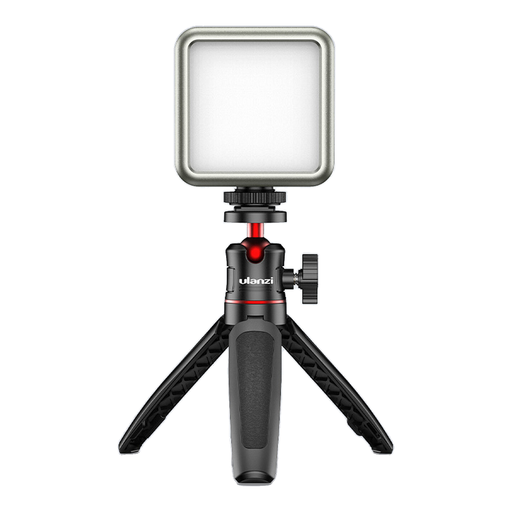 No image available
For a mobile recording set-up, the product title specifies a built-in battery and magnets on the back.
It also lists dimmable brightness and a colour temperature of 2.500–9.500 K.
According to the product title, the built-in battery has a capacity of 2000 mAh.
 No image available
For a portable camera set-up, the product description lists several mounting options.
It specifies dimmable brightness, 2.500–9.000 K, a 3100-mAh battery, a 1/4-inch thread and a cold shoe mount.
According to the description, it weighs 125 g. Battery life of up to 80 minutes is stated at full power.
Position the main light to one side of the paper, then record a short video to check your moving hand, bright areas of paper and dark graphite. If the shadowed side looks too dark, consider adding a weaker fill light. The best angle will depend on the paper and camera position.
No. CRI describes colour rendering; visible flicker can also depend on how the light interacts with your camera settings. Record a clip using your intended frame rate, shutter speed and dimmer setting. If needed, use your camera’s flicker reduction feature.
It depends on the model. According to the manufacturer, the NEEWER NL-116AI has a built-in battery, while the batteries for the Rollei LUMIS LED Panel Bi-Color are optional and not included. Check the specific offer to see whether a stand, power adapter and charging accessories are included too.
The electrical product on offer must meet the relevant EU requirements. CE marking is required where the applicable EU rules specify it for that product. Check the marking and any required accompanying information on the specific offer. The CE mark is not an independent assessment of video quality.
If there’s a fault, remember that your statutory rights against the seller are separate from any voluntary guarantee. A discarded electrical panel should go to a separate electrical waste collection point, not in your household rubbish. Local authority collection points and suitable take-back facilities are options.