
Lieferung heute & morgen

Qualitätsgarantie

Willkommens-Angebote freischalten: KOSTENLOSE Lieferung | Bis zu 80 % RABATT | Kostenlose 30-Tage-JoyPlus-Testphase
App herunterladen
LED strip lights are ideal for indirect room lighting, backlighting your TV, gaming set-ups or creating bespoke interior lighting for your car. However, models can vary considerably in how they’re controlled, how their light is distributed, their IP rating and how they’re installed. A high number of LEDs or ‘millions of colours’ alone tells you little about whether a strip light is right for your needs.
The points below can help you avoid common buying mistakes and choose the right option for your home, home cinema or car.
A classic RGB LED strip mixes red, green and blue, and usually displays a single colour along the entire strip. An RGBIC LED strip, on the other hand, can display several colours at once, provided its controller supports this feature. This makes colour gradients, chase effects and segmented animations possible.
So, if you’re looking for dynamic scenes for gaming or music synchronisation, check that the product is specifically described as RGBIC or has a comparable segmented control system. ‘Dreamcolour’ on its own is not a consistent technical standard.
A self-adhesive LED strip sticks most reliably to a dry, smooth surface that’s free from dust and grease. Textured plaster, untreated wood and dusty furniture edges can all affect adhesion. Plan the full route before installation. Don’t bend the strip sharply around corners unless the manufacturer provides suitable corner connectors.
You’ll also need to consider heat from the power supply. Don’t cover it or use it in a cramped, poorly ventilated space.
An IP20 rating is intended for dry indoor spaces. A model rated IP44 is protected against splashes from certain directions, but isn’t suitable for immersion in water. So, IP44 doesn’t automatically make an LED strip suitable for permanently exposed outdoor areas or damp zones.
Before buying, make sure the IP rating is right for where you plan to install the strip. For kitchens, bathrooms and patios, you should also follow the manufacturer’s specific guidance.
First, measure the area where you plan to install the strip, allowing a little extra for connections and curves. Common lengths include 2 m, 5 m or several sections connected together. You should only cut an LED strip at clearly marked cut points. Cutting it elsewhere can damage the circuit tracks and controller.
Check the power supply too. A 5 m model’s power consumption can vary depending on its LED technology and brightness. Make sure the power supply, input voltage and connection are compatible. For automotive products, the specified 12 V DC supply is particularly important: connecting the strip to an unsuitable power source can damage its components.
RGB creates colourful lighting effects, but it doesn’t always provide practical white light. If you also want to use your strip for neutral or warm lighting, look for RGBCCT or a clearly stated white-light function.
Brightness is measured in lumens. For example, the Hama neon LED strip is listed as having 300 lm, a colour temperature of 2.700 K for warm white and a maximum power consumption of 24 W for 5 m. Dimming can help you adjust the brightness to suit different situations, but make sure it’s supported via the remote, app or compatible smart home platform.
An LED strip with app control lets you manage colours, brightness, scenes and schedules from your smartphone. Bluetooth is generally suited to a local connection at short range. A Wi-Fi LED strip can be controlled from further away, depending on the app and network. Many models only connect to 2.4 GHz Wi-Fi, so a 5 GHz-only network won’t be enough.
Matter LED strips can be added to compatible smart home systems from different providers. Even so, check which platforms are specifically supported before you buy. Matter compatibility doesn’t automatically mean that every feature will be available in every app.
The products below vary in their intended use and features. The details are based on the information provided for each product.
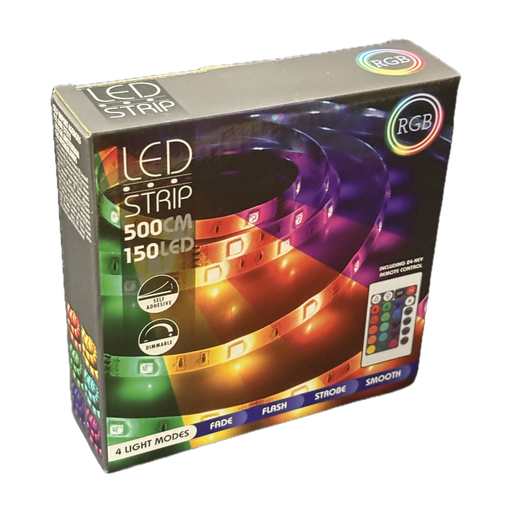
Why it suits this profile: This 5 m RGB strip comes with an infrared remote and is suitable for dry indoor spaces, shelves, furniture or simple TV backlighting.
You can operate it without having to set up an app. Its stated IP20 rating makes it clear that it’s intended for dry rooms.
5 m length, dimmable brightness, self-adhesive backing and a 24 V power supply, according to the product details.
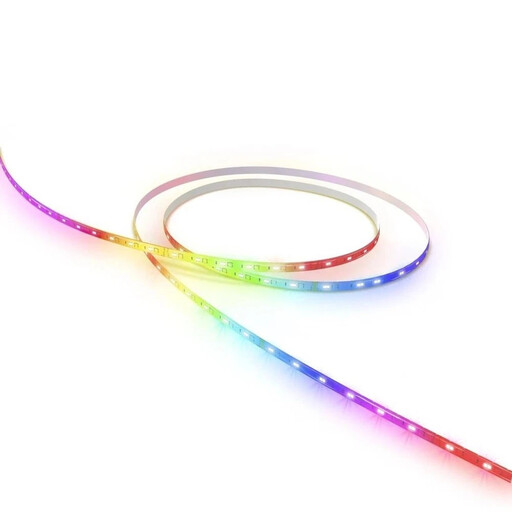
Why it suits this profile: For smart home users who want to combine RGB colours and adjustable white light with Matter, Wi-Fi, app and voice control.
The specifications list RGBCCT, 2.700–6.500 K, IP20 and marked cut points. This makes it easier to plan how you’ll use the strip before buying.
Matter and Wi-Fi support, stepless dimming, scenes, schedules and the option to cut the strip at marked points.
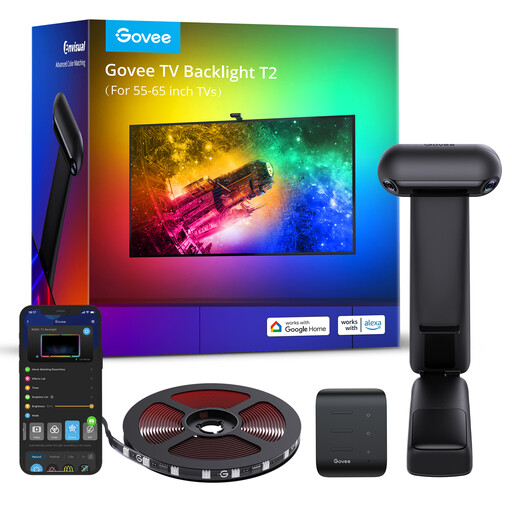
Why it suits this profile: This set is designed for 55 to 65-inch TVs and offers RGBIC effects, app control and camera-based colour matching for TV and gaming content.
The recommended TV size is clearly specified. The product information also states that the strip must not be cut, helping you avoid planning mistakes before installation.
Dual cameras, RGBIC technology, music synchronisation and control via the Govee app, Alexa and Google Assistant.
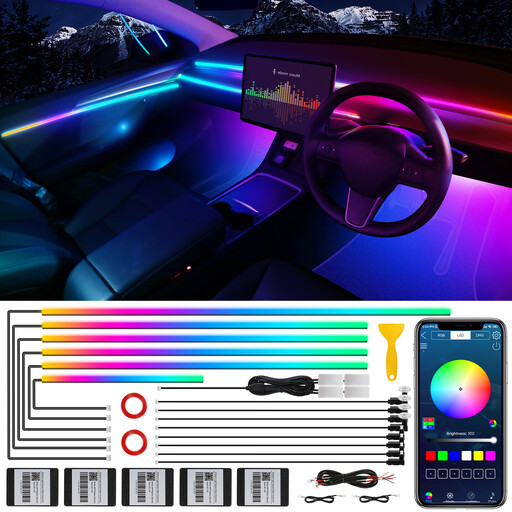
Why it suits this profile: This 10-in-1 set is designed for 12 V interior car lighting, with sections for the doors, dashboard and footwells.
The 12 V operating voltage, permitted operating temperature of −20 to 60 °C and separate zone control are all clearly specified.
600 LEDs, Bluetooth app, dual-zone control, touch button and built-in sound sensor, according to the product description.
We’ve put together a complete, regularly updated list of products that meet these strict selection criteria and fully comply with the safety regulations in force in the EU.
Its actual lifespan depends on LED quality, how long it’s used, heat dissipation, the power supply and how it’s installed. Without specific information from the manufacturer, there’s no reliable way to give a general lifespan. Running strips while rolled up or covering the power supply can increase heat build-up.
It depends on the strip’s length, voltage, LED density, brightness and how long it’s used. A model with a maximum power consumption of 24 W uses 0,024 kWh per hour when running at full power. Consumption may be lower when dimmed; check the details on the product and power supply.
No. The model needs app control via Bluetooth, Wi-Fi or a compatible smart home standard. Before you buy, check the operating system, Wi-Fi band required, app and supported voice assistants. A basic RGB strip with an infrared remote won’t automatically offer this feature.