
Lieferung heute & morgen

Qualitätsgarantie

Willkommens-Angebote freischalten: KOSTENLOSE Lieferung | Bis zu 80 % RABATT | Kostenlose 30-Tage-JoyPlus-Testphase
App herunterladen
The search for the right notebook can quickly become overwhelming. Marketing buzzwords make big promises, but they often hide technical compromises that only become apparent in daily use. Especially with premium devices like the Lenovo IdeaPad Slim 5 16-Inch, understanding the specifications is crucial to making an informed decision. This guide will help you avoid common purchasing pitfalls and identify the features that truly matter.
Before you make a purchase, you should be aware of three common marketing traps that often lead to disappointment:
To make a future-proof investment, you should focus on three core technical areas. These define the actual performance and user experience of a modern laptop.
The latest generation of processors, like the Intel Core Ultra 5 Laptop, marks a turning point. These chips integrate not only a CPU (Central Processing Unit) and a GPU (Graphics Processing Unit) but also an NPU (Neural Processing Unit). This NPU is specifically optimised for AI tasks and forms the foundation of so-called Copilot+ PCs. When you buy a Copilot+ PC, you are investing in a platform that is ready for future AI-powered software features. This allows for more efficient execution of tasks like real-time translations, intelligent photo editing, and proactive system optimisations without heavily draining the battery.
For users who value visual quality, a 16-inch OLED notebook is a clear recommendation. Unlike conventional IPS displays, OLED panels do not require a backlight. Each pixel illuminates itself. The result:
Such a display makes a significant difference not only for media consumption but also for editing photos and videos.
A modern notebook should be fast not only internally but also externally. A Wi-Fi 7 laptop offers decisive advantages here. The new standard enables higher speeds, significantly lower latency, and a more stable connection in crowded networks—ideal for the home office, university, or public places. Paired with fast and ample storage, like a Lenovo IdeaPad 1TB SSD, you are guaranteed quick system boot-ups, short program load times, and enough space for all your data and projects. This combination is a key factor for a smooth and productive workflow and contributes to the perception of a laptop with long battery life, as the system operates more efficiently.
Choosing the right laptop depends heavily on individual needs. Here are some models tailored to specific user profiles.
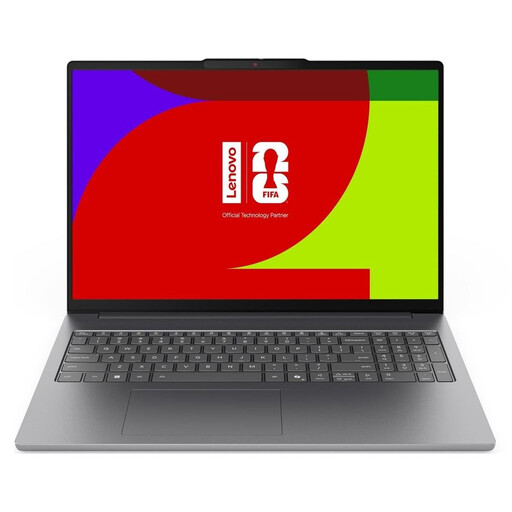
Why This Fits Their Persona: This model (83S60033GE) is ideal for users who are always on the go. It combines a low weight of just 1.69 kg with an exceptionally long battery life (according to the manufacturer) and the future-proof performance of a Copilot+ PC. Perfect for long days at university or on business trips.
It avoids the pitfalls through transparency: The brilliant 16-inch OLED notebook display, the efficient Intel Core Ultra 5 laptop processor, and the clear specification of the battery capacity (60 Wh) provide a solid basis for performance evaluation.
The combination of Wi-Fi 7, a large 1TB SSD, and the NPU for AI functions makes it an extremely future-proof choice. The long battery life is a crucial advantage for mobile users.
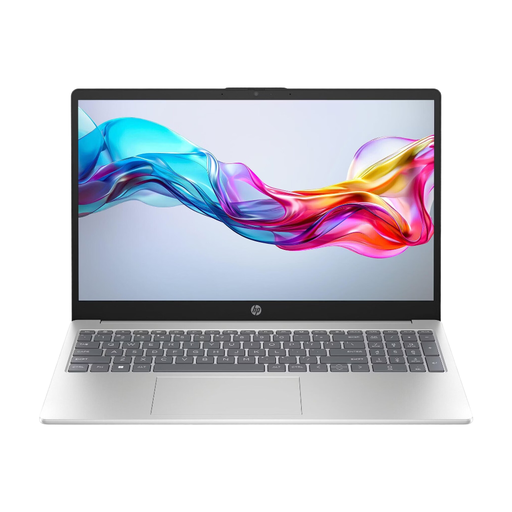
Why This Fits Their Persona: For users looking for a reliable device for everyday tasks like browsing, emails, and streaming. It offers modern features with an Intel Core 5 processor and sufficient storage at an attractive price.
This model relies on proven standards: a solid Full HD IPS display instead of a low-quality panel, and an efficient current-generation processor instead of an outdated, power-hungry chip.
A well-balanced overall package for daily use. The combination of Wi-Fi 6E, a solid battery life of up to 10.5 hours (according to the manufacturer), and a lightweight chassis makes it a dependable companion.
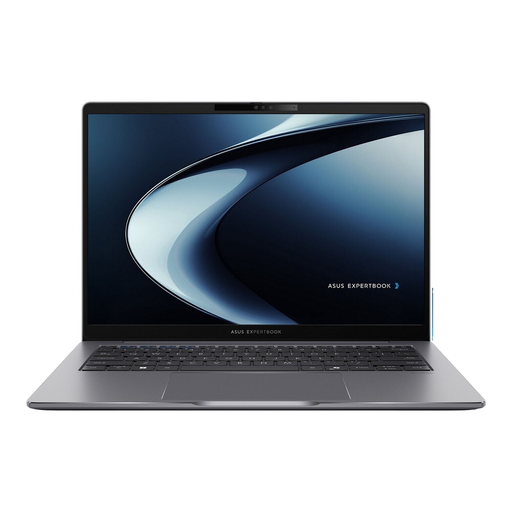
Why This Fits Their Persona: Designed for professional users who need a compact yet powerful work machine. The high-resolution 144 Hz WQXGA display, Windows 11 Pro, and extensive connectivity options, including an RJ45 port, are built for productivity.
It focuses on specifications that matter in a business context: a display that shows more detail (WQXGA), a powerful H-series processor for demanding applications, and an operating system with advanced security and management features.
With a 2560 x 1600 pixel resolution and 144 Hz refresh rate, the display is often superior to competitors in this size class. The low weight of 1.4 kg and the robust aluminium chassis make it an ideal companion for business travel.
We have compiled a complete, real-time updated list of products that fully meet these strict selection criteria and German safety regulations.
A Copilot+ PC is a computer equipped with a powerful Neural Processing Unit (NPU) capable of at least 40 TOPS (Trillion Operations Per Second). This hardware is designed to run AI functions directly on the device instead of in the cloud, enabling faster and more private AI applications. Whether you need one depends on your usage. If you plan to use future AI-powered software for productivity, creativity, or communication, a Copilot+ PC like the Lenovo IdeaPad Slim 5 16-Inch is a future-proof investment.
For the 83S60033GE model, Lenovo states a battery life of up to 29.4 hours for local video playback. In real-world daily use, with a mix of web browsing over Wi-Fi, office applications, and medium screen brightness, you can expect a significantly lower but still very long runtime. The actual duration heavily depends on the running applications and system settings. However, thanks to the efficient Intel Core Ultra 5 processor and the 60 Wh battery, it is designed as a laptop with long battery life.
The decision depends on your priorities. If you work extensively with visual media (photo editing, video production), want to enjoy movies and series in the highest quality, or simply value excellent image quality with deep blacks and vibrant colours, the extra cost for a 16-inch OLED notebook is generally justified. For primary office work and web browsing, a high-quality IPS display can also be sufficient, but the visual difference compared to OLED is immediately noticeable.