Level designers who use lots of editor windows
If you need the viewport, hierarchy and tools visible at the same time, usable screen space, resolution and the layout of windows in your editor all matter.


Choose based on the task that most often holds you back: 4K and suitable colour modes for assessing details and scenes, ultrawide for editor windows side by side, or a higher refresh rate for playtesting in motion. Also check readability at your chosen scaling, desk space, adjustability and your computer’s ports; manufacturers’ specifications are no substitute for checking how a monitor works in your own setup.
If you need the viewport, hierarchy and tools visible at the same time, usable screen space, resolution and the layout of windows in your editor all matter.
If you assess fine image details and colour palettes, choose a colour mode to suit your project rather than relying on a colour-gamut percentage alone.
For regular tests involving movement, a higher refresh rate may matter more than extra editor width. It also depends on what your computer and connection can actually output.
| Priority | What to check before buying | Who it matters most to |
|---|---|---|
| Space for the viewport and tools | Compare pixel dimensions, aspect ratio and screen width, and check readability at your intended scaling. | If I need to see the viewport, hierarchy and tools at the same time, usable width matters most to me. Around 37% of consumers put workspace at the top of their list. |
| Detail and colour reproduction | Check the colour gamut you need, the available colour modes and the calibration documentation for the specific model. | When working with textures and lighting, I want to assess detail and choose a colour mode to suit my project. Around 27% of consumers prioritise detail and colour. |
| Ergonomics and ports | Check the stand’s adjustability and footprint, and make sure they meet your computer’s video output and charging needs. | If I work at a screen for long periods or want to connect my laptop, the position and connection need to suit my setup. Around 18% of consumers prioritise ergonomics and suitable ports. |
| Playtesting in motion | Compare the refresh rate at your desired resolution and through the intended input with the frame rate your setup can achieve. | If I regularly check movement in a running game, refresh rate matters more to me than extra editor width. Around 18% of consumers make playtesting their main priority. |
An ultrawide can make it easier to arrange windows side by side, but depending on the model, it may offer fewer vertical pixels than a 4K display. Its usefulness depends on how your editor arranges panels and the viewport.
Compare your actual window layout and the dimensions of the screen and stand with the space available on your desk.
A wider display may take up more desk space.
The models covered offer different colour modes. A percentage on its own doesn’t tell you which mode suits your project’s output requirements.
Set your colour target, then check the relevant mode, calibration documentation and how the display looks in your own setup.
Power Delivery output varies by model, and the capabilities of the connected computer and cable matter too.
Check your specific laptop’s video output, cable and charging needs against the monitor’s ports.
Your statutory rights are with the seller, while a warranty is subject to voluntary terms and conditions.
Check the warranty terms separately and keep your proof of purchase and any stated product specifications.
The DesignVue PD2706U is a 27-inch 4K option with different colour modes for assessing detail and colour.
The ProArt PA279CRV is a 27-inch 4K model with several colour modes for different project requirements.
The LG 34WN80C-B is a 34-inch ultrawide option with a 21:9 aspect ratio and 3440 × 1440 pixels.
According to Dell, the UltraSharp U2725QE combines a 27-inch 4K display with a Thunderbolt hub and 120 Hz refresh rate.
This selection includes 4K models for detailed work, a 21:9 ultrawide for arranging editor windows side by side, and models with higher refresh rates for frequent playtesting.
 No image available
For fine level details and multiple sources or a compatible laptop, the stated 4K resolution and PIP/PBP may be useful.
The product name or specifications list 27 inches, IPS, 3840 × 2160 pixels, 120 Hz and USB-C with 90 W Power Delivery.
 No image available
If you combine detailed work with frequent playtesting, the product name specifies 4K UHD resolution and 240 Hz.
The specifications list 32 inches, 3840 × 2160 pixels, 240 Hz and USB-C with 98 W Power Delivery.
 No image available
For a combination of 4K detail and frequent playtesting, the product name specifies 240 Hz.
The specifications list 32 inches, 3840 × 2160 pixels, 240 Hz and USB-C with 90 W Power Delivery.
 No image available
If you want the viewport and editor tools visible side by side, the stated 21:9 format suits this way of working.
The product name specifies 34 inches, 3440 × 1440 pixels, 100 Hz and a VA panel.
 No image available
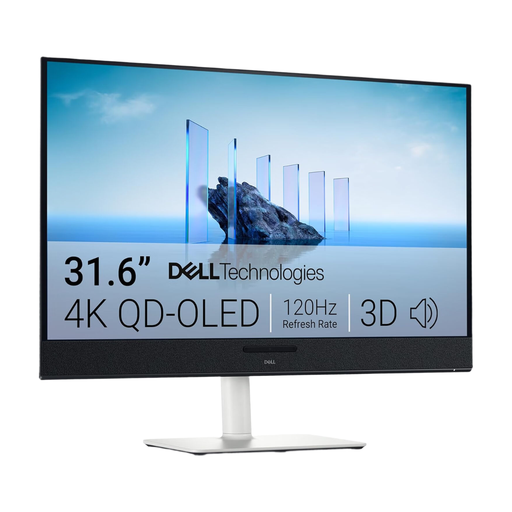
The product name specifies a 4K UHD display for detailed work; also check that its size and positioning suit your setup.
The product name specifies 31.6 inches, 3840 × 2160 pixels and QD-OLED.
No. Choose based on readability, the window layout you need and the amount of detailed work you do. The examples covered include an ultrawide model with 3440 × 1440 pixels and 4K models with 3840 × 2160 pixels. In particular, test the scaling of your editor interface.
Only if your laptop and cable support the video transfer you need and provide enough charging power. BenQ specifies 90 W for the PD2706U and ASUS specifies 96 W Power Delivery for the PA279CRV; these manufacturer specifications don’t confirm compatibility with your laptop.
Adjust the position and display to suit your viewing distance, body and, if applicable, your glasses. Germany’s Federal Institute for Occupational Safety and Health recommends coordinating your workstation, visual aids and screen position. Check that the stand and available space allow you to make the adjustments you need.
When you buy online as a consumer, you generally have a 14-day right to cancel. If goods are faulty, your statutory rights against the seller are separate from any voluntary warranty; the Verbraucherzentrale explains these rights separately.
Not simply because you work from home. ASR A6 sets out employers’ duties for workplaces and teleworking, among other things, but excludes screen use in private homes outside such teleworking arrangements from its scope. Whether a workplace qualifies as a suitably equipped teleworking workplace depends on the specific circumstances.