What should you consider when choosing?
Start with the part of your work that needs the most space or coordination. Then check that the format, setup and connections suit your shared office and the computers you use.
| Criteria |
What to look for when buying |
Who it matters most to |
| Editor overview |
Consider window layout, aspect ratio, visible screen height and desk width together. |
If I want to see my tools, hierarchy and preview at the same time, the screen width needs to fit the available space. Around 33% of consumers put an overview of the level editor first. |
| Colour workflow |
Match the colour mode and profile to your output target; agree on who will manage the settings on a shared computer. |
For consumers assessing textures or lighting against a set output target, a suitable workflow is essential. Around 27% prioritise their colour workflow. |
| Desk setup |
Check the stand, adjustability and reflections at the desk where the monitor will actually be used. |
If several people use the same desk, I want to be able to adjust the screen to suit my seating position and the lighting. Around 20% of consumers put desk setup first. |
| Switching computers and previews |
Check the video output, cables, USB data connection and charging requirements for each computer; the computer and application must also support any higher refresh rate. |
If I switch between computers or check movement in a preview, I need suitable connections and a usable refresh rate. Around 20% of consumers prioritise this need. |
Monitors for level design at Joybuy
The selection ranges from QHD and 4K displays to a 40-inch 21:9 model and portable Full HD screens. Consider which screen area and setup suit your editor and shared workspace.
 No image available
Z-Edge AGEX, 27-inch QHD monitor
If a higher refresh rate matters for game previews, this model offers a QHD option. Check that your computer and application support the refresh rate you want.
2560 × 1440 pixels, 144 Hz, Fast IPS panel and FreeSync. The product details also list a height-adjustable stand, DisplayPort and HDMI.
View at Joybuy
 No image available
INNOCN 40C1U, 40-inch 21:9 monitor
If you need space for several editor windows side by side, this wide format could give you the working area you need. Check that a 40-inch monitor will fit on your desk first.
5120 × 2160 pixels, IPS panel and 100 Hz. The product details also list USB-C with 65 W Power Delivery, PIP/PBP and a height-adjustable stand.
View at Joybuy
 No image available
INNOCN CB27U1, 27-inch 4K monitor
If you want to assess image detail at a high native resolution, this 27-inch 4K model is one option. The colour mode and profile should match your output target.
3840 × 2160 pixels, IPS panel and 120 Hz. The product details also list USB-C with 90 W Power Delivery, PIP/PBP and a height-adjustable stand.
View at Joybuy
 No image available
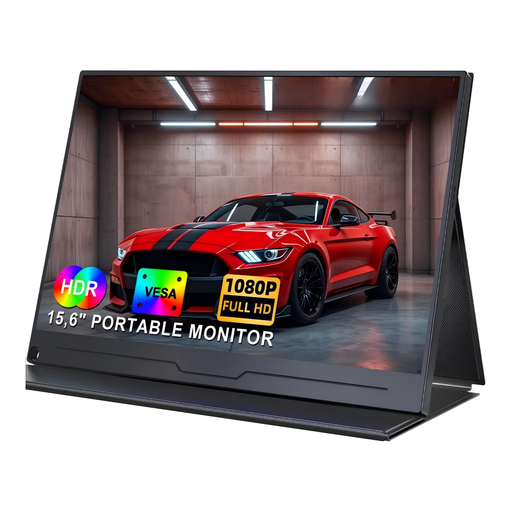
UPERFECT portable monitor, 15.6-inch, Full HD
A portable screen could work as an extra display when you need to move between locations. Its smaller working area offers less room for editor windows than a wide desktop display.
IPS panel, 1920 × 1080 pixels, USB-C and HDMI. VESA mounting is listed in the product details.
View at Joybuy
 No image available
UPERFECT portable monitor, 15.6-inch, 100% sRGB
If you’re looking for a portable second screen and sRGB matters to your workflow, check that the colour mode and profile suit your output target. The 15.6-inch Full HD screen is smaller than a desktop monitor.
The product details list 1920 × 1080 pixels, an IPS panel and 100% sRGB. They also mention USB-C, Mini HDMI, an adjustable integrated stand and VESA compatibility.
View at Joybuy
Frequently asked questions
Is an ultrawide or 4K monitor better for level design?
It depends on whether you value side-by-side windows or a detailed native-resolution view more. The AOC CU34P3CV is listed at 3440 × 1440 pixels; according to ASUS, the ASUS PA279CRV offers 3840 × 2160 pixels. Also check your desk width, preview size and text scaling.
Is one USB-C cable enough for a shared office laptop?
Only if the laptop, monitor and cable support the video transmission you need, and the charging power is sufficient for the laptop. AOC lists up to 65 W for the CU34P3CV, while ASUS lists 96 W for the PA279CRV. These figures apply to the respective models, not to every computer you might connect.
What should I check when setting up a monitor in a shared workspace?
Position the screen for the actual seating position and check for reflections under the lighting in that space. Workplaces covered by Germany’s Workplace Ordinance must meet requirements for workstation design and the prevention of distracting glare and reflections. The Federal Institute for Occupational Safety and Health provides further guidance through ASR A6; the employer is responsible for designing the workplace.
What rights apply when buying a monitor in Germany?
For a standard consumer purchase, the seller is generally responsible for ensuring the goods are free from defects at the time of delivery for two years; this is separate from any voluntary manufacturer’s guarantee. Consumers generally have a 14-day right to cancel an online purchase. The German Consumer Advice Centre explains these rights; different contractual arrangements may apply when the employer makes the purchase.
How can I compare monitor power consumption?
Compare the figures on the EU energy label in kWh per 1,000 hours of use. Your actual electricity costs will also depend on how long you use the monitor and your current electricity tariff, so the label alone won’t give you an individual cost.


