For frequent note-takers and source organisers
If you add or sort lots of titles and notes, look for a comfortable typing experience and a screen that makes it easy to read your list and sources.


If you’ll mainly be typing up entries and comparing sources, a good keyboard, an easy-to-read display and enough space on the library desk usually matter more than maximum processing power. Then consider portability, working away from a socket and software compatibility. A touchscreen convertible is most useful if you want to interact directly with the screen or write by hand. Manufacturers’ battery-life claims don’t guarantee how long your library session will last.
If you add or sort lots of titles and notes, look for a comfortable typing experience and a screen that makes it easy to read your list and sources.
If you often change desks or can’t count on having a socket nearby, compare the weight and dimensions of the exact configuration, and consider battery life in the context of realistic usage scenarios.
If you need a particular application or want to work on your list without Wi-Fi, first check that your exact workflow will work with the operating system and files you need.
Start by checking the typing experience and screen readability, then consider portability and whether your software will be available without an internet connection.
| What matters | What to check when buying | Who should pay particular attention? |
|---|---|---|
| Typing and readability | Compare the keyboard layout, screen finish, resolution and dimensions of the exact model. | If I’m writing longer entries and reading sources alongside my list, I want a suitable keyboard and an easy-to-read display. Around 29% of consumers prioritise typing and readability. |
| Portability and battery | Check the weight of the actual configuration, as well as the conditions and usage scenarios behind the battery-life figures. | If I often take my device with me or work without a reliable socket nearby, weight and enough battery reserve matter. Around 22% of consumers prioritise portability and battery life. |
| Software and offline access | Check the system requirements for the application you need. If you use Drive, make the necessary files available offline in advance and test them. | If my reading list depends on a particular application or on files being available without Wi-Fi, I check these features before buying. Around 21% of consumers prioritise software and offline compatibility. |
| Quiet working | Look for noise measurements for the exact configuration under a comparable workload. | If I’m working at a quiet library desk, I want to know how loud the laptop is likely to be in the relevant usage scenario. Around 14% of consumers prioritise working with minimal disruption. |
| Total cost and accessories | Check what’s included and the product’s condition. Don’t confuse your statutory rights with a voluntary warranty. | If I’m planning my budget, including any accessories I need, I want to know what’s included before I buy. Around 14% of consumers put total cost first. |
Lenovo notes that actual battery life depends on factors including configuration, usage, wireless connectivity and screen brightness. Apple gives different maximum figures for the MacBook Air depending on whether it’s tested for video streaming or wireless web browsing.
Compare battery-life claims with their test conditions in mind, and leave yourself some extra charge for working in the library.
The term ‘touchscreen’ alone doesn’t confirm stylus support or that a compatible stylus is included.
Check stylus support and what’s included for the exact model. If you’ll mainly be typing, prioritise the keyboard and display first.
If you want to write by hand, you may also need a compatible stylus. Check whether one is included with the model you’ve chosen.
Lenovo offers different memory and display options in the IdeaPad ranges mentioned here. For the 13-inch MacBook Air M5 with 16 GB of memory and a 512 GB SSD, Joybuy doesn’t list a power adapter as included.
Check the full model number, keyboard layout and what’s included with the exact version you’re buying, rather than relying on the model range name alone.
If you need a compatible charger, check in advance whether you already have one or will need to buy one separately.
The IdeaPad Slim 3 range includes examples of traditional laptops and Chromebooks.
The Vivobook 14 X1407QA is an example of a compact Windows laptop with a matte-screen option.
The 13-inch MacBook Air with M5 is a macOS option if your workflow is compatible with macOS.
The OmniBook 5 Flip 14-fp0765ng is an example of a convertible with a touchscreen.
The following Joybuy models include touchscreen convertibles and traditional Windows laptops for writing entries and working with sources.
 No image available
An option if you want a touchscreen and convertible design for your work.
14-inch touchscreen, Windows 11 Home, 32 GB of memory, 1 TB SSD, 2.8K OLED display and a weight of 1,34 kg.
 No image available
The 2-in-1 design is a good fit if you want to switch between laptop mode and other screen positions while you work.
15,6-inch FHD IPS touchscreen, 8 GB DDR4 memory, 512 GB SSD, 5.000-mAh battery and backlit keyboard.
 No image available
A traditional laptop option if you want to work on your reading list in Windows.
16-inch FHD IPS display, Windows 11, 16 GB DDR4 memory, 1 TB SSD and a weight of 1,8 kg.
 No image available
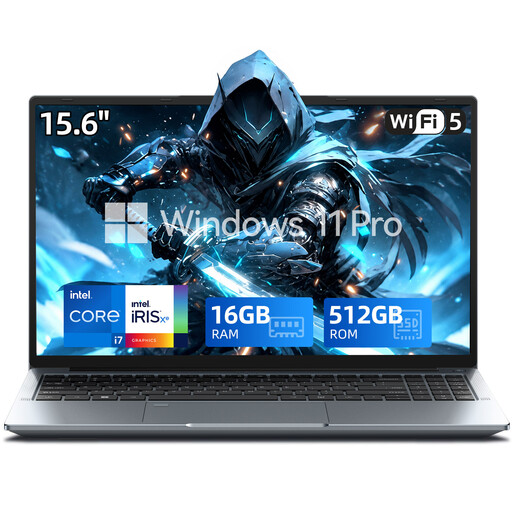
An option if you’re looking for a laptop with Windows 11 Pro for working on your reading list.
15,6-inch FHD display, Intel Core i7-1255U, 16 GB of memory, 512 GB SSD and USB Type-C.
Some Drive files, including Google Docs and Sheets, can be used offline. Mark the files you need as available offline beforehand, and check that you can access them before your library visit. Google notes that some apps don’t work offline, and changes will sync once you reconnect.
No. A touchscreen alone doesn’t confirm stylus support. Check whether a compatible stylus works with the exact model and whether it’s included. HP describes the OmniBook 5 Flip as a touchscreen device, but that alone doesn’t mean a stylus is included.
For consumer purchases in the EU, the statutory two-year legal guarantee generally applies to the seller, not the manufacturer. An additional voluntary warranty doesn’t replace it; the circumstances of the fault and the specific purchase contract still matter.
The German Federal Network Agency includes CE marking, product traceability, manufacturer details and German instructions with the required information among the areas it checks when monitoring the market. This description of the authority’s checks doesn’t amount to a conformity assessment of any particular laptop.
According to the Verbraucherzentrale, online purchases generally come with a 14-day right to cancel, which you must communicate to the other party to the contract. Check the terms of your specific purchase contract, and distinguish cancelling the contract from your rights if the product is faulty.