What to look for when buying
Desk microphone with USB or USB/XLR
A good fit if: the seated speaker can stay comfortably close to the microphone and record directly to a computer.
Things to consider: Keep the speaking direction and distance as consistent as possible. XLR requires a suitable microphone input.
Lavalier microphone
A good fit if: the person telling their story may move their head or would rather not have a microphone on the table in front of them.
Things to consider: The connection, power supply and attachment need to suit both the recording device and the clothing.
Portable recorder with built-in microphones
A good fit if: you want to record without a computer running.
Things to consider: At greater distances, more room ambience may be picked up. Make sure storage, power and positioning are all sorted before you start.
When recording someone who is seated, your choice mainly depends on whether they can stay close to a desk microphone, whether they’ll be recording directly to a computer, or whether they need more freedom to move or want to record without a computer.
| Buying priority |
What to look for |
Who will find this most important? |
| Clear speech |
Check the pickup pattern and whether the microphone can be positioned comfortably nearby; listen to a test recording from the actual seat. |
If the voice matters more to me than the room sound, I look for a suitable direction and close working distance. Around 33% of consumers prioritise speech clarity at the recording location. |
| Easy connection |
Check the computer’s USB connection, as well as the cable and headphone monitoring. For XLR, make sure you have a suitable microphone input. |
I want a straightforward computer setup that lets me monitor the signal during the conversation. Around 27% of consumers prioritise an easy connection. |
| Freedom to move |
For a lavalier, check the 3.5 mm TRS connection or a compatible transmitter; test the attachment and clothing during a trial recording. |
If I lean back or move my head while telling a story, I don’t want to keep thinking about staying in a fixed microphone position. Around 20% of consumers prioritise freedom to move. |
| Recording without a computer |
Check where the built-in microphones will sit in relation to the speaker; prepare storage and power before the conversation. |
If I want to record in different locations without a computer, I need a device that can record on its own. Around 20% of consumers prioritise recording at the conversation location. |
Joybuy products
This selection includes desk microphones for a seated speaker and lavalier microphones for greater freedom to move. For each model, check that the connections, cables and any other components you need are compatible with your recording device.
 No image available
FIFINE K688CTW USB/XLR dynamic microphone with boom arm, white
Directional recording and the boom arm suit a desk setup where the seated speaker faces the microphone.
USB and XLR connections; headphone monitoring and controls are specified for USB. The XLR cable is not included, and the controls are inactive in XLR mode.
View at Joybuy
 No image available
FIFINE AM8 USB/XLR dynamic microphone with desktop tripod
The desktop tripod and USB connection suit recording at a computer while seated, as long as the speaker faces the microphone.
USB and XLR connections; headphone monitoring and a mute button are listed for USB. The XLR cable is not included; RGB lighting and controls are inactive in XLR mode.
View at Joybuy
 No image available
Dynamic USB/XLR microphone set with desktop tripod
The desktop tripod is designed for recording at a computer while seated, with the speaker facing the microphone.
USB and XLR connections; headphone monitoring and gain control are listed for USB. The product description recommends a speaking distance of 2–6 inches.
View at Joybuy
 No image available
Wireless lavalier microphone set with two transmitters, 2.4 GHz, USB-C and Lightning
The two transmitters and clip-on microphones are designed for a two-person conversation where both speakers can move as they talk.
The product details list 2.4 GHz and USB-C and Lightning connections. Before using it in Germany, check the frequency and conditions for the specific system; the Bundesnetzagentur’s general allocation of April 2026 lists certain frequency bands and operating conditions.
View at Joybuy
 No image available
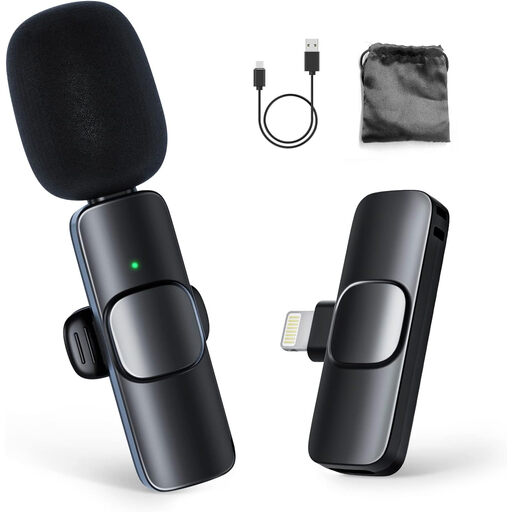
Moman CP1A wireless lavalier microphone for iPhone, 1TX&1RX
A lavalier microphone could be a good option if the seated speaker needs to move their head rather than stay facing a desk microphone.
The product description lists one transmitter and one receiver and says it connects to an iPhone or iPad. Check that the receiver is compatible with your specific recording device.
View at Joybuy
Frequently asked questions
How should I position a microphone for a seated conversation?
Point a cardioid microphone towards the speaker and listen to a short test recording through headphones from the actual seat. If they can’t comfortably keep the same distance from a desk microphone, consider a suitably connected lavalier. Distance from the voice is still important when using a recorder on a tripod.
Do I always need an audio interface for a USB/XLR microphone?
No, not if the specific model connects to a compatible computer via USB. For the analogue XLR connection, you’ll need a suitable microphone input. Check the features for each connection separately: FIFINE identifies the AM8’s listed monitoring and controls as USB features.
What should I check about what’s included and what to do if something is faulty?
Before buying, check whether you already have a tripod, cables, memory card, headphones or an interface, and whether any of these are included with the specific product. In Germany, the seller’s statutory liability for defects is distinct from a voluntary guarantee. If there’s a fault, the first step may be to request a repair or replacement. Verbraucherzentrale explains the difference.
Can I simply record someone else’s life story in Germany?
Recording another person’s words spoken in private without authorisation is prohibited: § 201(1) of the German Criminal Code (StGB) makes this a criminal offence. Get the speaker’s consent before you start; any later publication or sharing is a separate matter to consider. The provision is set out in the text of the law available from the Federal Ministry of Justice and the Federal Office of Justice.
Can I use any wireless lavalier microphone in Germany without checking anything first?
You can’t assume this applies to every system. The Bundesnetzagentur’s general allocation of April 2026 specifies certain frequency bands, along with technical and operating conditions. Check the frequency band and conditions for the specific wireless system; a wired Lavalier GO is not itself a wireless transmitter.


