
Lieferung heute & morgen

Qualitätsgarantie

Willkommens-Angebote freischalten: KOSTENLOSE Lieferung | Bis zu 80 % RABATT | Kostenlose 30-Tage-JoyPlus-Testphase
App herunterladen
In competitive gaming, the right equipment can make all the difference. A lag-free, precise, and lightweight mouse isn't a luxury—it's a necessity for swift reactions and pinpoint manoeuvres. A heavy or cumbersome mouse can lead to fatigue and hinder your performance.
This guide is designed to demystify the technical specifications and assist you in selecting a suitable lightweight wireless gaming mouse. We will present objective criteria and a selection of models with different specialisations to provide you with a solid basis for an informed decision.
Choosing the right mouse depends on individual preferences and playstyle. However, three technical aspects are particularly relevant for performance.
An ultra-lightweight gaming mouse (typically under 70 grams) reduces inertia and the effort required for quick movements. This allows for faster changes in direction and lessens wrist fatigue during long gaming sessions. The shape of the mouse should match your grip style (Palm, Claw, or Fingertip Grip). Symmetrical models are often also suitable as a left-handed mouse, while ergonomically shaped mice are tailored to the anatomy of the right hand.
The sensor is the heart of any gaming mouse. Modern sensors like the PAW3395 sensor offer high resolution (measured in DPI) and flawless tracking. A 26000 DPI mouse provides immense sensitivity, though most gamers prefer settings between 400 and 3200 DPI. More important is the polling rate, which indicates how often the mouse reports its position to the computer. A 4K polling rate mouse (4000 Hz) updates its position every 0.25 milliseconds, resulting in visibly smoother cursor movement and minimal latency compared to the 1000 Hz (1 ms) standard.
Modern wireless mice often feature multiple connection modes. A tri-mode gaming mouse can connect via low-latency 2.4 GHz wireless, Bluetooth, or a cable. For competitive gaming, the 2.4 GHz connection is the top choice. Bluetooth is practical for use with laptops or other non-gaming-focused devices. A wireless gaming mouse with long battery life is crucial to avoid interruptions during gameplay. Models with over 100 hours of runtime offer particular peace of mind.
Based on the criteria above, we have compiled a selection of models that stand out for their specific features.
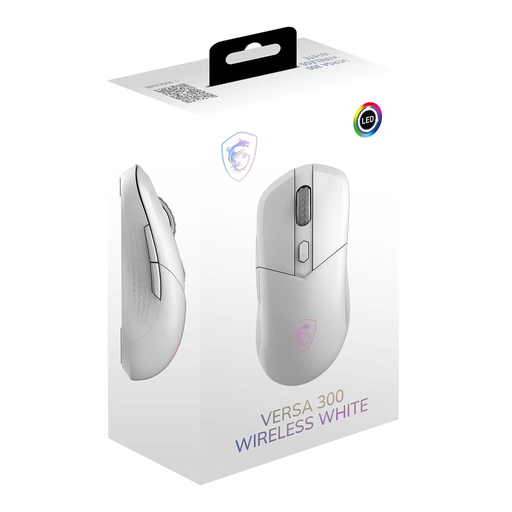
Why It Stands Out The MSI Versa 300 is a versatile model that shines with its low 60-gram weight and symmetrical design. This shape makes it equally suitable for right- and left-handed users and supports all common grip styles. Its tri-mode connectivity offers maximum flexibility for both gaming and productivity tasks.
Technical Specifications
Who It's For Gamers looking for a very light, flexible, and ambidextrous mouse that performs well in both gaming and everyday use.
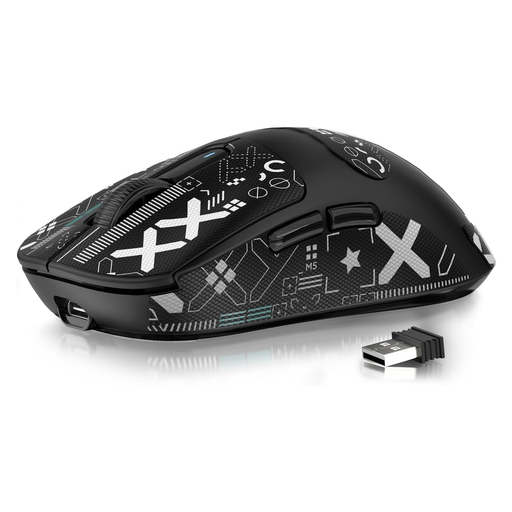
Why It Stands Out Weighing just 49 grams, the ATTACK SHARK X3 is one of the lightest models on the market. Combined with the high-precision PAW3395 sensor, it is designed for maximum speed and agility. Its impressive battery life of up to 200 hours makes it an enduring companion.
Technical Specifications
Who It's For Competitive FPS and MOBA players for whom every gram counts and who require an extremely responsive mouse with a top-tier sensor.
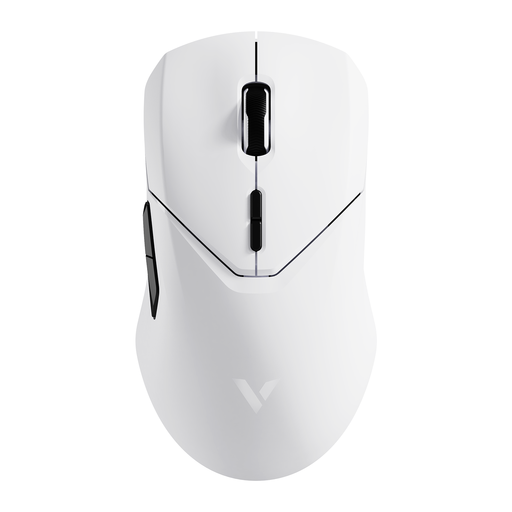
Why It Stands Out The RAPOO VT9Pro 4K stands out with its 4K polling rate in wireless mode. This enables an extremely low latency of 0.25 ms and exceptionally smooth cursor movement, which can provide a tangible advantage in fast-paced gaming situations. Despite its powerful technology, it offers a very long battery life.
Technical Specifications
Who It's For Esports enthusiasts and demanding gamers who seek the lowest possible latency for a maximum competitive edge and value high customisability.
A high-performance gaming setup consists of more than just the mouse. For stable and lossless signal transmission to your monitor, especially over long distances, high-quality connection cables can be crucial.
Discover our range of fibre optic cables to complete your setup.
1. What is the advantage of a lightweight gaming mouse? A lightweight mouse requires less effort to move, leading to faster reactions and reduced fatigue in your hand and arm. This is especially advantageous in games that demand quick and repetitive mouse movements, such as FPS titles.
2. Is a higher DPI number always better? Not necessarily. DPI (Dots Per Inch) describes the sensitivity of the mouse sensor. A high DPI number means the cursor moves a long distance with only a small mouse movement. While a high maximum DPI (e.g., 26000 DPI) indicates a high-quality sensor, most gamers use lower settings in practice (typically 400–3200 DPI) for better control. The ability to make fine adjustments is more important than an extremely high maximum value.