If you want to learn Linux without a lengthy setup, choose a specific configuration with Linux pre-installed. If you want installation and future component upgrades to be part of the learning experience, consider an upgradeable model with documented Linux compatibility. First, decide whether you want to use the laptop’s screen alongside one external monitor, or two external monitors. Then check that the distribution, exact model variant and HDMI or USB-C video output suit your setup. A manufacturer’s stated maximum number of displays does not automatically guarantee compatibility with every dock or Linux configuration.
Which option is right for you?
Linux beginners using two displays
You want to start using Linux with as little setup as possible, while working across your laptop and an external monitor. Documented support for the specific system and a suitable video port matter more than an especially high-end specification. TUXEDO describes its devices as coming with Linux pre-installed and support from Linux specialists.
DIY installers and upgraders
You want to install Linux yourself, perhaps connect two external monitors, and have the option to change the memory or SSD later. Framework provides Linux guidance and documents upgrade options; distribution guidance depends on the model and generation.
Students on the move who are watching costs
You move between working on the go and using a monitor at your desk, and want to weigh up portability, specification and any extra costs for display connections. Check which components and ports are included in the specific configuration.
What matters when buying?
First, decide whether you want to use the laptop screen with one external monitor or connect two external monitors. This determines which ports and display combinations you need.
| Priority |
What to check before buying |
Who is it most important for? |
| Linux support |
Check the exact model number, pre-installed operating system, supported distribution and any known limitations. |
If I want to learn Linux without a lengthy setup, I need to know whether my specific variant is supported. Around 29% of consumers put Linux support for their configuration first. |
| Connecting a second screen |
Check the number of external displays, monitor inputs, and video output from the laptop port and, if applicable, the dock. |
If I want to use two displays at once, I need to know whether my setup includes one or two external monitors. Around 29% of consumers prioritise having the right monitor connection. |
| Cost and upgradeability |
Compare the included RAM and storage, upgrade options, and any expansion cards or cables you will need. |
If I may want to change components later or connect additional hardware, I care about the total setup rather than just the laptop itself. Around 24% of consumers put cost and future upgradeability first. |
| Portability and specification |
Check the weight, screen size, RAM actually installed and the learning software you plan to use on the specific variant. |
If I carry my laptop around often, I want to balance portability against the basic specification needed for my learning software. Around 18% of consumers prioritise portability and everyday practicality. |
Linux pre-installed
A good fit if: you want to get started straight away with a configured Linux system; TUXEDO describes this option for its devices.
Consider: the distribution, specific configuration and monitor setup still need to work together; the stated number of displays does not guarantee dock compatibility.
Install Linux yourself
A good fit if: installation and possible future hardware changes are part of your learning goals; Framework offers a DIY option for this.
Consider: with the DIY Edition, you will need to plan for the memory, storage and operating system yourself, and check the Linux guidance for your model and generation.
Configurable business laptop
A good fit if: you want direct monitor connections and a selectable Linux option; Lenovo lists such options for the ThinkPad T14 Gen 6 AMD series.
Consider: the specific German variant 21QJ001GGE is described as having Windows 11 Pro; options for the series do not automatically apply to this configuration.
Avoiding buying mistakes
-
Assuming USB-C guarantees monitor output
The shape of the connector alone does not tell you whether it outputs the video signal you need. For the Framework Laptop 13 with AMD Ryzen AI 300, documented display capabilities also depend on which expansion slot you use.
Check that the video protocol and port work with your monitor setup. If you are using a dock, check that it is suitable too.
-
Assuming Linux support for a series applies to every variant
A Linux option for a product series does not prove that every individual configuration ships with Linux or supports all features.
Before buying, check the operating system and full model number of the specific variant on offer.
-
Budgeting for a DIY Edition as if it were a fully set-up laptop
Framework describes its DIY Edition as one where buyers supply the memory, storage and operating system themselves.
Before comparing options, make a list of the components and connections you need.
Brands to consider
TUXEDO
Linux-focused devices; the InfinityBook Pro 14 Gen10 is described as having Linux set-up and HDMI and USB-C monitor outputs.
- TUXEDO describes its devices as coming with Linux pre-installed and support from Linux specialists.
- Information about multi-monitor support and upgrade options applies to the specific model and is not a guarantee of dock compatibility.
Framework
The Laptop 13 with AMD Ryzen AI 300 is described as a DIY option for buyers who want to install Linux themselves and change components.
- Framework documents Linux guidance, expansion cards and the display capabilities of its ports.
- With the DIY Edition, buyers need to plan for the components and set-up themselves; check distribution guidance for the specific model and generation.
Lenovo
For the ThinkPad T14 Gen 6 AMD series, Lenovo lists monitor connections and Linux preload options.
- Series information lists HDMI, Thunderbolt and different RAM configurations.
- The specific German configuration 21QJ001GGE is described as having Windows 11 Pro; the series options do not prove that every SKU supports Linux.
Dell
The Ubuntu operating system filter can be a useful starting point if you are looking for a Linux configuration.
- The filter makes it easier to find listings marked accordingly.
- For the specific model number, check which operating system is included and whether it suits your monitor setup.
Joybuy products
The Joybuy laptops below are listed with Windows or macOS, so they are not options with Linux pre-installed. If you plan to install Linux yourself, check support for the specific model variant first.
 No image available
Microsoft Surface Laptop 8 Core Ultra 5 24GB 1TB Platinum
This configuration is only an option for your Linux learning setup if you check support for the specific variant before installing.
It comes with 24 GB RAM and a 1 TB SSD. The listed operating system is Windows 11 Pro, not Linux.
View at Joybuy
 No image available
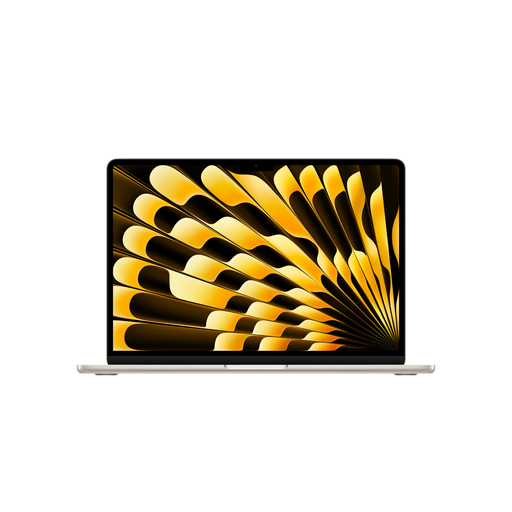
Apple 13-inch MacBook Air (M5, 2026), 10-core CPU and 10-core GPU, 24GB, 1TB SSD, Starlight, German QWERTZ keyboard
If you are considering this model for learning Linux, check support for the specific variant first; the listed operating system is macOS, not Linux.
The product description states that it can support up to two external displays at once and weighs 1.23 kg. It also lists 24 GB Unified Memory and a 1 TB SSD.
According to the product description, a power adapter is not included and must be purchased separately.
View at Joybuy
Frequently asked questions
Is one USB-C port enough for a second screen?
Not just because of the connector shape. Check the port’s video capabilities and, for the Framework Laptop 13 with AMD Ryzen AI 300, which expansion slot you use. Then check that the monitor input, cable and, if applicable, dock are compatible.
How do I get started with installing Ubuntu myself?
Back up your data before installation and prepare a bootable USB stick. The Ubuntu installation tutorial uses Ubuntu 24.04 LTS as an example; check the guide against the version you plan to install.
Do I need a dock to connect two external monitors?
Not necessarily: TUXEDO lists HDMI and two USB-C video outputs for the InfinityBook Pro 14 Gen10. Whether you can connect both monitors directly depends on their inputs, the cables and the specific configuration.
What rights do I have when buying a laptop online in Germany?
Online consumer purchases generally come with a 14-day right to cancel, although exceptions and the specific contract terms should be taken into account. The Verbraucherzentrale distinguishes this right from claims relating to faulty goods. Your Europe states that goods in the EU have a minimum two-year legal guarantee from the date of receipt; this is separate from a voluntary manufacturer’s warranty.


