For Linux on a small desk, a compact x86 mini PC is a natural starting point, provided the specific hardware is compatible with your chosen distribution. If you plan to run several virtual machines, the actual installed RAM and storage also matter. An SFF PC is an option if you need expansion slots, while the Raspberry Pi 5 offers a separate learning path based on Arm hardware and is not a direct replacement for an x86 machine.
Which learning path is right for you?
Linux beginners with a small desk
If you want to try Linux for yourself, a compact desktop can help save space. Check that the specific hardware is supported and find out how it can be installed, rather than relying on the label “mini PC” alone. Canonical lists certified Ubuntu hardware for specific configurations.
Learners using several virtual machines
If you want to test operating systems and networks in virtual machines, check the actual installed RAM and storage. Oracle explains that virtual machines use resources from the physical host computer.
Hardware enthusiasts and Arm tinkerers
If you want to learn Linux alongside GPIO and how to set up a single-board computer, the Raspberry Pi 5 could be a good fit. Bear in mind that it uses the Arm architecture, and plan for the extra steps involved in choosing a boot drive, power supply and peripherals. Raspberry Pi OS is based on Debian, according to Raspberry Pi.
What should you look for when buying?
For Ubuntu, check the exact hardware configuration against Canonical’s listings. If you’re installing Linux directly, make sure you can select the installation media from the computer’s boot options, as described by the Debian Project.
Ready-to-use x86 mini PC
A good fit if: desk space is limited and you want to learn Linux as a desktop operating system or start by running it in a virtual machine.
Consider: A compact design alone tells you nothing about Linux compatibility or the resources available in a specific configuration.
Small form factor PC
A good fit if: you need expansion slots and can make room for a larger case and more desk space.
Consider: Listed expansion slots don’t guarantee that every card or distribution will work with every configuration.
Raspberry Pi 5
A good fit if: you want to explore Arm, GPIO and building a single-board computer alongside Linux.
Consider: Arm differs from x86, so check that your learning software is available and plan for a boot drive, power supply and desktop peripherals.
| Priority |
What to check before buying |
Who is it important to? |
| Linux compatibility |
Compare the exact hardware with the requirements of your chosen distribution; for Ubuntu, check the specific configuration in Canonical’s certification listings. |
If I want to install Linux directly, I want to know whether the graphics, network and boot process will work with my hardware. Around 29% of consumers are likely to put Linux compatibility first. |
| Space and connections |
Check the case, room for cables, and the display, USB and network ports you need on the specific model. |
On a small desk, I want room for my computer and work essentials without overlooking the space taken up by cables. Around 24% of consumers are likely to prioritise desk space. |
| A complete learning setup |
Check what’s included with the specific model and find out which peripherals or components you’ll still need. |
If I want to get started as soon as my purchase arrives, I want to know in advance whether any essential parts are missing. Around 18% of consumers are likely to prioritise getting a learning setup ready with as little effort as possible. |
| Resources for virtual machines |
Check the actual installed RAM and SSD, and compare them with the virtual machines you plan to run. |
If I want to run several learning environments at once, I pay attention to the host computer’s resources. Around 18% of consumers are also likely to make VM resources their top priority. |
| Arm and learning about hardware |
Check that your chosen programmes are available for Arm, as well as the Raspberry Pi 5’s RAM option and what’s included. |
If I want to learn about GPIO and a different processor architecture, I look specifically for this kind of hardware learning setup. Around 11% of consumers are likely to put Arm and learning about hardware first. |
Buying and planning pitfalls
-
Assuming Ubuntu certification covers an entire model range
A certification listing applies to a specific hardware configuration. Models in the same range may differ in processor, RAM, SSD or network connectivity.
Compare all the components in the model on offer with the relevant Canonical listing.
-
Assuming a barebone is a ready-to-use PC
The listed barebone version of the GMKtec NucBox M6 Ultra is sold without RAM, an SSD or an operating system.
Check exactly what’s included and plan for any missing components and the setup process.
-
Planning to use the Raspberry Pi 5 as a like-for-like x86 replacement
The Raspberry Pi 5 uses an Arm CPU. That means you can’t automatically apply programmes and instructions designed for x86 to this learning path.
First check whether your chosen learning software is available for Arm. Then confirm which boot drive, power supply and peripherals you’ll need for the specific package.
Brands to consider
Lenovo
The ThinkCentre M75q Gen 5 Tiny is a compact x86 desktop range that could be worth considering if desk space is limited.
- Lenovo lists different RAM, SSD and network configurations for models in the range.
- Canonical lists one M75q Gen 5 hardware configuration. This doesn’t confirm support for every model on sale or every Linux distribution.
HP
The Pro Mini 400 G9 and Pro SFF 400 G9 come in different form factors, suited to compact workspaces and specific expansion needs respectively.
- According to HP, the reviewed Pro Mini 400 G9 offer includes 16 GB RAM and a 512-GB SSD. The reviewed Pro SFF 400 G9 has PCIe x16 and PCIe x1 slots.
- The reviewed Pro Mini offer comes with Windows. Ubuntu certification listings for other configurations don’t confirm compatibility with every version on sale.
Dell
The Pro Essential Micro PVM1265 is a compact PC with a choice of configurations.
- Dell lists different RAM and SSD options for the PVM1265.
- The reviewed offer is configured with Windows 11 Pro, which doesn’t confirm Linux compatibility for this configuration.
GEEKOM
The A5 Pro 2026 Edition is a compact x86 PC. Compare the specific version based on its configuration.
- GEEKOM lists 16 GB RAM and a 1-TB SSD for the 7530U version.
- The manufacturer says this version comes with Windows pre-installed; that doesn’t confirm Linux compatibility.
Raspberry Pi
The Raspberry Pi 5 is an Arm-based single-board computer for Linux and hardware learning projects.
- Raspberry Pi lists several RAM options, GPIO and Raspberry Pi OS, which is based on Debian.
- Setting it up as a desktop requires planning for a boot drive, power supply and peripherals. The Pi 5 isn’t a like-for-like replacement for an x86 mini PC.
Mini PCs for a Linux learning setup
This Joybuy selection includes mini PCs for a space-saving desktop learning setup. You should still check Linux support for the specific model and configuration separately.
 No image available
SOYO Y5Pro mini PC
The mini PC form factor could suit a learning setup where desk space is limited. Check that the specific hardware supports Linux before installing it.
Specifications listed in the product title: Intel Core i5 8250U/8350U, 8 GB DDR4, 256 GB SATA SSD and Windows 11.
View at Joybuy
 No image available
ACEMAGIC AK1PLUS mini PC
The compact design can help free up desk space. Check in advance whether the exact configuration works with your chosen Linux distribution.
Specifications listed in the product title: Intel Celeron N5095 (4C/4T), 16 GB LPDDR4X, 256 GB M.2 2280 SATA SSD, HDMI 2.0 and Windows 11 Pro.
View at Joybuy
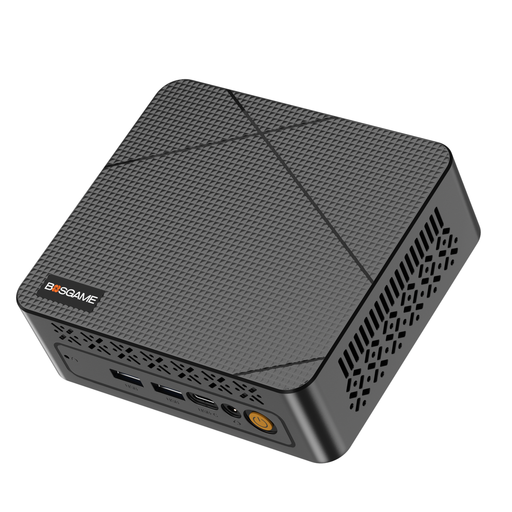 No image available
BOSGAME E3 Neo mini PC
This mini PC could be a good option for a space-saving learning setup. Check its hardware compatibility with your chosen Linux distribution before buying.
Specifications listed in the product title: N95 up to 3.4 GHz, 16 GB DDR4 RAM, 512 GB SSD and dual HDMI output.
View at Joybuy
 No image available
MaxMini B3 mini PC
The mini PC form factor can be practical when desk space is limited. For Linux, compare the specific hardware and the ports you need with your learning plans.
Specifications listed in the product title: Intel N4100 up to 2.4 GHz, 8 GB LPDDR4, 256 GB SSD, dual HDMI, 1000M LAN, Wi-Fi 5 and Bluetooth 5.0.
View at Joybuy
 No image available
BMAX B6 mini PC
The compact design could suit a small desk. Check support for your chosen Linux distribution on the specific version you’re considering.
Specifications listed in the product title: Intel Core i3-8109U up to 3.6 GHz, 12 GB RAM, 256 GB SSD, HDMI, DP, 1000M LAN, Wi-Fi 5 and Bluetooth 5.0.
View at Joybuy
Frequently asked questions
Is a PC labelled “Linux-compatible” enough?
No. Check the exact configuration and its components against your chosen distribution. Canonical provides a list of Ubuntu-certified hardware. Otherwise, you can use a test environment to check that everything works before installing.
What should I do before installing Linux on a PC I already use?
First, back up any important files and check how to start the installation media from the boot menu. Canonical notes that creating the installation USB drive will erase its existing contents.


