Learners using two monitors
You want to keep a guide or browser open alongside your terminal and editor. To do that, the mini PC’s outputs need to match the inputs on both monitors. A user post on the Hardwareluxx forum describes a similar need.


Choose a mini PC with clearly documented Linux support for the exact configuration, and two video outputs that suit your monitors. Look for relevant manufacturer documentation or certifications, and if you also want to use local learning tools, check the RAM, SSD and upgrade options. Having Windows pre-installed or two ports alone doesn’t prove that every component will work with Linux or that the PC is suitable for your monitors.
You want to keep a guide or browser open alongside your terminal and editor. To do that, the mini PC’s outputs need to match the inputs on both monitors. A user post on the Hardwareluxx forum describes a similar need.
You want to try installing Linux yourself and need to know whether the specific hardware will work with your distribution. Documentation for the exact configuration is more useful than a general claim about a model range; Lenovo Support and Canonical provide configuration details and certifications.
You’re planning to try additional local tools or different installations, so you want to compare RAM, SSD and what’s included in the box. For a GMKtec model explicitly sold as a barebone, the manufacturer states that RAM, an SSD and an operating system are not included.
First, check that the connections on both monitors match the full PC configuration. Then check Linux support for the specific hardware and confirm which components are included.
| What matters when buying | What to check | Who is this important to? |
|---|---|---|
| Two compatible video outputs | Check the ports on the exact model against the inputs on both monitors and the cables you need. | If I want to use a guide and browser alongside my terminal and editor, I need to be able to connect both monitors; around 34% of consumers put suitable dual-monitor connections first. |
| Linux compatibility | Compare the exact model and Wi-Fi variant with evidence of support for your chosen distribution. | If I want to install Linux myself, support for my specific hardware matters more than extra features; around 33% of consumers prioritise Linux compatibility. |
| RAM and upgrade options | Check the installed memory, any free slots and the SSD in the exact variant. | If I want to try additional local tools alongside my Linux desktop, I want to choose the right amount of memory and upgrade options; around 20% of consumers prioritise this flexibility. |
| Everything included | Check whether RAM, an SSD and an operating system are included, and whether the necessary cables are supplied. | If I want to keep extra components and setup steps to a minimum, clear details of what’s included are essential; around 13% of consumers focus mainly on this. |
A device might have HDMI and DisplayPort, for example, rather than two HDMI ports. You’ll also need to detect and configure the second screen for an extended desktop.
Check the outputs on the exact PC variant against both monitor inputs and your cables. In GNOME, select ‘Join Displays’ rather than mirroring to use an extended desktop.
Processors, Wi-Fi and other components can vary between configurations, so evidence for one variant doesn’t automatically confirm support for another.
Compare the exact model and hardware configuration with the Linux or Ubuntu certification.
According to the manufacturer, the barebone version of the GMKtec NucBox M6 Ultra is sold without RAM, an SSD or an operating system.
Check what’s included before you buy, and allow for the components you’ll need as well as installing the operating system.
ThinkCentre M75q Gen 5 Tiny: for buyers who want to check documented Linux support and two different video connections.
Pro Mini 400 G9: for buyers who want to check a specific configuration listed by Ubuntu.
A5 Pro: for buyers comparing a compact configuration with manufacturer information on Linux and multiple display options.
NucBox M6 Ultra: for buyers who want to choose their own components and check upgrade options.
These Joybuy products are aimed at learning Linux with two screens. Check the ports and Linux support for the exact variant and your chosen distribution.
 No image available
For two monitors with HDMI inputs; check that both connections suit your chosen screen setup.
The product title lists 8 GB LPDDR4, a 256 GB SSD, two HDMI outputs, 1000M LAN, 2.4 and 5 GHz Wi-Fi, and Bluetooth 5.0.
 No image available
For two monitors with compatible HDMI inputs; also check that the exact hardware works with your Linux distribution.
The product description lists two HDMI 2.0 outputs. The product title specifies 12 GB LPDDR5 and a 512 GB NVMe SSD.
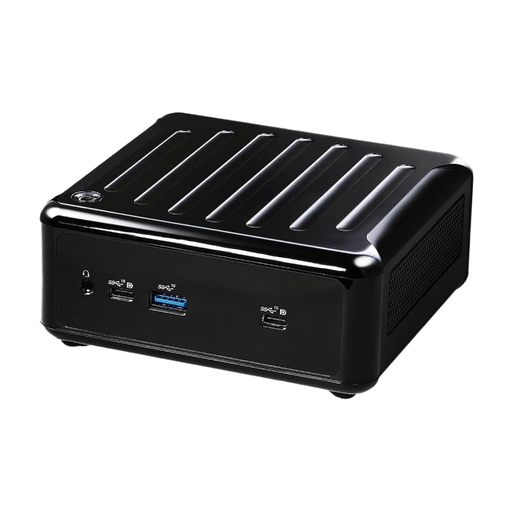 No image available
For a dual-monitor setup if you want to choose HDMI and DisplayPort connections to suit your monitors.
The product description lists HDMI, DisplayPort, quad-display support and up to 64 GB DDR4. No operating system is included.
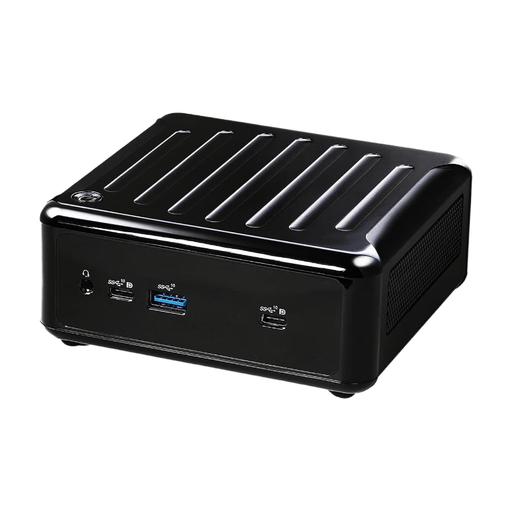 No image available
Worth considering for your Linux learning setup: before buying, check the connections on the exact variant against both monitors, and confirm that the hardware works with your distribution.
If your Linux desktop uses GNOME and detects both monitors, open ‘Displays’, arrange them as you want and select ‘Join Displays’ rather than ‘Mirror’. You can set the resolution and refresh rate for each monitor there.
Yes. Canonical explains how to boot from an Ubuntu USB drive and try Ubuntu without changing your existing PC setup. Back up any existing data before installing it later; creating the installation media will overwrite the data on the USB drive you use.
If a product is faulty, your statutory rights are against the seller and are separate from any voluntary guarantee. The Verbraucherzentrale also explains that many online purchases generally come with a 14-day right to cancel; the terms of your specific contract apply.
Products covered by the relevant EU harmonisation legislation must carry the CE marking. The Bundesnetzagentur also lists identifiable manufacturer details, required German instructions and warnings, and the declaration of conformity as things to check. The CE mark is not proof of independent certification.