If you want to focus on Linux, a desktop with Linux pre-installed or a configuration documented for your chosen version of Ubuntu is a sensible starting point. If you install it yourself, check the exact specification and, where possible, try Linux first. To reduce reflections by a window, focus on the monitor’s screen finish, its position and how you control daylight – not on getting a more powerful PC.
Who is this selection for?
Linux beginners with no installation experience
If you’re new to Linux, a pre-installed system or clear information about support for your chosen distribution can be helpful. Canonical lists certified hardware, while TUXEDO describes selected PCs as prepared for Linux.
Students at a sunny desk
If your screen is near a window, consider your monitor and PC separately. The German Federal Institute for Occupational Safety and Health identifies glare and reflected light as potential visual problems.
Experimenters with a small desk
If you’re short on desk space and may want to replace components later, check both the dimensions and the actual accessibility of the storage and expansion options on the specific model. TUXEDO says the Nano Pro Gen14 AMD has replaceable RAM and SSD modules.
What should you look for when buying?
Desktop with Linux pre-installed
A good fit if: You want to get started with the Linux interface straight away and don’t want to install it yourself.
Bear in mind: The manufacturer’s Linux support information applies to the specific configuration and doesn’t replace checking that it supports your chosen distribution.
Windows PC with a documented Ubuntu configuration
A good fit if: You want to install Ubuntu yourself and follow a documented configuration.
Bear in mind: Canonical lists a ThinkCentre M75q Gen 5 configuration. Check that the components in the PC you’re buying match this listing.
Compact Windows PC for self-installation
A good fit if: You’re short on space, want to install Linux yourself and are looking for a particular memory configuration.
Bear in mind: A manufacturer’s statement about Linux compatibility is not the same as independent Ubuntu certification for the version you order.
If you’re setting up by a bright window, monitor position is another factor to consider when buying. The German Federal Institute for Occupational Safety and Health identifies glare and reflected light as potential visual problems. A more powerful PC won’t solve them.
| Priority |
What to check when buying |
Who it matters most to |
| Clear information about Linux support |
Your chosen distribution and version, the exact PC configuration, and documented certification or manufacturer support. |
If you’re learning the basics, you won’t want to start with unanswered installation questions. Around 36% of consumers put Linux support first. |
| A screen you can read by a window |
Whether a monitor is included, its screen finish and position, and the video outputs available on the PC. |
If your screen is near a bright window, being able to position it appropriately is key. Around 29% of consumers prioritise readability by a window. |
| Space and upgrade options |
Case dimensions and accessible RAM and SSD slots; remember to allow space for the power supply and cables too. |
On a small desk, you’ll want to save space and, if possible, replace components later. Around 21% of consumers put this combination first. |
| Specification and installation effort |
What’s actually included, monitor and input devices, connections, operating system and data backup. |
If you want to add or set up as little as possible before getting started, you’ll want to know exactly what’s included and what installation involves. Around 14% of consumers prioritise the overall effort. |
Common buying misconceptions
-
Ubuntu certification applies to every configuration in a model range
Canonical lists specific components for the ThinkCentre M75q Gen 5. A similar model name alone doesn’t prove that the PC on offer has the same specification.
Compare the full specification, including the processor and wireless hardware, with the listing for your chosen version of Ubuntu.
-
A more powerful PC will eliminate reflections
Glare is related to the screen finish and lighting conditions in your workspace, not the PC’s processing power.
First check the monitor’s screen finish and angle, and how you can control the daylight.
-
‘Linux compatible’ means ‘Linux pre-installed’
A compatibility claim may refer to installing Linux yourself. The GEEKOM version mentioned here is listed with Windows 11 Pro as its operating system.
Check the operating system listed for the specific version and, if you’re installing Linux yourself, plan to test it from a USB drive.
Key brands at a glance
TUXEDO Computers
Linux-focused desktop PCs, including compact models for workspaces with limited room.
- For the Nano Pro Gen14 AMD, the manufacturer lists replaceable RAM and SSD modules, as well as a VESA mount.
- The manufacturer’s Linux information doesn’t automatically apply to every distribution or every configuration you can order.
Lenovo
The ThinkCentre M75q Gen 5 Tiny is a compact desktop. Check its exact specification against the relevant Ubuntu listing.
- Canonical lists an M75q Gen 5 configuration with a Ryzen 5 PRO 8500GE.
- The German product number 12RQCTO1WWDE1 is listed with Windows 11 Pro; this doesn’t confirm that every component matches Canonical’s listing.
GEEKOM
Compact Windows mini PCs for buyers who want to install an operating system themselves.
- For the A5 Pro 2026 Edition with Ryzen 5 7530U, the manufacturer lists 16 GB RAM, a 1 TB SSD and Windows 11 Pro.
- Linux suitability is a manufacturer claim, not proven Ubuntu certification for the specific version.
Dell
A range of desktops with Ubuntu available as a filter option for buyers looking for a specific Linux configuration.
- The German shop offers Ubuntu as a configuration filter.
- The filter doesn’t mean every desktop version includes Ubuntu or is certified for the version you want.
Joybuy products for compact desktop setups
The following Joybuy models are designed for compact desktop setups. Pre-installed operating systems and information about Linux suitability vary by version.
 No image available
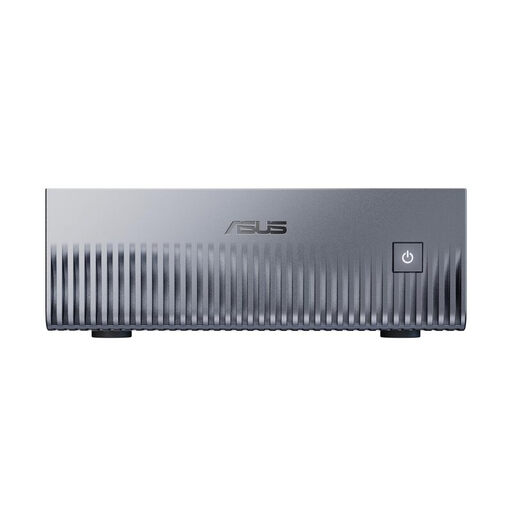
ASUS Ascent GX10 Mini AI Supercomputer, NVIDIA Grace Blackwell GB10, 128 GB unified memory, 2 TB SSD
This model may suit you if you want Linux without handling the initial installation yourself and DGX OS fits your learning goals. Check that the distribution meets your needs before buying.
Linux (DGX OS) is listed as the operating system. The specifications include 128 GB unified memory, a 2 TB SSD and HDMI 2.1.
Joybuy
 No image available
MaxMini B3 Mini PC, Intel N4100, 8 GB LPDDR4, 256 GB SSD
Designed for a small desk with a separate monitor. Before buying, check that your chosen Linux distribution works with this specific configuration.
The product name lists 8 GB LPDDR4, a 256 GB SSD and two HDMI ports.
Joybuy
 No image available
FIREBAT A8 Mini PC, AMD Ryzen AI 9 365, 24 GB DDR5, 1 TB SSD
A compact setup with a separate monitor. Before installing Linux, check that this specific version is suitable for your distribution.
The listed specifications include 24 GB DDR5, a 1 TB PCIe 4.0 SSD, HDMI 2.1 and USB4. The title states that it supports up to four 4K displays.
Joybuy
 No image available
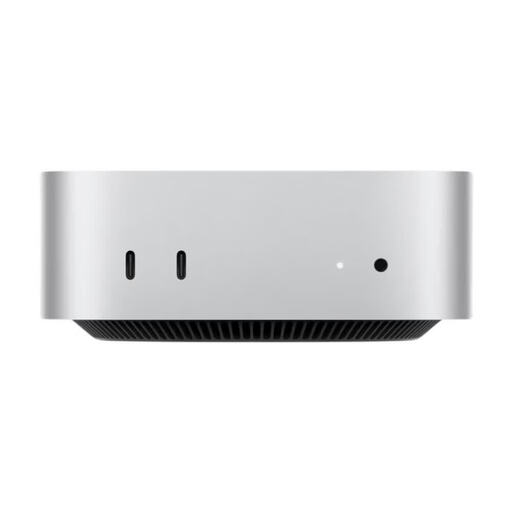
Apple Mac mini MHQM4_CTO_8 A3534 M6, 32 GB unified memory, 1 TB SSD
A compact workspace option if macOS suits you; Linux isn’t pre-installed on this version.
The product name lists 32 GB unified memory, a 1 TB SSD and HDMI. The description states that it supports up to three external displays.
Joybuy
 No image available
Ninkear L12 Pro Mini PC, 16 GB DDR4, 1 TB SSD, Intel i9-12900HK
A compact PC for installing Ubuntu yourself. Windows 10/11 is listed as the operating system, so Linux isn’t pre-installed.
The title lists Ubuntu compatibility, 16 GB DDR4, a 1 TB SSD, USB 4.0 and dimensions of 130 × 127.5 × 52 mm.
Joybuy
Frequently asked questions
Can I try Linux before installing it?
Yes. Canonical explains how to run Ubuntu from a USB drive as a live environment, without changing your existing PC setup. Check that the features you need work, and back up any existing data before installing Ubuntu.
Do I need a particular processor for a bright window?
The first things to consider when working by a bright window are the screen finish, monitor position and control of the light – not your choice of processor. Also check that the PC has the right video outputs for your separate monitor.
What should I plan for before installing Ubuntu myself?
Check whether a monitor, keyboard and mouse are included, and whether the connections suit your setup. Canonical lists a USB drive as the installation media and recommends backing up your data before installing Ubuntu on a PC you already use.
Does Ubuntu certification prove that every version is compatible?
No. Canonical’s listing applies to the configuration shown there. Compare the specification of the specific PC with the listing and check that the certification covers your chosen version of Ubuntu.


