Choosing the right AIO liquid cooler can significantly impact your PC's performance and longevity. However, the market is saturated with marketing promises that often obscure more than they clarify. Many users invest in a supposedly high-performance CPU liquid cooler, only to be disappointed later by loud noise, compatibility issues, or hidden flaws.
As your Joybuy Product Recommendation Officer, I'm here to help you identify these pitfalls. We will focus on the objective facts so you can make an informed decision. Here are the three most common mistakes made when buying an all-in-one CPU cooler:
- The Compatibility Trap: A cooler is advertised as "compatible," but the specific mounting kit for modern sockets like liquid cooling for AM5 or liquid cooling for LGA 1700 is missing or poorly designed. The result is insufficient mounting pressure and poor cooling performance.
- The Noise Trap: Budget-friendly models entice with high RPMs and impressive cooling specs on paper. In practice, this often means the pump emits a distracting whirring sound under load, or the fans sound like a jet engine. A truly quiet CPU cooler depends on the quality of the pump and fan bearings, not just the maximum RPM.
- The Software Trap: An AIO with a display or elaborate RGB liquid cooling looks impressive but is often tied to bloated and resource-heavy manufacturer software. This can slow down your system and cause conflicts with other software.
Crucial Criteria for Selecting Your PC Liquid Cooler
To avoid a bad purchase, you should focus on three core technical parameters. These determine the performance, noise level, and fit within your system.
1. Radiator Size: AIO 360mm vs. AIO 240mm
The radiator's size is directly linked to its cooling capacity. The surface area determines how much heat can be dissipated into the ambient air.
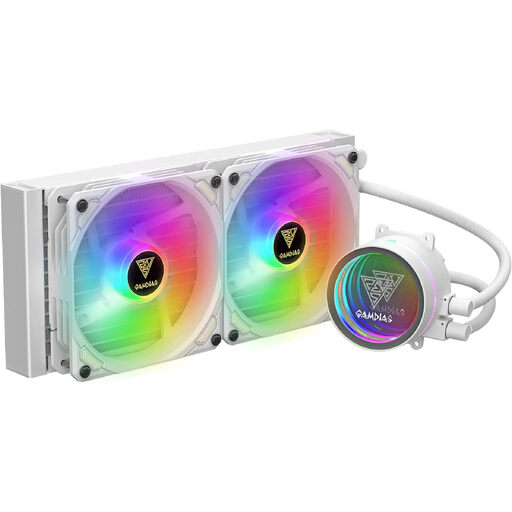
- AIO 240mm (2x 120mm fans): A very common size that fits in most mid-tower cases. It offers a significant performance advantage over most air coolers and is sufficient for mid-range to high-end gaming CPUs. The trade-off is that the fans may need to spin faster under heavy load, which can increase noise levels.
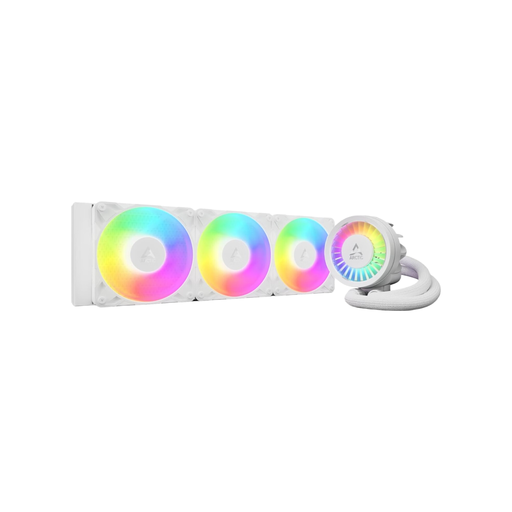
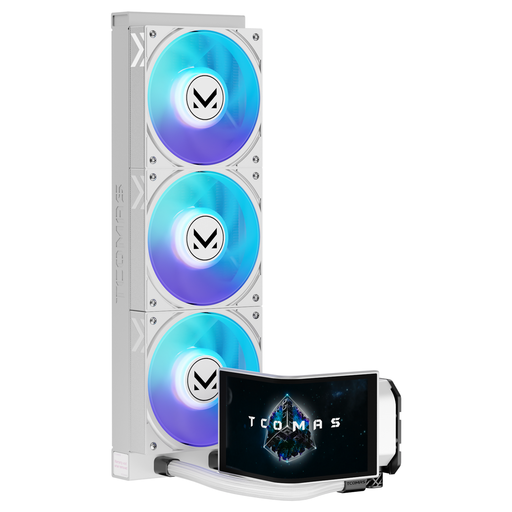
- AIO 360mm (3x 120mm fans): Offers a significantly larger surface area. This allows the fans to run slower and quieter to achieve the same or even better cooling performance. This size is ideal for high-end CPUs, overclocking, and users who want an exceptionally quiet system. Always ensure your case has space for a 360mm radiator.
- Other Sizes (120mm, 280mm, 420mm): 120mm models are only an option for very compact systems. 280mm (2x 140mm fans) and 420mm (3x 140mm fans) models offer even greater cooling surface area but require more specific case compatibility.
2. Socket Compatibility: A Perfect Fit for AM5 and LGA 1700/1851
Modern processors from Intel (socket LGA 1700 and the upcoming LGA 1851) and AMD (socket AM5) have specific requirements for the mounting system.
- Intel LGA 1700/1851: These sockets have a rectangular shape. A standard mounting system can lead to uneven pressure, which can bend the CPU over time and impair cooling performance. Some manufacturers therefore offer special contact frames, which replace the motherboard's standard retention mechanism and ensure a perfectly flat contact surface.
- AMD AM5: With Ryzen 7000 and 9000 series CPUs, the heat hotspots are not centrally located. An AIO with an offset mounting system, which positions the cold plate slightly off-centre, can optimise heat transfer directly over the chiplets, potentially lowering temperatures by several degrees.
Before buying, always check if the exact mounting hardware for your socket is included and whether the manufacturer offers special solutions like contact frames or offset mounting.
3. Pump and Fan Design: The Key to a Quiet CPU Cooler
The noise level of an AIO is determined by two components: the pump and the fans.
- Pump: A high-quality pump should feature PWM control, allowing its speed to be adjusted based on the CPU temperature. Models with 3-phase motors often run quieter and with less vibration than basic designs.
- Fans: Look for fans with Fluid Dynamic Bearings (FDB). Compared to simple sleeve or ball bearings, these are significantly quieter and more durable. The ability to be controlled via PWM is also a must-have here to ensure quiet operation at idle.
Top Recommendations by Profile
Here are some recommendations tailored to specific user needs that take the aforementioned pitfalls into account.
MATCH FOR: The Performance-Driven System Builder
Why This Fits Their Persona: This model is designed for users who demand maximum cooling performance for demanding applications or overclocking. The focus is on technical superiority and system stability.
How It Avoids the Trap
Addresses the compatibility trap directly by including a contact frame for Intel LGA1700/1851 and an offset mount for AMD AM5. The additional VRM fan cools the motherboard's voltage regulators, preventing instability.
Key Advantage & Pros
Integrated VRM fan for cooling motherboard components. Specific mounting systems for optimal heat transfer on modern CPUs.
MATCH FOR: The Design-Focused PC Builder
Why This Fits Their Persona: For users who prioritise the aesthetics of their PC build. The huge, customisable display becomes the central focal point in the case, allowing for unparalleled personalisation.
How It Avoids the Trap
Bypasses the software trap, as the complex software is not a drawback but the central feature. The buyer consciously chooses the advanced customisation options and accepts the software interaction.
Key Advantage & Pros
Unique aesthetics thanks to the large, curved 6.67-inch AMOLED display. Extensive customisation options for system stats, GIFs, or custom images.
MATCH FOR: The Value-Focused Upgrader
Why This Fits Their Persona: Ideal for users looking to upgrade from a stock air cooler for better cooling performance and a more appealing look with RGB, without investing a large budget.
How It Avoids the Trap
Avoids the cost and complexity trap of high-end models. As a 240mm AIO, it offers a straightforward all-in-one solution with broad case compatibility and a clear focus on its core function: cooling with a visual RGB accent.
Key Advantage & Pros
Excellent price-to-performance ratio for an entry into the world of PC liquid cooling. Integrated RGB lighting to visually enhance the system.
Looking for more options?
We have compiled a complete, up-to-date list of products that fully meet these strict selection criteria.
Frequently Asked Questions (FAQ)
What is the average lifespan of an AIO liquid cooler?
The lifespan of an AIO liquid cooler is typically between 3 and 6 years. The limiting factors are the pump, which is subject to mechanical wear, and the slow diffusion of the coolant through the tubing (permeation). Many manufacturers offer warranties of 3 to 5 years, which is a good indicator of the expected durability.
Is an AIO liquid cooler always a better choice than an air cooler?
Not necessarily. Both cooling methods have their place.
- AIO Liquid Cooler: Typically offers higher peak cooling performance, making it ideal for overclocked, high-end CPUs. It transports heat directly to the edge of the case, which can lower the overall temperature inside the chassis. It also allows for a cleaner look around the CPU socket.
- Air Cooler: High-end air coolers can compete with many 240mm AIOs. They are often more affordable, extremely reliable (as there is no pump or liquid), and have no risk of leaks. Their main disadvantage is often their sheer size, which can block access to RAM slots.
What are the key steps for installing a PC liquid cooler?
- Check Compatibility: Ensure your case can accommodate the radiator (e.g., 240mm or 360mm) in the desired location (top or front).
- Correct Mounting: Use the exact mounting hardware for your CPU socket (e.g., LGA 1700 or AM5).
- Thermal Paste: Remove the protective film from the cold plate. Apply thermal paste to the CPU if it is not already pre-applied to the cooler.
- Connections: Connect the pump's cable to the AIO_PUMP or CPU_FAN header on the motherboard and the fans to the appropriate fan headers. For RGB models, the RGB connector must also be connected to the motherboard or a controller.