First, choose a controller that’s compatible with your console or PC and the specific version of the game. For a local match, you’ll also need enough compatible controllers for everyone playing. If you’re sitting to the side of the screen, consider whether a wireless connection supported by your platform or a safely routed cable will work better. Customisable buttons only matter if you plan to use them, and a controller won’t improve a poor viewing angle.
Who should take extra care when choosing?
Playing with others on one console
If you’re looking for an extra controller for a local match, first check that it works with your console and game version, and find out how many players the mode supports. Nintendo requires one compatible controller per player for multiplayer in NBA 2K27 on Switch 2.
Playing from a seat at the side of the sofa
If you’re playing from a seat beside the screen, make sure the supported connection will work at that distance. Microsoft lists the Xbox Wireless Controller as compatible with Xbox consoles and Windows PCs, but the right connection still depends on your specific device.
Players who want customisation
If you want to change buttons or profiles, compare the specific model’s features with your platform. Sony says the DualSense Edge lets you customise button assignments and save profiles, but that doesn’t mean it offers a general advantage in basketball games.
What to look for when buying
| Buying priority |
What to check |
Who it matters most to |
| Platform and game |
Check your console or PC, console generation and game version. Nintendo confirms that the Switch 2 Pro Controller can only be used with Nintendo Switch 2. |
If I want to avoid buying the wrong controller and start playing straight away with my version of the game, compatibility comes first. Around 36% of consumers prioritise compatibility with their platform and specific game. |
| Connection from your seat |
Check which wireless connection or cable route is actually supported by your platform. Turtle Beach says the Stealth Pivot works wirelessly on PC, but connects to Xbox by cable only. |
If I’m sitting to the side, I want to play without an annoying cable or one trailing across the room, so I check which connection will work from my seat. Around 29% of consumers prioritise a connection that works from where they’re sitting. |
| Enough controllers |
Check the number of players in local mode against the compatible controllers you already have. Sony says up to four PS5 controllers can be used at once; the PlayStation Store lists a local mode for 1 to 4 players in NBA 2K27 on PS5. |
If several people are going to play at once, I want to know before buying whether there’s a suitable controller for everyone. Around 21% of consumers prioritise having enough controllers for a local match. |
| Controls and power |
Check whether you’ll actually use profiles or extra buttons, and what power source and accessories come with the specific version. Microsoft says the Xbox Wireless Controller uses AA batteries or a compatible rechargeable battery pack. |
If specific button assignments matter to me or I’m planning longer gaming sessions, I also want to consider the ongoing requirements. Around 14% of consumers prioritise customisation options or the power source. |
Avoid common buying mistakes
-
Assuming “wireless” means it works with your platform
A model may use different connections depending on the platform. Turtle Beach describes the Stealth Pivot as a wireless controller for PC, but specifically says it connects to Xbox by cable only.
Check the connection for the exact combination of controller and device. If you’re using a cable, measure the distance to your seat and plan a safe route for it.
If the cable won’t reach your seat, you may need to find a suitable route for it or choose another model that works wirelessly with your platform.
-
Confusing online player numbers with local matches
Online player numbers don’t automatically tell you how many people can play locally on the same console. The PlayStation Store lists a local mode for 1 to 4 players in NBA 2K27 on PS5; Nintendo says its Switch 2 version requires one compatible controller per player.
Check the player count for the local mode you want to play, then count the compatible controllers you already have.
You may need extra compatible controllers for additional players.
-
Assuming customisable features give you an advantage in the game
Profiles and extra buttons give you more ways to customise your controller, but they don’t prove a performance advantage in any particular basketball game.
First decide which buttons or settings you want to change, then check that the specific model supports those features on your platform.
-
Overlooking the power requirements of a second controller
Microsoft says the Xbox Wireless Controller uses AA batteries or a compatible rechargeable battery pack.
Check what comes with the specific version and make sure you have the right power source for your gaming session.
Depending on the version, batteries or a separately purchased battery pack could mean extra hassle.
Relevant brands at a glance
Sony PlayStation
A relevant choice for local matches on PS5 and for players who want to make use of profiles on the DualSense Edge.
- Sony says up to four PS5 controllers can be used at once. PlayStation describes the DualSense Edge as offering customisable button assignments and profiles.
- When used with other devices, features may depend on the supported game and connection.
Microsoft Xbox
An option for Xbox consoles and supported Windows PCs if you’re considering a standard controller with wireless connectivity.
- Microsoft lists Xbox and Windows as supported platforms, with Bluetooth as a connection option.
- Microsoft says it uses AA batteries or a compatible rechargeable battery pack. Check the power source and connection type for the specific version.
Nintendo
A relevant choice for local basketball matches on Nintendo Switch 2.
- Nintendo confirms that the Switch 2 Pro Controller can be used with Nintendo Switch 2.
- Nintendo says this controller doesn’t work with the older Nintendo Switch. For NBA 2K27 multiplayer, each player needs a compatible controller.
PowerA
A wired option for Xbox and PC if the cable can reach your seat.
- PowerA lists a 10-ft USB-C cable and mappable extra buttons for the Advantage Wired Controller.
- Check the exact model and make sure the cable can reach your seat safely.
8BitDo
A potential PC option if 2.4 GHz wireless or a wired connection suits your setup.
- 8BitDo lists 2.4 GHz wireless or a wired connection for the Ultimate 2C Wireless on Windows, and Bluetooth for Android.
- Check that the listed connection works with your device. Manufacturer claims about responsiveness aren’t a measure of performance from your own seat.
Turtle Beach
The Stealth Pivot may suit PC players who want to use a 2.4 GHz wireless connection.
- Turtle Beach describes wireless use on PC.
- For Xbox, the manufacturer specifically requires a wired connection with this model.
Controllers at Joybuy
This selection includes wired and wireless controllers for several platforms named in the product titles. Before buying, check that the specific model works with your game version and device.
 No image available
Black Wireless Dualshock Controller for PS4 and PC
An option if you’re looking for a wireless controller for PS4 or PC. Also check that your specific game supports it.
PS4 and PC are listed as compatible platforms, with a wireless connection.
View at Joybuy
 No image available
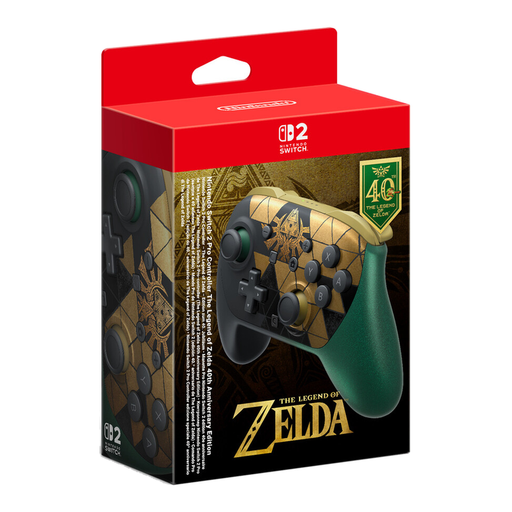
Nintendo Switch 2 Pro Controller The Legend of Zelda 40th Anniversary Edition
For a local match on Nintendo Switch 2. Nintendo confirms that this controller can’t be used with the older Switch.
This version is described as The Legend of Zelda 40th Anniversary Edition with HD Rumble 2.
View at Joybuy
 No image available
Game Controller with Dual Vibration and Gyro for Switch and PC
An option if you’re looking for a controller for Switch or PC. Check that your game supports it on your device.
The product title lists dual vibration and gyro.
View at Joybuy
 No image available
BIGBIG WON Rainbow 3 Wireless Controller
A wireless option if the platforms named in the product title match your gaming device. Check compatibility before buying.
Features listed in the product title: 2000Hz polling rate, capacitive joysticks, 16 mechanical buttons and a 6-axis gyroscope. The platforms listed are PC, Switch 2, iOS and Android.
View at Joybuy
 No image available
BIGBIG WON Rainbow 2 Pro Wired Controller
A wired option if you have a compatible port and the cable can reach your side seat safely.
The product title lists PC, Switch Lite and PS4 as platforms.
View at Joybuy
Frequently asked questions
How many controllers do I need for a four-player local match on PS5?
Make sure there are enough usable controllers for everyone playing. Sony says up to four PS5 controllers can be used at once; the PlayStation Store lists a local mode for 1 to 4 players in NBA 2K27 on PS5. For another version of the game, check the details for the mode you want to play.
Can you use a wireless controller wirelessly with any console?
No, it depends on the specific model and platform. Turtle Beach describes the Stealth Pivot as a wireless controller for PC, but for this model it requires a wired connection when used with an Xbox console.
Does the Nintendo Switch 2 Pro Controller also work with the older Switch?
No. Nintendo confirms that the Switch 2 Pro Controller can be used with Nintendo Switch 2, but not with the older Nintendo Switch.
Do extra buttons or profiles improve your basketball game?
Extra buttons and profiles give you ways to customise your controls, but they’re no proof of better basketball results. Sony says the DualSense Edge lets you customise button assignments and profiles; these features are most useful if you plan to make targeted changes to your settings.
What power source should I plan for with an Xbox Wireless Controller?
Microsoft says it uses AA batteries or a compatible rechargeable battery pack. Check what comes with your specific version and make sure you have the right power source for your gaming session.


