First, choose a controller supported by your platform and the local multiplayer mode in your basketball game. Then check the player limit, connection options and power supply. Wireless gives you more flexibility over where you sit, but it won’t eliminate screen reflections. The German PlayStation Store lists 1–4 players for NBA 2K27 on PS5; this doesn’t automatically apply to other platforms or game modes.
Who is this guide for?
Couch gamers with a dedicated console
You need another compatible controller and want to know before buying whether your console and basketball game mode support enough local players. Sony explains how to pair additional DualSense controllers; the number of players also depends on the game and its mode.
PC gamers who move between seats
You’re comparing USB, Bluetooth and wireless connections so you can connect your controller from your preferred seat. Microsoft lists USB, Bluetooth and, where available, Xbox Wireless for Windows; options vary by model.
Gamers in a bright living room
You want to share the screen with others, so you’ll need to think about seating and reflections from windows. A controller won’t change the lighting or the screen itself.
What should you consider when buying?
| What matters when buying |
What to check |
Who it matters most to |
| Platform and game |
Check your console or PC operating system, the full model name and the details for your version of the game. |
If I’m using my existing console or PC, the controller needs to work with both the platform and the specific basketball game. Around 31% of consumers prioritise platform and game compatibility. |
| Controllers for the game |
Count the controllers available and check the player limit and multiplayer details for the game mode you want to play. |
When playing with friends, I want to be sure the game mode and the controllers we have are a good match. Around 25% of consumers prioritise having enough controllers for local multiplayer. |
| Seating and visibility |
Check your view of the screen at your usual playing time; if you’re using a wired controller, measure the distance to your seat. |
If we’re sharing the screen in daylight, I need a seat with a clear view and want to plan where the cables will run. Around 19% of consumers prioritise seating and visibility when dealing with light from windows. |
| Grip and buttons |
Consider the shape of the grips and the layout of the sticks and buttons, as well as whether you want to use additional controls. |
For longer gaming sessions, I want a button and stick layout that suits the way I play. Around 13% of consumers prioritise grip and extra controls. |
| Power and accessories |
Check what’s included with the exact variant, as well as the available ports, cables and charging options. |
Before buying, I want to know whether the cables, receiver and power supply will work with my setup. Around 12% of consumers prioritise what’s needed to get a controller ready to play, including power and connection accessories. |
Avoid common buying mistakes
-
Assuming similarly named models work with the same platform
For the 8BitDo Ultimate 2C Wireless, the manufacturer lists USB or 2.4 GHz connections for Windows and Bluetooth for Android. The similarly named Ultimate 2C Bluetooth is a different variant designed for Switch. The Nintendo Switch Pro Controller and Switch 2 Pro Controller are different products, too.
Before buying, check the full model name, the platform and the connection mode you intend to use.
-
Confusing the maximum number of controllers with the number of players
Sony says that up to four controllers can be used at the same time on PS5. Whether you can play with the number of people you want also depends on the game and its mode.
First check the player limit for your version of the game, then check the requirements for the specific mode.
-
Assuming wireless will solve screen reflections
A wireless connection can give you more choice over where to sit, but it won’t get rid of reflections from windows. On the other hand, a cable can limit where you sit, depending on its length and route.
Check your view of the screen at your usual playing time, and plan the cable route if you’re using a wired controller.
-
Confusing the manufacturer’s guarantee with your statutory rights
Verbraucherzentrale distinguishes between voluntary manufacturer’s guarantees and your statutory rights against the retailer.
Read the terms of any guarantee and treat it separately from your statutory rights.
Controller brands to consider
PlayStation
The DualSense is an obvious choice as an extra controller for PS5 games. The German PlayStation Store lists 1–4 players for NBA 2K27 on PS5.
- Sony explains how to pair additional DualSense controllers and says up to four controllers can be used at the same time.
- The actual number of players also depends on the game and its mode.
Xbox
The Xbox Wireless Controller is designed for Xbox and Windows PCs. Microsoft lists several possible connection options for Windows.
- Microsoft lists USB, Bluetooth and, where available, Xbox Wireless.
- You may need an adapter to use Xbox Wireless on PC. According to Xbox Support, the number of USB controllers you can use at once may also depend on connected headsets.
Nintendo
The Switch Pro Controller and Switch 2 Pro Controller are different models for their respective platforms.
- Nintendo confirms that the Switch Pro Controller can be used wirelessly with a Switch 2. The Switch 2 Pro Controller has GL and GR buttons, which Nintendo says can be assigned freely.
- For NBA 2K27 on Switch 2, Nintendo requires one compatible controller per person in multiplayer mode; this doesn’t specify a maximum number of local players.
8BitDo
The Ultimate 2C is available as a Wireless variant and as a separate Bluetooth variant.
- 8BitDo lists Hall Effect sticks and extra buttons for the Ultimate 2C Wireless.
- According to the manufacturer, Bluetooth on the Wireless model is for Android; 8BitDo lists USB or 2.4 GHz for Windows. That’s why it’s important to check the full model name.
PowerA
According to PowerA, the wired controller we checked is designed for Xbox Series X|S, Xbox One and Windows 10/11.
- PowerA says this model comes with a 3-metre USB-C cable.
- Plan the cable route to your seat. PowerA says impulse triggers aren’t supported by every game.
Joybuy controllers for different platforms
The Joybuy picks below include controllers for PC, PlayStation 5, Switch and Switch 2. Before buying, check the platform details and the exact variant of the model you’re considering.
 No image available
EasySMX D10 Wireless Controller
The product name lists PC, Switch, Android and iOS as supported platforms; Bluetooth connectivity can be useful when choosing where to sit.
The product name lists a TMR joystick, dual-mode triggers, mechanical buttons, a 1000 Hz polling rate and RGB lighting.
View on Joybuy
 No image available
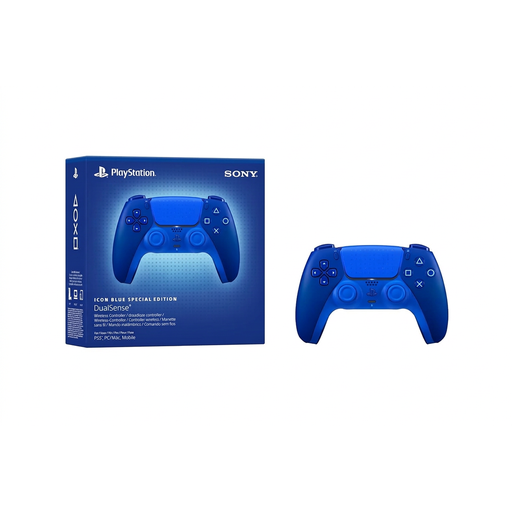
PlayStation DualSense CFI-ZCT2WZBX Icon Blue Special Edition
A good option if you’re looking for an extra DualSense for local games on PS5; the player limit still depends on your version of the game and its mode.
The listing says that a USB cable isn’t included.
View on Joybuy
 No image available
VIELLAN Wireless Gaming Controller for PC
An option to consider for PC if you’re looking for extra controls; the model name alone doesn’t confirm PS5 support.
The product name lists Hall Effect joysticks, 255-level Hall Effect triggers, programmable back buttons, RGB lighting, a 1000-mAh battery and USB-C. “PS5 Button Layout” refers to the listed button layout.
View on Joybuy
 No image available
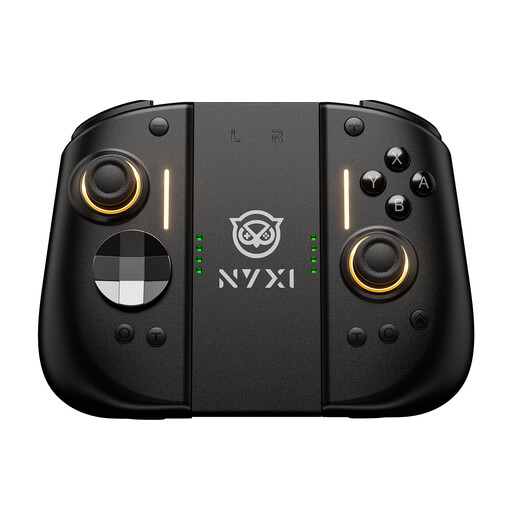
NYXI Hyperion 3 Wireless Controller for Switch 2
The product name identifies this as a wireless controller for Switch 2. Check that the details match your version of the game and its player limit.
The product name lists a 9-axis gyroscope, Hall Effect joysticks, mechanical buttons and two back buttons.
View on Joybuy
 No image available
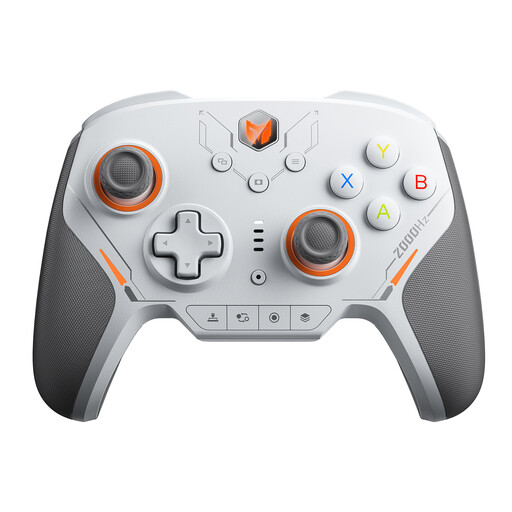
BIGBIG WON BLITZ2 Wireless Controller
The product name lists PC, Switch, iOS and Android; check the connection options and support for your specific platform.
The product name lists 16 mechanical microswitches, a 2000 Hz polling rate and TMR joysticks.
View on Joybuy
Frequently asked questions
Are two controllers enough for a local game of NBA 2K27 on PS5?
For two players, the German PlayStation Store lists a player limit of 1–4 for the PS5 version; Sony also explains how to pair a second DualSense. Choose a mode for the local game you want to play, as the Store listing doesn’t confirm that every mode supports four players.
How do I connect a second DualSense to my PS5?
Sony explains how to pair it wirelessly via “Settings > Accessories > General > Bluetooth Accessories”: press and hold the Create and PS buttons on the second controller at the same time, then select it on screen.
Can a different controller help with sunlight or screen reflections?
No. A wireless controller may let you sit somewhere else, but that’s all. Reflections depend on the lighting and screen setup; Samsung describes anti-reflection surfaces for certain TVs, not controllers.
What should I check about accessories and power?
Check whether cables or a receiver are included with the exact variant and how the controller is powered. For faulty products, Verbraucherzentrale distinguishes between your statutory rights against the retailer and a voluntary manufacturer’s guarantee.


