Co-op session on a console you already own
You’re looking for an extra input for your Switch, Switch 2, PS5 or Xbox. The key is to make sure the controller and the specific game suit your platform and the way you want to play.


Choose an extra controller that suits the console or PC you already have, as well as the specific co-op game you want to play. Connecting a controller to a device alone doesn’t guarantee that the game supports another local player. Nintendo says individual Joy-Con 2 controllers can be used as inputs, provided the software supports that style of play. For other models, connection type, cable reach and charging options also matter.
You’re looking for an extra input for your Switch, Switch 2, PS5 or Xbox. The key is to make sure the controller and the specific game suit your platform and the way you want to play.
Sometimes two of you play; other times, there are more. Check how many local players the game supports and whether you can share the controllers you already have.
You’re connecting several inputs to a PC and want to choose the right connection type, check game support and make sure each model’s cable reaches your table set-up.
The number of people who can play depends on the game and the input types it supports. Team17 says Overcooked! 2 supports up to four players in local play; that doesn’t automatically apply to other titles.
| Buying priority | What to check | Who is it important to? |
|---|---|---|
| Platform and game | Check that your console or operating system, the exact controller model and the inputs supported by the game all match. | If I’m looking for an extra input for my console or PC, I want to be sure our particular co-op game will support it. That’s why around 36% of consumers put platform and game compatibility first. |
| Enough local inputs | Check the game’s player limit and count the controllers you already have; make sure the game supports the shared-controller set-up you want to use. | If more people are joining us at the table, I want to know whether we can share our existing controllers or need extra gamepads. For around 29% of consumers, the number of available local inputs is the main consideration. |
| Controls that suit you | Check whether the game supports a single Joy-Con and whether everyone playing is comfortable with that set-up. | If we’re sharing controllers, I want to make sure the controls work well for everyone at the table. Around 21% of consumers focus above all on having the right control layout. |
| Connection and power | For the specific model, check the cable reach, any required ports or receiver, and the charging options. | If there isn’t much room for gaming at the dining table, I want to be able to set up the cables and connections so they reach everyone’s seat. For around 14% of consumers, connection and power are the main priorities. |
For the Ultimate 2C Wireless, 8BitDo lists Bluetooth for Android, while Windows connection is via a 2.4 GHz receiver or cable. The connection options can vary by device.
Check the connection options for the exact model and your operating system. Also make sure you have a spare USB port for the receiver or can use a cable.
A 2.4 GHz receiver needs a compatible USB port on your PC.
The number of connected controllers doesn’t automatically determine how many people can play a particular game locally.
Check the player limit and supported input types for the specific game, and first count the controllers you can already use.
Nintendo confirms that older Joy-Con can be used wirelessly with Switch 2, but they can’t be attached to or charged on the console.
Before buying, work out how you’ll charge your existing and extra controllers. Nintendo recommends using a Switch console or suitable licensed charging accessories.
You may need a Switch console or suitable charging accessories to charge them.
Joy-Con, Joy-Con 2 and the Switch Pro Controller offer different input options for Switch and Switch 2 sessions.
The Xbox Wireless Controller is an option for gaming on Xbox consoles and Windows PCs.
The DualSense Wireless Controller is designed for PS5 players and can also be used with compatible games on supported PCs.
The Ultimate 2C Wireless is an option for Windows PC gaming if a receiver or cable suits your set-up.
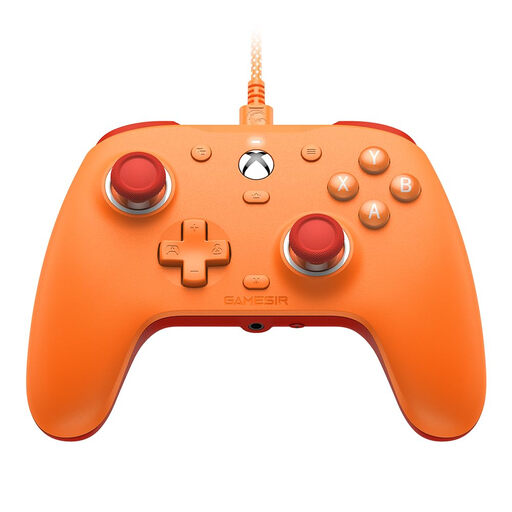
The G7 SE is a wired controller option for the Xbox consoles and Windows PCs listed by GameSir.
This selection includes shared Joy-Con inputs for Nintendo Switch and Switch 2, as well as separate controllers for PlayStation 5, Xbox and Windows PC. Before buying, check that your game supports the input you want to use and that the connection suits your table set-up.
 No image available
For Switch 2 sessions where the game supports using Joy-Con 2 individually.
The set includes one left and one right Joy-Con 2. Nintendo says whether a single Joy-Con 2 can be used depends on the software.
 No image available
For Xbox or Windows PC gaming, provided the specific game supports the controller as an extra local input.
Xbox Wireless and Bluetooth are listed as connection options, along with a 3.5 mm headset jack.
 No image available
For PS5 sessions or compatible PC games, provided the title supports the controller.
Bluetooth and USB-C are listed as connection options. Sony says haptic feedback on PC requires a USB connection and support from the game.
 No image available
For Switch sessions where the game supports using the two Joy-Con separately.
The set includes one left and one right Joy-Con. The product information says the Joy-Con Grip, which lets you use them together as a traditional gamepad, is sold separately. Nintendo says older Joy-Con can be used wirelessly with Switch 2, but can’t be attached to or charged on the console.
 No image available
For Xbox Series X|S, Xbox One or Windows 10/11, if the cable can reach your gaming spot at the table.
The controller is wired and comes with a 3 m USB-C cable. Hall Effect sticks and a 3.5 mm audio jack are also listed.
Only if the specific game supports another local player and that input type. Team17 says Overcooked! 2 supports up to four players in local play; this isn’t a general limit for other games.
It depends on the software. Nintendo says a single Joy-Con 2 held sideways can be used for this style of play, provided the game supports it.
Nintendo confirms they can be used wirelessly with Switch 2, but they can’t be attached to or charged on the console. Nintendo recommends using a Switch console or suitable licensed charging accessories.
For ordinary purchased goods, § 438 BGB generally provides for a two-year limitation period from delivery for the defect claims specified there. Statutory liability for defects is separate from any additional manufacturer’s guarantee; the specific claim depends on the circumstances of the purchase and the defect.
The German Environment Agency advises taking used batteries and rechargeable batteries to a collection point at a retailer or a local authority, rather than putting them in household waste. Remove them from old electrical equipment before returning it, if you can do so easily.