A co-op duo on a small screen
You play side by side on a small monitor or in Switch tabletop mode. Before buying, check whether the game uses split-screen or a shared view.


Choose a second controller based on whether your console and the game you want to play support two local inputs. If you’re playing on a small screen, it also matters whether the game uses a shared view or split-screen. Valve lists local split-screen for It Takes Two, while Nintendo says you can use individual Joy-Con as controllers in compatible Switch games. A controller won’t change how the screen is divided: separate Joy-Con avoid a cable running between seats, while a full-size gamepad gives you a different button layout.
You play side by side on a small monitor or in Switch tabletop mode. Before buying, check whether the game uses split-screen or a shared view.
You need an extra controller for a specific co-op game and want to make sure the controller, console generation and game are all compatible.
You’re sitting close together and want to plan for cables, connectivity and charging space to suit the room you have.
First, check whether the specific game supports local multiplayer and how it displays the action. Then you can choose a controller shape and connection to suit your device and seating area.
| What to consider | What to check before buying | Who is it important to? |
|---|---|---|
| Platform and game | Does the model work with your specific console or PC, and does the game support two local inputs? | If I’m looking for a second controller for a particular system, I want to make sure the game and device are compatible first. Around 36% of consumers put compatibility first. |
| Screen space | Does the game show a shared view or split-screen? Which screen is used in the selected game mode? | If we’re playing on a small screen, I want to know how much screen space each person gets. Around 29% of consumers focus on screen space first. |
| Cable and connection | Will the cable reach your seat, or do your device and controller support the wireless connection you need? | If we’re sitting close together, I want to route cables so they’re out of the way, or play wirelessly. Around 21% of consumers prioritise space and connectivity. |
| Power and controls | What power source and controls does the exact model need for the game you want to play? | If we play together regularly, I want to plan for power and the required inputs in advance. Around 14% of consumers focus primarily on ease of use and controls. |
The game mode determines how the screen is divided; adding another controller won’t change that.
Before buying, check whether the specific game shows a shared view or split-screen on your screen.
Joy-Con 2 are designed for Switch 2. Original Joy-Con only work wirelessly with Switch 2 and can’t be charged by attaching them to the console.
Compare the full model name with your console and check which charging option you’ll need.
PowerA specifies that the Advantage Wired Controller for Switch 2 is for docked play only.
Before buying, check the intended play mode and cable reach. “Compatible with Switch 2” alone doesn’t tell you whether the model works in tabletop mode.
Joy-Con 2 and the Switch 2 Pro Controller are options for compatible Switch 2 games, offering different ways to play.
The Xbox Wireless Controller is an option as an extra controller for Xbox or supported Windows games.
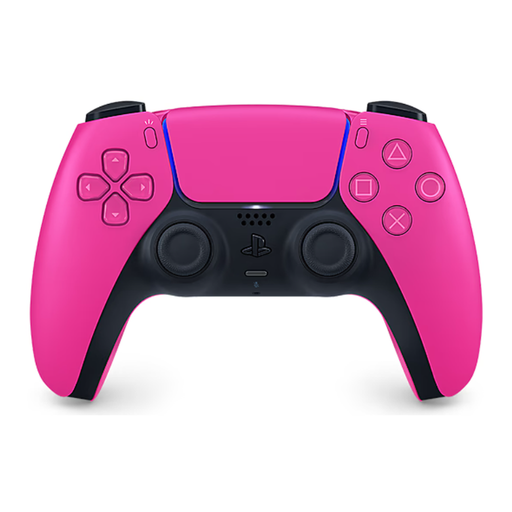
The DualSense is an extra controller option for compatible local PS5 games.
According to the manufacturer, the similarly named Ultimate 2C models differ in their platform compatibility and connection options.
The Advantage Wired Controller is a wired option for docked play on Switch 2.
This selection includes individual Joy-Con 2 and full-size wireless gamepads for the listed console and PC setups. Whether a controller is suitable still depends on your console and the local inputs supported by the specific game.
 No image available
For compatible local multiplayer games where players can use individual Joy-Con as controllers.
Includes one left and one right Joy-Con 2. For Nintendo Switch 2 only; the inputs you need depend on the game.
 No image available
For Xbox or supported PC games when you’d prefer a full-size gamepad to individual Joy-Con.
The product name lists Xbox One, Xbox Series X/S and PC as platforms. The stated wireless connection can avoid running a controller cable to your seat.
 No image available
For local co-op games on PS5 when you need an extra DualSense with a full-size gamepad layout.
The product name specifies PlayStation 5. The features available in a game depend on the game itself.
 No image available
For a full-size gamepad layout, provided the platform and game support it on your specific device.
The product name lists PC, Nintendo Switch, Switch 2, Steam and Android. It also lists Haptic Feedback Triggers, Adjustable Damping Joysticks and 6 Programmable Buttons.
 No image available
For Switch 2 games that support a full-size gamepad layout and don’t require individual Joy-Con inputs.
Nintendo says the Switch 2 Pro Controller can only be used with Nintendo Switch 2. The product description lists a wireless connection.
Only if the specific game supports local co-op on your platform. Also check whether it uses a shared view or split-screen: Valve lists local split-screen for It Takes Two, and a controller won’t change how the screen is divided.
The Switch 2 model described here isn’t designed for tabletop mode. PowerA specifies that the Advantage Wired Controller is for docked play only; in tabletop mode, Switch 2 is used outside the dock with its own screen.
Check the connection options for the exact model and make sure you’ve planned how to charge wireless controllers. For the Xbox Wireless Controller on a Windows PC, Microsoft lists USB, Bluetooth or Xbox Wireless with suitable hardware. Original Joy-Con can only be used wirelessly with Switch 2 and need a suitable alternative charging option.
The seller is responsible for statutory consumer rights, which are separate from a voluntary guarantee. The Verbraucherzentrale explains that retailers are generally liable for two years for faults in newly purchased goods that were present when the goods were handed over. The rights available in an individual case depend on the circumstances.