First, choose an additional controller that suits your console or PC, then check which controls and how many players the game supports. Wireless can be handy if you’re sitting some distance from your device. A wired model may work well if the connection and cable reach, but it could have limitations on certain platforms or features. The brightness of your living room alone won’t determine which controller technology you need.
Who might need an additional controller?
Co-op gaming on a console you already own
Check whether the game supports separate inputs for every player. Nintendo says that using individual Joy-Con 2 controllers depends on the game, while Sony says up to four controllers can be used at the same time with PS5.
Playing some distance from your device
If you’re playing from the sofa, make sure the connection suits your setup. Choose between wireless and a cable that’s long enough and has the right connection for where you’re sitting.
Co-op on PC with multiple gamepads
Check that each controller is compatible with your operating system, connection and the features you need in your game. Bluetooth support alone doesn’t guarantee that a gamepad will work with your chosen game or support all its features.
What should you look for when buying?
Start by checking your platform and game, then work out how many inputs you need and how far you’ll be sitting from your device.
| Consideration |
What to check before buying |
Who is it important to? |
| Platform and game compatibility |
Check the exact model version against your platform and the co-op game’s requirements. |
If I already know which console or PC I’ll use and which co-op game I want to play, I need to know that the controller will work with both. Around 36% of consumers put platform and game compatibility first. |
| Separate inputs |
Check the number of players and the controller positions supported by the specific game. |
When several people are playing, I want to know whether each person will have their own supported input in the game. For around 29% of consumers, the number of separate player inputs is the main consideration. |
| Connection and seating position |
Check the distance from your device, cable reach, available ports and wireless connection mode for your platform. |
If my gaming device is some distance from the sofa, I need to decide whether a cable will reach or if I need a compatible wireless connection. Around 21% of consumers prioritise the connection and freedom of movement from their seat. |
| Features and ongoing effort |
Consider only the motion and vibration features you need, as well as the power supply and charging requirements. |
If I’m planning to get extra gamepads for a gaming session, I want to focus on the features I’ll actually use and the effort involved in charging them. Around 14% of consumers put features and ongoing requirements first. |
Avoid common buying mistakes
-
Assuming ‘wireless’ means it works with every platform
Connection options can vary between models and platforms. According to GameSir, the standard GameSir G7 Pro can be used with Xbox via a wired connection; the 8BitDo Ultimate 2C Wireless uses different connection types with Windows and Android.
Before buying, check the exact model version and the connection method intended for your platform.
-
Assuming a wired controller will work with every Switch 2 game
According to the manufacturer, the PowerA Advantage can only be used with Switch 2 when it’s docked. It also doesn’t support features such as motion controls, and Joy-Con games are not supported.
Check that the cable will reach your seat and that the game doesn’t require features this model lacks.
-
Assuming the number of controllers equals the number of players
The number of controllers you can use with a console at the same time doesn’t automatically tell you how many people a particular game supports. Individual Joy-Con 2 controllers only work with compatible software and games, too.
Check the local player count and supported input type in the details for the specific game.
-
Confusing a guarantee with your statutory rights
A voluntary guarantee is not the same as your statutory rights against the seller. The Verbraucherzentrale (German consumer advice centre) makes this distinction.
Keep the seller’s details, guarantee terms and steps to take if something goes wrong separate.
Brands and platforms at a glance
Nintendo
There are different ways to play on Switch 2; the right option depends on the game.
- According to Nintendo, either Joy-Con 2 can be held horizontally and used as a single controller, depending on the software and play style.
- According to Nintendo, the Switch 2 Pro Controller offers motion controls and HD Rumble 2.
- According to Nintendo, the Switch 2 Pro Controller is not designed for the original Switch. Older Switch Pro Controllers can connect wirelessly to Switch 2, but Nintendo says they cannot wake the console from sleep using the HOME Button.
Sony PlayStation
The DualSense is an option for extra players on PS5 and for PC games that specifically support it.
- Sony says up to four controllers can be used at the same time with PS5.
- On PC, haptic feedback and other features depend on game support and, in some cases, a USB connection.
Microsoft Xbox
The Xbox Wireless Controller is an option for Xbox and Windows, provided the connection suits your platform.
- Microsoft lists USB, Bluetooth and the Xbox Wireless Adapter as possible connection options for Windows.
- You may need an adapter, depending on the connection method you want to use.
PowerA
The Advantage is a wired controller for Switch 2 when docked.
- PowerA lists a 3 m cable for this specific model.
- According to the manufacturer, it doesn’t have HD Rumble, an IR camera, motion controls or amiibo NFC, and it doesn’t support Joy-Con games.
8BitDo
According to the manufacturer, the Ultimate 2C Wireless is designed for Windows and Android, with different connection options for each.
- 8BitDo lists 2.4 GHz or a wired connection for Windows, and Bluetooth for Android.
- These model specifications don’t confirm compatibility with PS5, Xbox or Nintendo consoles.
GameSir
The standard G7 Pro uses different connection options for Xbox, Windows and Android.
- GameSir lists a wired connection for Xbox, a cable or receiver for Windows, and Bluetooth for Android.
- The specifications for the standard G7 Pro shouldn’t be confused with those for the separate G7 Pro Wireless editions.
Controller selection at Joybuy
This selection includes extra controllers for PS5 and Switch 2, as well as models for Xbox and Windows PC. Before choosing, check that the specific game supports the number of players and input type you need.
 No image available
PlayStation DualSense Wireless Controller Midnight Black with USB cable
For an additional player on PS5; check whether the specific co-op game supports the number of players you need.
Wireless DualSense controller for PlayStation 5; USB cable mentioned in the product name. Some features depend on game support.
View at Joybuy
 No image available
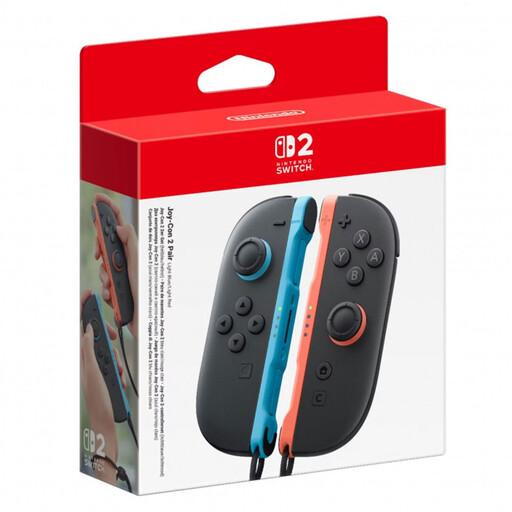
Nintendo Switch 2 Joy-Con 2, set of 2, L and R, Light Blue/Light Red
For games that support individual Joy-Con 2 controllers as separate inputs; according to Nintendo, this depends on the software and play style.
Set with one left and one right Joy-Con 2.
View at Joybuy
 No image available
GameSir G7 HE Wired Controller
For Xbox or Windows PC, if a wired connection works for where you’ll be sitting.
The product name lists Xbox Series X|S, Xbox One and Windows 10/11 as compatible. Check that the cable will reach your seat.
View at Joybuy
 No image available
Microsoft Xbox Wireless Controller Shock Blue
For an additional wireless controller for Xbox or PC; check that the available connection option suits your platform.
The product name lists Xbox One, Xbox Series X/S and PC as compatible.
View at Joybuy
 No image available
Nintendo Switch 2 Pro Controller
For an additional player on Switch 2 when you need a controller of this type rather than individual Joy-Con 2 controllers.
Nintendo lists HD Rumble 2 and motion controls for this model; according to Nintendo, it is not designed for the original Switch.
View at Joybuy
Frequently asked questions
Are the Joy-Con 2 controllers I already own enough for two players?
Only if the specific Switch 2 game supports individual Joy-Con 2 controllers held horizontally as inputs. Nintendo says the way they can be used depends on the software and play style.
How many controllers can you use at the same time with a PS5?
Sony says up to four controllers can be used at the same time with PS5. Also check how many players the specific game supports.
Do controllers from the first Switch generation work with Switch 2?
Nintendo says Joy-Con and the Switch Pro Controller can be used wirelessly with Switch 2. First-generation Joy-Con cannot be attached to or charged on Switch 2; Nintendo also says older Switch controllers cannot wake the console from sleep using the HOME Button.
What are my rights in Germany if a product is faulty or I want to return it?
Your statutory rights against the seller are separate from a voluntary guarantee. For a typical online purchase by a consumer, you generally have a statutory right to cancel the contract. The standard statutory cancellation period is 14 days. The terms and any exceptions that apply to your specific contract should be checked. The relevant legislation is Sections 312g and 355 of the German Civil Code (BGB).
How should I dispose of an old controller and removable batteries?
The German Environment Agency advises that old electrical equipment should not be put in household waste. Batteries that can be removed easily should be taken separately to a suitable collection point.


