Start by choosing a controller for your console or PC, then check which inputs the specific game supports for local multiplayer. Two connected controllers don’t automatically mean that two full gamepads or split Joy-Con will work. In daylight from tall windows, visibility depends on the screen and how it’s positioned, not on any proven controller feature.
Who needs to think carefully about their controller choice?
Co-op players with a specific console
You’re looking for a suitable second controller. First, check the console generation, connection type and whether the specific game supports it. Nintendo, Sony and Microsoft each describe controllers for use with their respective platforms.
Two players with different control needs
You’ll need to check whether each player can use a Joy-Con on its own, or whether everyone needs a full gamepad. Nintendo says that using a Joy-Con 2 individually depends on the supported play style.
Co-op players in a bright living room
You want both players to have a clear view, so consider screen reflections separately from controller range and freedom of movement. LG Deutschland treats reflections as a display and lighting issue.
What should you look for when buying?
Check the platform and game first, then the input each player needs. If daylight comes in through the windows, it’s also worth checking the screen from both seats.
The table below shows each consumer’s main priority when choosing a controller for local co-op in a bright room.
| Priority |
What to check before buying |
Who is this most important to? |
| Platform and game |
Check the console generation, connection type and the game’s local input requirements. |
If I’m buying a second controller, I want it to work with my console or PC and the specific game. Around 36% of consumers prioritise platform and game compatibility. |
| Inputs for both players |
Check whether the game supports split Joy-Con or requires a full gamepad for each player. |
When we play together, I want to know whether each person has the sticks and buttons they need. Around 29% of consumers are mainly concerned with making sure both players have the right inputs. |
| Visibility in daylight |
Check the screen from both seats at the time you’ll actually be playing, and consider its position relative to the window. |
When we play from different seats, I want to be able to see the picture clearly in daylight. Around 21% of consumers prioritise being able to see the screen together in daylight. |
| Comfort and power |
Check the seating distance, cable route and power supply for the exact version. |
For longer gaming sessions together, I want to plan for freedom of movement and a suitable power supply. Around 14% of consumers prioritise these factors. |
Avoid common buying mistakes
-
Taking “Switch-compatible” at face value without checking the console generation
Joy-Con 2 don’t work with the original Nintendo Switch. According to Nintendo, older Joy-Con can be used wirelessly with the Switch 2, but you’ll need a suitable alternative to charge them.
Check the exact console generation, controller model and charging options you have available.
-
Assuming split Joy-Con can replace two full gamepads
Whether you can use a Joy-Con on its own depends on the play style supported by Nintendo. The PowerA Enhanced Wired Controller model reviewed here isn’t designed for games that only support Joy-Con.
Check which local inputs the specific game requires for both players.
-
Leaving cables and power until you start playing
The PowerA model reviewed here is designed for docked play and has a 3 m USB cable. As Microsoft explains, rechargeable AA batteries can’t be charged inside the Xbox Wireless Controller.
Check the distance between your seats and the cable route, and confirm the power requirements for the exact version.
-
Confusing controller features with a solution to window reflections
Controller features affect how you play; reflections depend on the screen and the lighting in the room. LG Deutschland describes reflections as a display issue.
Check the screen in daylight from both seats before choosing a controller.
Brands to consider
Nintendo
Joy-Con 2 are an option for supported split controls on Switch 2, while the Switch 2 Pro Controller is made for this console generation.
- Nintendo says Joy-Con 2 can be used individually in supported games. The Pro Controller also features motion controls and HD Rumble 2.
- Joy-Con 2 don’t work with the original Switch, and Nintendo says the Switch 2 Pro Controller is only for Switch 2.
Sony PlayStation
A second DualSense is an option for supported local multiplayer games on PS5.
- Sony explains how to pair an additional DualSense with a PS5.
- According to Sony, haptic feedback and adaptive triggers depend on the game and, in some cases, the connection type.
Microsoft Xbox
The Xbox Wireless Controller is an option for supported Xbox consoles and Windows PCs.
- Microsoft lists USB, Bluetooth and Xbox Wireless as connection options for Windows.
- The standard model uses AA batteries or a compatible battery pack. Rechargeable AA batteries can’t be charged inside the controller.
8BitDo
The manufacturer lists the Ultimate 2 Bluetooth as compatible with Switch and Windows.
- 8BitDo lists a charging dock and compatibility with Switch and Windows.
- 8BitDo requires a firmware update for Switch 2. This information applies to the Ultimate 2 Bluetooth, not to similarly named versions in general.
PowerA
The Enhanced Wired Controller reviewed here is a wired option for docked play on supported Nintendo consoles.
- PowerA lists a 3 m USB cable for this model, which doesn’t require batteries.
- The model doesn’t support motion controls, HD Rumble or amiibo NFC, and isn’t designed for games that only support Joy-Con.
Controllers for local co-op
This Joybuy selection includes controllers for Switch 2, PS5, Xbox and PC, as well as a pair of Joy-Con 2 for supported split controls.
 No image available
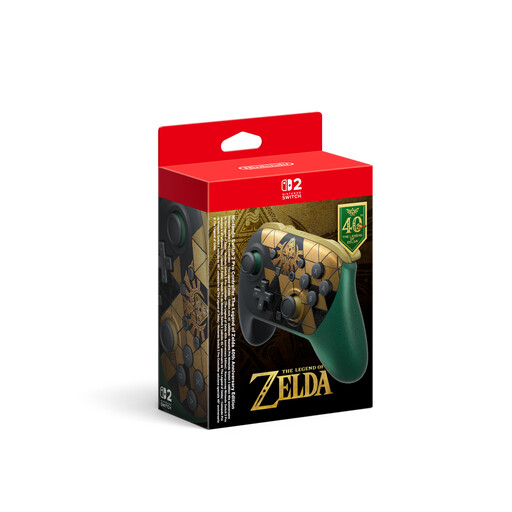
Nintendo Switch 2 Pro Controller, The Legend of Zelda 40th Anniversary Edition
An option when each player needs a full gamepad for a supported co-op game on Switch 2.
Nintendo says the Switch 2 Pro Controller is only for Switch 2. Listed features include HD Rumble 2 and motion controls; the product name also mentions Mouse Controls, amiibo and GameChat.
Joybuy
 No image available
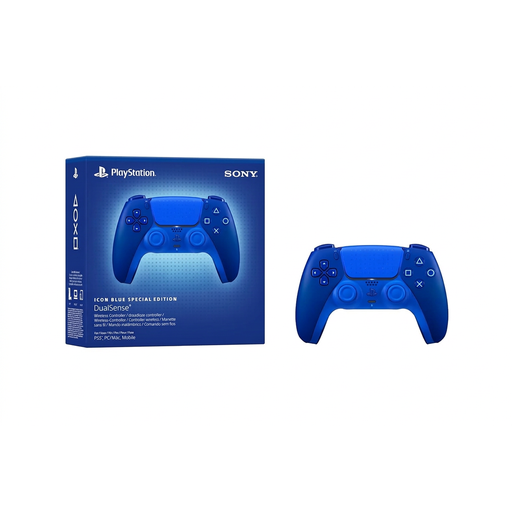
PlayStation DualSense Wireless Controller CFI-ZCT2WZBX Icon Blue Special Edition
An option for an additional controller on PS5, if the specific game supports local multiplayer.
Sony explains how to pair additional DualSense controllers with a PS5. Haptic feedback and adaptive triggers depend on the game and connection type.
Joybuy
 No image available
Xbox Wireless Controller Deep Pink for Xbox One, Xbox Series X/S and PC
An option for local co-op games on a supported Xbox or Windows PC. Check the requirements of the specific game.
Microsoft lists AA batteries or a compatible battery pack for the Xbox Wireless Controller. Rechargeable AA batteries can’t be charged inside the controller.
Joybuy
 No image available
BIGBIG WON Rainbow 3 Wireless Controller
A possible choice if the controller’s listed platform is compatible with your device. You’ll also need to check that it supports the specific co-op game.
The product name lists PC, Switch 2, iOS and Android, as well as capacitive joysticks, switchable Hall-effect/micro-switch triggers and a 6-axis gyroscope.
Joybuy
 No image available
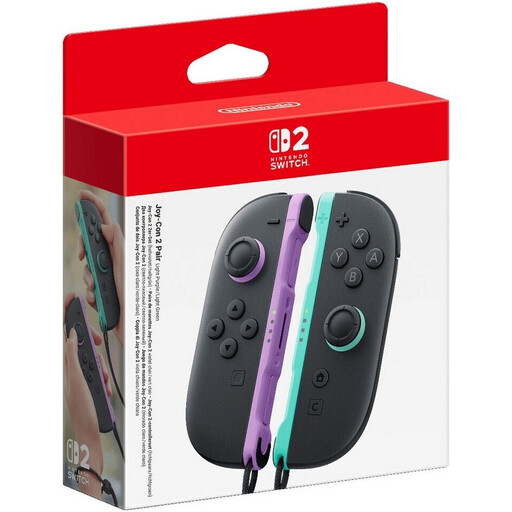
Nintendo Switch 2 Joy-Con 2 pair, Light Purple/Light Green
An option if the Switch 2 game supports using each Joy-Con 2 as a separate controller and this type of input is enough for both players.
Nintendo lists motion controls and HD Rumble 2 for Joy-Con 2. Joy-Con 2 don’t work with the original Nintendo Switch.
Joybuy
Frequently asked questions
Can one pair of Joy-Con 2 work for two players?
Yes, if the Switch 2 game supports using each Joy-Con 2 as a separate controller. Nintendo says this play style depends on the software, and Joy-Con 2 can’t be used with the original Switch.
How do I set up a second DualSense on PS5?
According to Sony, you can pair another DualSense with the PS5 wirelessly. The game must then support local multiplayer, and you’ll need to select that mode in the game.
Can rechargeable AA batteries be charged in the Xbox Wireless Controller?
No. Microsoft says rechargeable AA batteries need to be charged outside the controller. A compatible battery pack has its own charging requirements.
Can a controller with illuminated buttons prevent reflections from a window?
There’s no evidence of this in the controller features described. Reflections affect how clearly you can see the screen. Check the display in daylight from both seats before choosing a controller.
What’s the difference between statutory rights and a manufacturer’s guarantee in Germany?
If a product is faulty, your statutory rights apply against the seller. Verbraucherzentrale distinguishes these from an additional voluntary manufacturer’s guarantee, which comes with its own terms and conditions.


