Two players without a TV
If you want to solve puzzles together at a table, make sure the game has a confirmed local play mode. Nintendo describes Snipperclips as a two-player game for tabletop and TV modes, with each player able to use a Joy-Con.


Start by choosing the game you want to play, then check that the specific console version supports local co-op. If you don’t have a separate screen, the Switch 2 and Switch – OLED Model are options thanks to their tabletop mode. If you already have a screen, you could also consider a PS5 or Xbox. What matters is whether both of you can see the game clearly from where you’re sitting – in split-screen, you share the screen.
If you want to solve puzzles together at a table, make sure the game has a confirmed local play mode. Nintendo describes Snipperclips as a two-player game for tabletop and TV modes, with each player able to use a Joy-Con.
If you have different views from where you’re sitting, or split-screen clues look too small, check how the specific game looks from both positions. PlayStation and Xbox describe It Takes Two as supporting local split-screen co-op.
If you’re looking for a console to play a particular co-op game, check that version’s platform, local mode and controller requirements. Nintendo, PlayStation and Xbox each provide details for specific games and versions.
First, decide whether you want to play without a TV or use an external screen. Then check the game mode, visibility and equipment you’ll need.
| What matters to you | What to check before buying | Who is this especially important for? |
|---|---|---|
| Local co-op | Check the local play mode, player count and controller layout for the specific game. | If you want to play together on one console, the exact version of your game needs to support local co-op. Around 36% of consumers rank local co-op as their most important buying priority. |
| Visibility and readability | Decide where to place the screen and how far away to sit; check the game from both seats. | If you need to spot clues from your respective seats, the actual view matters more than a single console specification. Around 29% of consumers put visibility and readability first. |
| A specific game you want | Check the platform version and local mode for every game you want to play. | If you already have a particular co-op puzzle in mind, you’ll want to check that it’s compatible before buying a console. Around 21% of consumers prioritise the game they want. |
| Overall setup | Check which controllers you need and whether the game is on disc or available as a download. Only check online requirements if you want to play online. | If you also want to use games you already own or avoid buying extra equipment, consider the whole setup. Around 14% of consumers prioritise the overall cost and access to games. |
Console specifications alone won’t tell you whether small puzzle clues are easy to see from two particular seats. In split-screen, each player only gets part of the screen.
Check how the game looks and where you’ll set it up from both seats.
Online co-op and couch co-op are different game modes. A general mention of co-op doesn’t confirm that two people can play on one console.
For the specific console version, look for explicit confirmation of local or couch co-op and the number of players supported.
The control scheme Nintendo describes for Snipperclips, with one Joy-Con per player, doesn’t automatically apply to other games or consoles. Digital-only console versions can’t use your existing game discs directly.
Check the controller setup, what’s included and whether your game is on disc or available as a download.
Nintendo’s Switch 2 and Switch – OLED Model offer both tabletop and TV modes. Nintendo lists Snipperclips as a puzzle game to play together on Switch; according to Nintendo, the game is compatible with Switch 2.
PlayStation is an option for co-op on an external screen. PlayStation describes It Takes Two as supporting couch co-op with split-screen.
The Xbox Series S is a digital option for use with an external screen. The German Xbox Store lists It Takes Two for Series X|S with couch co-op.
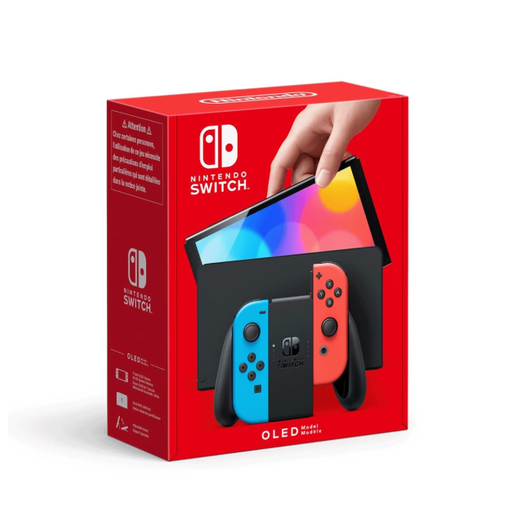
This Joybuy selection includes a Nintendo console for playing together at a table without a separate TV.
 No image available
Tabletop mode is useful if you want to play together without a separate TV. Whether both of you can see the clues still depends on your distance from the screen and how it’s positioned.
Nintendo lists a 7-inch OLED display for Switch – OLED Model. Nintendo describes Snipperclips as a two-player game, with one Joy-Con per player.
You don’t need an online subscription just to play in local mode. The subscription information for It Takes Two relates to online play. Check the requirements for your specific game version if you’d rather play online.
For tabletop mode, place the console on a flat surface and open the stand. Nintendo describes playing together on Switch with one Joy-Con per player; check the details for your specific puzzle game to see whether it supports this control setup.
Not with the built-in hardware on these digital versions: Sony describes the PS5 Digital Edition as a console without a disc drive, while Microsoft calls the Xbox Series S all-digital. Before buying extra accessories for a PS5, check the exact model and disc-drive compatibility.
The USK age rating indicates an age classification for youth protection; it doesn’t tell you whether a game is educationally suitable or easy to understand. For games on physical media made publicly available to minors in Germany, the USK describes rating and distribution requirements. When choosing a game, check the rating for that specific title.