Choose extra controllers to suit the console or PC you’re using and the specific game mode. Spectators don’t need their own controller unless they’re joining in. Nintendo explains that Joy-Con can be used with a single or double grip, depending on the game, while Sony says up to four controllers can be used at the same time with PS5. What matters most is how many players the game actually supports and what type of input it requires.
Who’s playing locally?
Co-op group on one console
You want spectators to be able to join in, so you check the number of players the game supports, how many controllers you need and which grip styles are supported. Nintendo explains that a Joy-Con can be used horizontally as a single controller, provided the game supports this input method.
PC co-op session
You’re setting up several input devices for a PC game and checking whether the title supports local co-op and the controllers you have in mind. Microsoft lists the Xbox Wireless Controller as compatible with Windows; for its Ultimate 2C Wireless, 8BitDo lists 2.4 GHz or a wired connection as options for Windows.
Host with guests sitting in different places
You want to provide input devices for your guests and are considering whether a wired or wireless connection will reach their seats. For its specified PowerA Enhanced Wired Controller model, PowerA lists a 3 m cable. Make sure the connection type suits the seating arrangement and platform.
What should you look for when buying?
| Buying consideration |
What to check |
Who is this important to? |
| Platform and game |
Check the exact console generation or Windows version, as well as whether the specific game supports local co-op and your controller. |
When I’m buying for a particular device and game, I want to be sure the controller will work with them. Consumers whose main concern is platform or game compatibility are estimated to make up around 29%. |
| Players and input method |
Distinguish between the number of controllers you can pair and the number of player slots in the game. For Joy-Con, check which grip styles are supported and, where relevant, the Bluetooth audio setting. |
When several guests want to play at the same time, I want to know whether the game provides a suitable input for each person. Consumers most concerned with the number of people who can play simultaneously and the input method are estimated to make up around 29%. |
| Connection at your seat |
Check that a cable will reach your seat and that the specified wireless connection is suitable for your platform. |
When the group is playing from different seats, I want a suitable connection without the cable being too short. Consumers whose main concerns are seating and connectivity are estimated to make up around 24%. |
| Total cost and use |
Count the input devices you already have that are suitable for the game, and only add the ones you’re missing. If there’s a fault, check who the seller is and what statutory rights apply. |
If I already have controllers, I only want to add the inputs I’m actually missing and take into account whether they’re powered by cable or batteries. Consumers most concerned with the cost of the inputs they need and how they’ll be used are estimated to make up around 18%. |
Common buying mistakes
-
Confusing the controller limit with the number of players
The number of controllers you can pair with a console doesn’t tell you how many people a particular game mode supports.
Before buying, check the local game mode, then count how many additional inputs you’ll need.
-
Always counting a pair of Joy-Con as two player inputs
Whether a Joy-Con can be used on its own depends on the game. On Switch, Nintendo says that left and right Joy-Con connected wirelessly count as two controllers.
Check which grip styles are supported and, where relevant, take the Bluetooth audio setting into account.
-
Mixing up similarly named models or Switch generations
8BitDo lists the Ultimate 2C Wireless for Windows and Android, and the Ultimate 2C Bluetooth as a separate variant for Switch. Nintendo says Joy-Con 2 aren’t compatible with the original Switch.
Before buying, check the full model name and exact platform compatibility.
-
Checking only the connector on a wired controller
The specified PowerA Enhanced Wired Controller model is designed for use with a docked Switch and doesn’t support features including motion controls, HD Rumble, IR or amiibo NFC. It isn’t suitable for games that require Joy-Con exclusively.
Check the cable length, whether it works with the dock and which features your specific game needs.
Key brands at a glance
Nintendo
Joy-Con and Joy-Con 2 for games on the corresponding Switch generation.
- Nintendo explains that a single Joy-Con can be used horizontally when a game supports this grip style.
- Nintendo says Joy-Con 2 don’t work with the original Switch. Older Joy-Con can be paired wirelessly with Switch 2.
Sony PlayStation
DualSense as an extra controller option for PS5 and for supported games on other devices.
- Sony says up to four controllers can be used at the same time with PS5.
- On other devices, individual features depend on the game and connection support. The number of players supported in a co-op game should be checked separately.
Microsoft Xbox
Xbox Wireless Controller for Xbox Series consoles and supported Windows games.
- Microsoft lists compatibility with Xbox Series X|S and Windows PC.
- This platform compatibility doesn’t confirm how many local players a particular game supports.
8BitDo
Different Ultimate 2C variants for various platforms and connection types.
- For the Ultimate 2C Wireless, 8BitDo lists 2.4 GHz or a wired connection for Windows, and Bluetooth for Android.
- The Ultimate 2C Bluetooth for Switch is a different model, so don’t treat the variants as interchangeable.
PowerA
The specified Enhanced Wired Controller model is a wired option for compatible games on a docked Switch.
- PowerA lists a 3 m cable for this model, which doesn’t need batteries.
- PowerA says it doesn’t support motion controls, HD Rumble, IR or amiibo NFC. Games that require Joy-Con exclusively aren’t supported.
Controllers at Joybuy
Here you’ll find controllers with different platform compatibility, layouts and connection types. Whether a model works with the local co-op game you have in mind also depends on support from that specific game.
 No image available
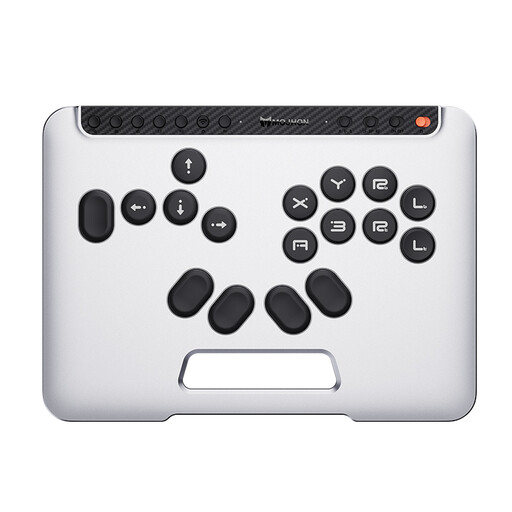
BIGBIG WON Fight Master Leverless Controller
The all-button hitbox layout is suited to players and games that work well with this input method.
Platforms listed: Switch 2, Switch, PC, iOS and Android. Connections: Bluetooth, 2.4 GHz or wired.
The leverless arcade layout is different from a conventional gamepad.
View at Joybuy
 No image available
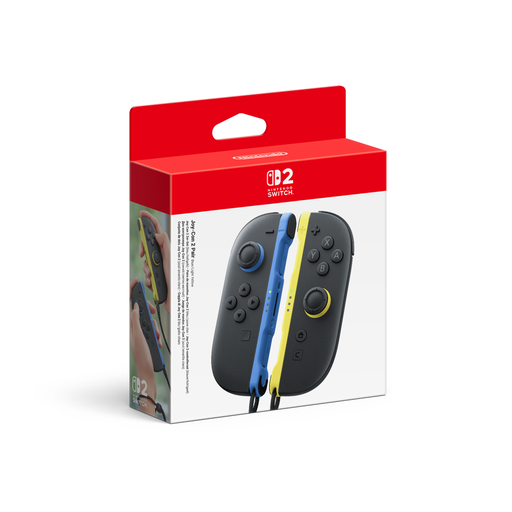
Nintendo Switch 2 Joy-Con 2 2-Piece Set (Blue/Light Yellow)
For local games on Switch 2, provided the required Joy-Con inputs and grip style are supported.
Set includes one left and one right Joy-Con 2. Nintendo says Joy-Con 2 aren’t compatible with the original Switch.
View at Joybuy
 No image available
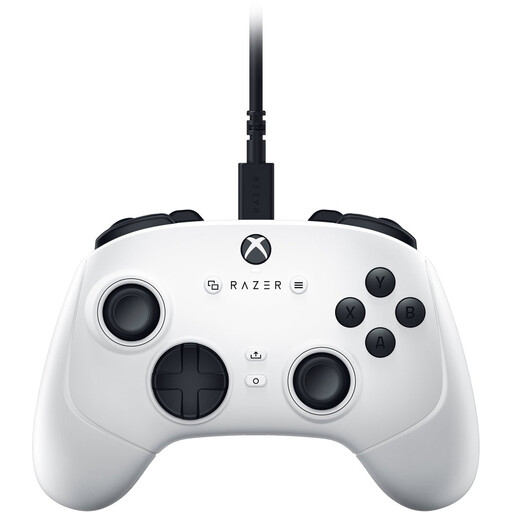
Razer Wolverine V3 Tournament Edition White
For compatible Xbox Series or PC games when a wired controller suits your seating position.
USB-C wired connection with a stated cable length of 3 m.
View at Joybuy
 No image available
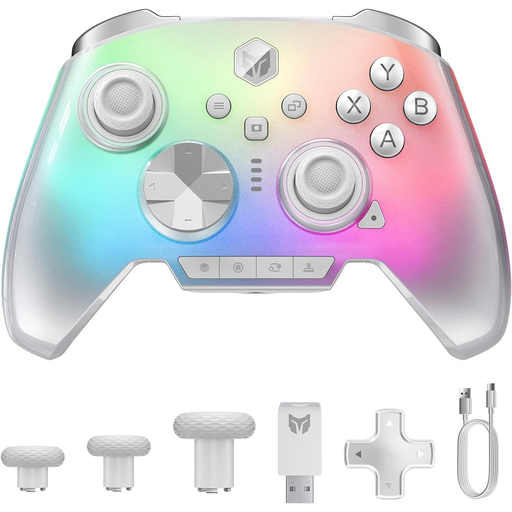
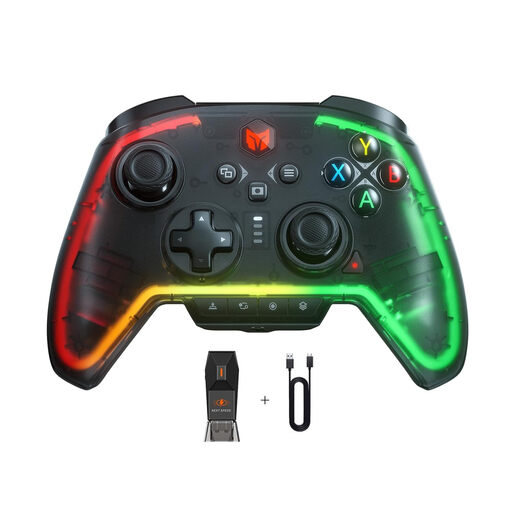
BIGBIG WON Rainbow 3 Wireless Controller
For compatible local games on PC or Switch 2, provided the game supports a wireless controller.
Listed as a wireless controller for PC, Switch 2, iOS and Android.
View at Joybuy
 No image available
BIGBIG WON Rainbow 2 Pro Wired
For compatible local games on PC, Switch Lite or PS4, provided the game supports wired input and the controller.
The controller is wired; the listed platforms are PC, Switch Lite and PS4.
View at Joybuy
Frequently asked questions
Does every spectator need their own controller?
No. Only people who want to play at the same time need a suitable input device. Check the number of players supported in the specific local game mode. Team17 lists couch co-op for up to four people in Overcooked! 2; this doesn’t automatically apply to other games.
Why doesn’t a pair of Joy-Con always count as one input?
On Switch, Nintendo says left and right Joy-Con connected wirelessly count as two controllers. Whether the pair allows two separate player inputs depends on whether the game supports using each Joy-Con on its own.
What are my rights if a controller is faulty in Germany?
For a consumer purchase, statutory rights relating to faulty goods apply against the seller and are separate from a voluntary manufacturer’s guarantee. The German federal portal explains that the first step for a fault may be to ask the seller to remedy it. The consumer advice centre also distinguishes between statutory rights and a guarantee.
Can a faulty controller go in the household bin?
No. The German Environment Agency explains that old electrical equipment must be collected separately from unsorted household waste.


