Which controller is right for you?

Players setting up a second console station

If you need another controller for a local match, make sure it’s compatible with your console. Sony Support explains how to pair additional DualSense controllers, while Nintendo lists which Switch controllers are compatible with Switch 2. Also check the player limit in the game you want to play.

PC players sitting off to the side

If you play from the sofa or another seat off to the side, check which connection works with your PC: Bluetooth, a USB receiver or a cable. Microsoft and 8BitDo list different connection options depending on the controller and platform.

Buyers looking for an affordable second controller

If you mainly want an extra controller that’s ready to use, compare the power options, what’s included and any extra features you need. Xbox Support notes that rechargeable AA batteries cannot be charged in the controller.

What should you look for when buying?

PS5: DualSense

A good fit if: You’re looking for an extra controller for a PS5. Sony Support explains how to pair another DualSense; the number of players still depends on the game.

Things to consider: The controller is rechargeable rather than powered by replaceable AA batteries. Some features on PC depend on the game; according to PlayStation Support, haptic feedback requires a USB connection.

Xbox Series X|S or Windows: Xbox Wireless Controller

A good fit if: You want to play on a compatible Xbox or Windows PC without a controller cable.

Things to consider: Microsoft lists AA batteries or a compatible battery pack as power options. Rechargeable AA batteries cannot be charged in the controller. Also check whether your game supports it.

Switch 2: Pro Controller

A good fit if: You want a full-size gamepad for Switch 2. Nintendo lists the Switch 2 Pro Controller for this console; according to Nintendo, an existing Switch Pro Controller can also connect wirelessly to Switch 2.

Things to consider: According to Nintendo, the Switch 2 Pro Controller is designed for Switch 2. The older Switch Pro Controller has some limitations on Switch 2, such as not being able to wake the console from sleep using the HOME button.

Windows: 8BitDo Ultimate 2C Wireless

A good fit if: You can use a wireless controller with your Windows PC and have a free USB-A port for the 2.4 GHz receiver.

Things to consider: For this specific wireless model, 8BitDo lists Bluetooth for Android, not Windows. The similarly named Ultimate 2C Bluetooth is a different model.

Xbox or Windows: wired PowerA controller

A good fit if: You can run the cable safely from your console or PC to your seat off to the side.

Things to consider: PowerA lists a detachable 3 m cable. Measure the route the cable will actually take and watch out for potential trip hazards.

Priority What to check before buying Most important for
Platform and game Check the console or PC, the full model variant, connection type and local multiplayer mode. If I want another player to join in on my existing console or PC, the controller needs to work with both the system and the game. Around 36% of consumers put compatibility first.
Connection from your seat Measure the distance to your seat and the cable route. For wireless connections, check the port and whether a receiver is needed. From a seat off to the side, I want to play without pulling on a cable, or have a safe cable route to the console. Around 29% of consumers prioritise their seating position and a suitable connection.
Controls during a match Consider the grip and button layout. Only count on extra features if your platform and game support them. When I’m pressing buttons often, an easy-to-reach layout matters more to me than effects my game might not use. Around 21% of consumers focus most on the controls.
Power and ongoing costs Compare what’s included, the battery type and how the specific model is charged. For a second controller, I want to know what else I’ll need to use it and whether I’ll need to budget for batteries or a compatible battery pack. Around 14% of consumers prioritise the total cost, including power.

Avoid common buying mistakes

  • Assuming similarly named 8BitDo models are the same

    The Ultimate 2C Wireless and Ultimate 2C Bluetooth differ in their platform compatibility and connection options. According to 8BitDo, the wireless version uses 2.4 GHz or a cable with Windows; Bluetooth is listed for Android.

    Check the full model name and make sure its connection option is intended for your platform.

  • Confusing an extra controller with an extra player

    The fact that you can connect several controllers to a console doesn’t automatically mean every football game supports local multiplayer.

    Before you buy, check the local player limit and which controller types your specific game supports.

  • Checking only the stated cable length on a wired model

    A 3 m cable won’t necessarily reach every seat off to the side or be safe to route there.

    Measure the actual route and keep cables away from walkways.

  • Assuming wireless means a built-in rechargeable battery

    The Xbox Wireless Controller can use AA batteries or a compatible battery pack. Xbox Support notes that rechargeable AA batteries cannot be charged in the controller.

    Check the power options and what’s included with the specific version. If you use rechargeable AA batteries, plan to charge them outside the controller.

Key brands and product ranges

Sony PlayStation

DualSense for an extra PS5 player; DualSense Edge for players who want to use customisable profiles.

  • Sony explains how to pair a second DualSense. With the DualSense Edge, you can save button profiles.
  • Haptic feedback depends on the game. Some PC features have additional requirements, including USB for haptic feedback.

Microsoft Xbox

The Xbox Wireless Controller is a wireless option for compatible Xbox consoles and Windows PCs.

  • Microsoft lists Bluetooth connectivity and customisable button mapping.
  • You’ll need to account for AA batteries or a compatible battery pack. Rechargeable AA batteries cannot be charged in the controller.

Nintendo

The Switch 2 Pro Controller is designed for Switch 2; an existing Switch Pro Controller can also be used wirelessly with Switch 2.

  • Nintendo lists customisable GL and GR buttons on the Switch 2 Pro Controller.
  • According to Nintendo, the Switch 2 Pro Controller is not designed for the original Switch. The older Switch Pro Controller has some limitations on Switch 2, such as not being able to wake the console from sleep with the HOME button.

8BitDo

The Ultimate 2C Wireless is an option for Windows and Android; the separately named Ultimate 2C Bluetooth is designed for Switch.

  • For the wireless version, 8BitDo lists 2.4 GHz or a cable on Windows, and Bluetooth for Android.
  • The similarly named versions have different platform and connection details. According to 8BitDo, Switch 2 support for the Bluetooth version depends on the firmware.

PowerA

The Enhanced Wired Controller is a wired alternative for compatible Xbox consoles and Windows.

  • PowerA lists a detachable 3 m cable and two mappable extra buttons.
  • The stated cable length doesn’t tell you whether you can route it safely to your seat.

Joybuy models for different platforms

The Joybuy models below are extra controllers for PS5, Switch or Switch 2, as well as Xbox and Windows. Choose one that works with your existing system and check whether your football game supports another local player.
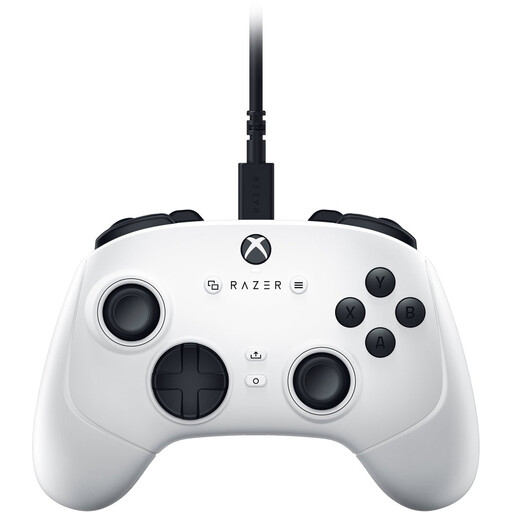
Razer Wolverine V3 Tournament Edition White

Razer Wolverine V3 Tournament Edition White

Could suit a seat off to the side if the wired connection works with your system and the cable can be routed safely.

Listed for Xbox Series X|S, Xbox One and Windows 10/11. The description mentions a detachable 3 m USB-C cable, four rear paddles and six mappable buttons.

View on Joybuy

Nintendo Switch Pro Controller, Black

Nintendo Switch Pro Controller, Black

A wireless option for Switch; according to Nintendo, the Switch Pro Controller can also connect wirelessly to Switch 2.

The product description mentions a rechargeable battery and motion controls. Check the local player limit and controller support in the specific game you want to play.

View on Joybuy
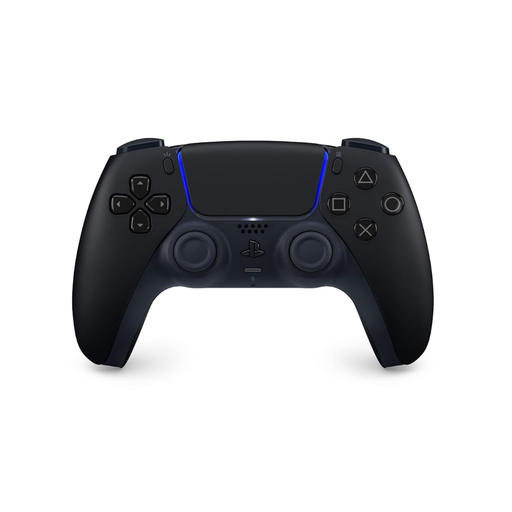
PlayStation DualSense Wireless Controller, Midnight Black

PlayStation DualSense Wireless Controller, Midnight Black

For another player on PS5; local multiplayer support needs to be available in the specific game.

The product description lists Bluetooth, USB-C, a rechargeable battery and an included USB cable.

View on Joybuy
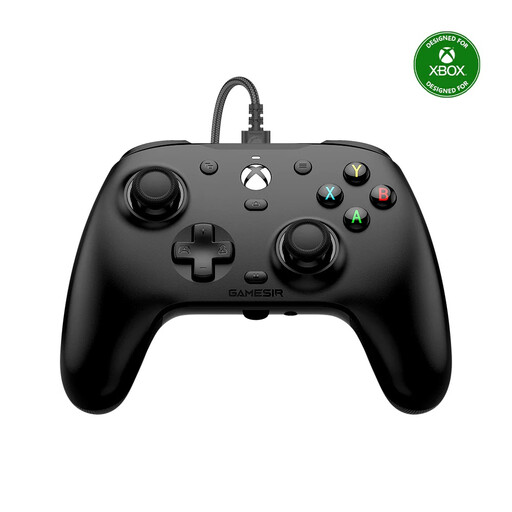
GameSir G7 HE Wired Controller, Black

GameSir G7 HE Wired Controller, Black

Could suit a seat off to the side if it’s supported by your Xbox or Windows PC and the cable reaches your seat safely.

The product details list Xbox Series X|S, Xbox One and Windows 10/11, Hall Effect sticks and a 3 m USB-C cable. The controller is wired.

View on Joybuy
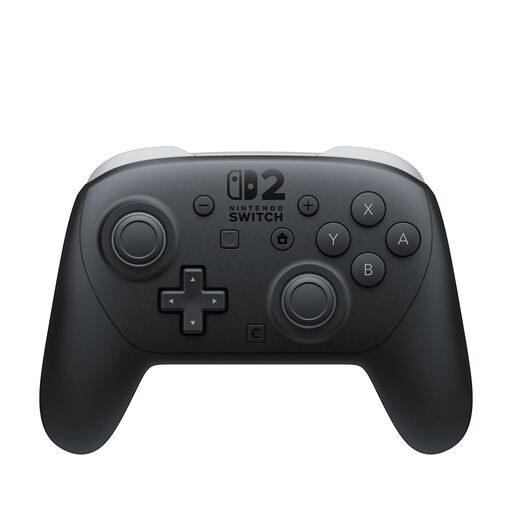
Nintendo Switch 2 Pro Controller

Nintendo Switch 2 Pro Controller

For an extra player on Switch 2, provided the specific football game supports local multiplayer.

The product description lists a wireless Bluetooth connection, a rechargeable battery and mappable GL and GR buttons.

View on Joybuy

Frequently asked questions

How do I connect a second DualSense to my PS5?

Sony Support explains how to add one wirelessly via ‘Settings > Accessories > General > Bluetooth Accessories’: hold down the Create and PS buttons on the second controller, then select it using the first controller. Whether two players can join in locally also depends on the game.

Does the 8BitDo Ultimate 2C Wireless work via Bluetooth on a Windows PC?

For the Ultimate 2C Wireless, 8BitDo lists the 2.4 GHz USB-A receiver or a wired connection for Windows; Bluetooth is listed for Android. The Ultimate 2C Bluetooth is a different model.

Do I need to charge rechargeable AA batteries in the Xbox Wireless Controller?

No. According to Xbox Support, rechargeable AA batteries should be charged outside the controller, following the manufacturer’s instructions. A compatible Xbox battery pack is another power option.

Who should I contact if my controller is faulty?

In Germany, you have statutory rights against the seller if a product is faulty; these are separate from any voluntary guarantee. The Verbraucherzentrale explains that you can initially ask for the fault to be put right through a repair or replacement. The rules for any further repairs to a specific product cannot be inferred across the board from regulations covering other product categories.

Can an old controller and its batteries go in household waste?

No. The Federal Ministry for the Environment points to separate return routes for old electrical appliances, such as retailers or recycling centres. Removable old batteries must be disposed of separately; the Ministry lists collection points at retailers among the options.